
Open source, AGPL-3.0
Your single pane of glass into Kubernetes
An open-source Kubernetes dashboard for every cluster in your kubeconfig. See what needs attention and why, and fix it from the problem itself. Browse and change any resource, read logs, open shells and check access, all with your own Kubernetes permissions. One binary serves the whole UI.
brew install kubeglass/tap/kubeglass- One binary
- Runs in your browser, not a desktop app
- No account to create
Recognises 29 Kubernetes distributions by name. Any conformant cluster works.
- Amazon EKS
- Google GKE
- Azure AKS
- Red Hat OpenShift
- OKD
- Azure Red Hat OpenShift
- Red Hat OpenShift on AWS
- VMware Tanzu
- Rancher
- RKE2
- K3s
- k0s
- Talos Linux
- MicroK8s
- Oracle OKE
- DigitalOcean Kubernetes
- Linode LKE
- Civo
- Vultr
- Scaleway Kapsule
- CodeReady Containers
- minikube
- kind
- k3d
- Docker Desktop
- Rancher Desktop
- Podman Desktop
- OrbStack
- Colima
Screenshots
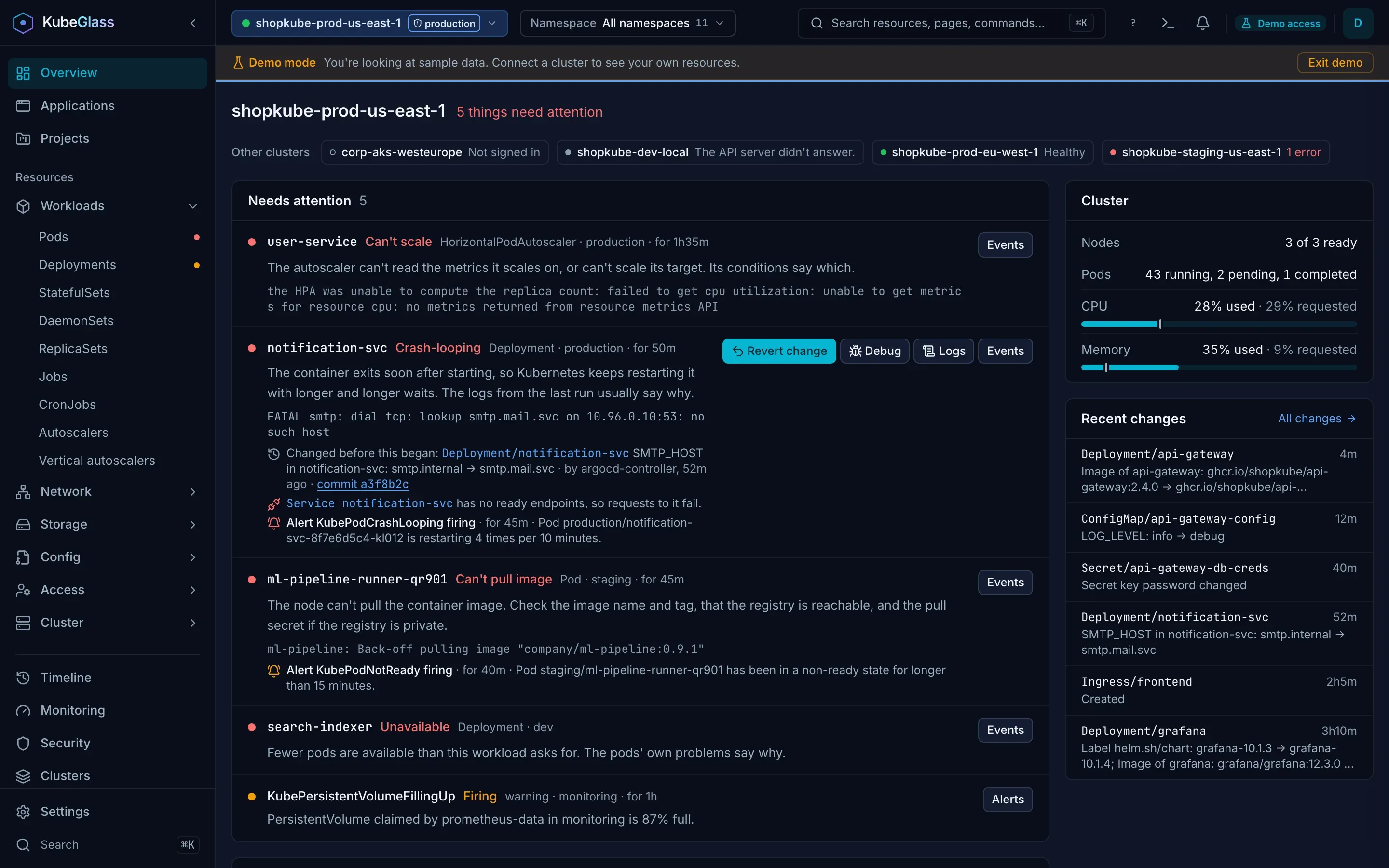
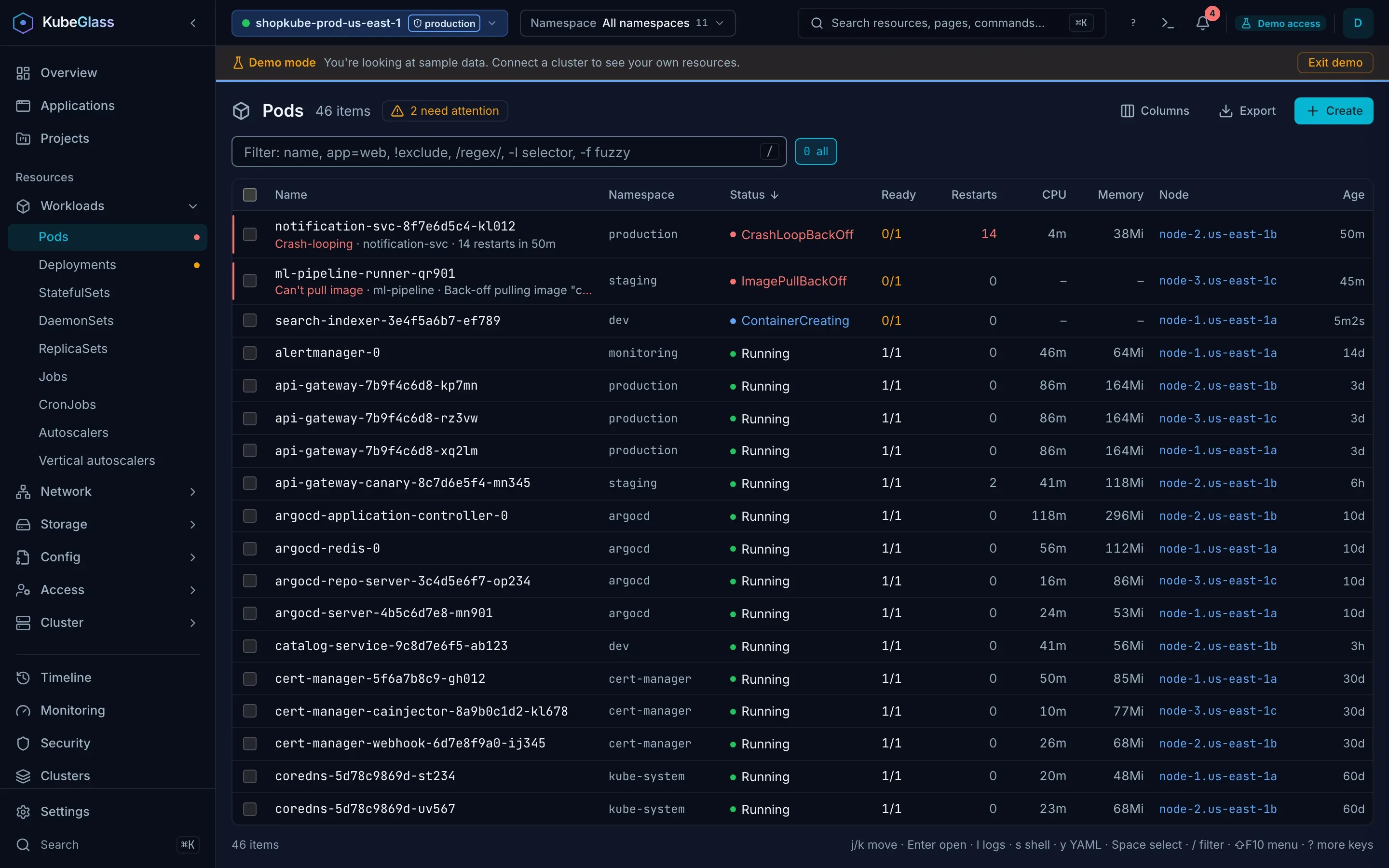
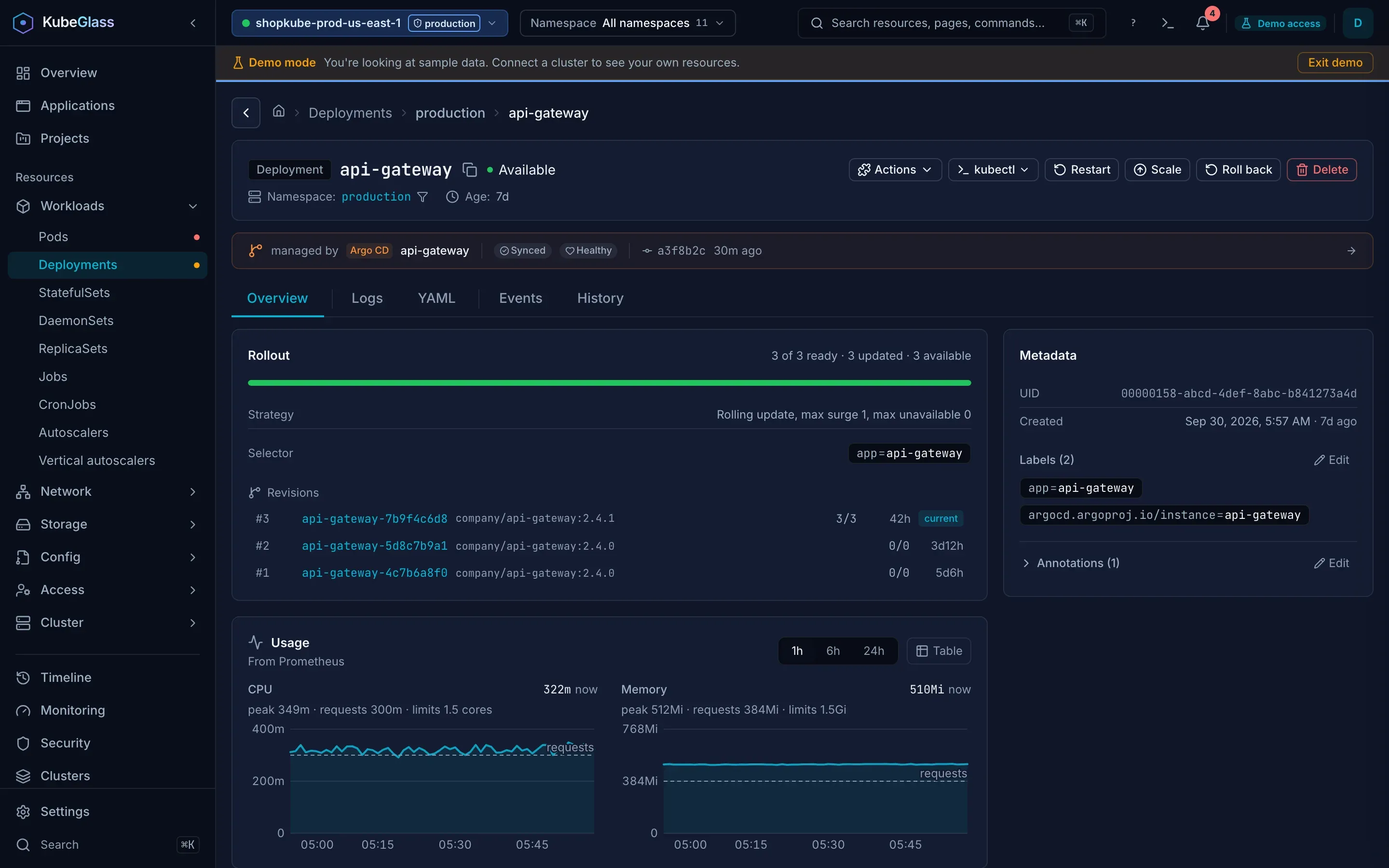
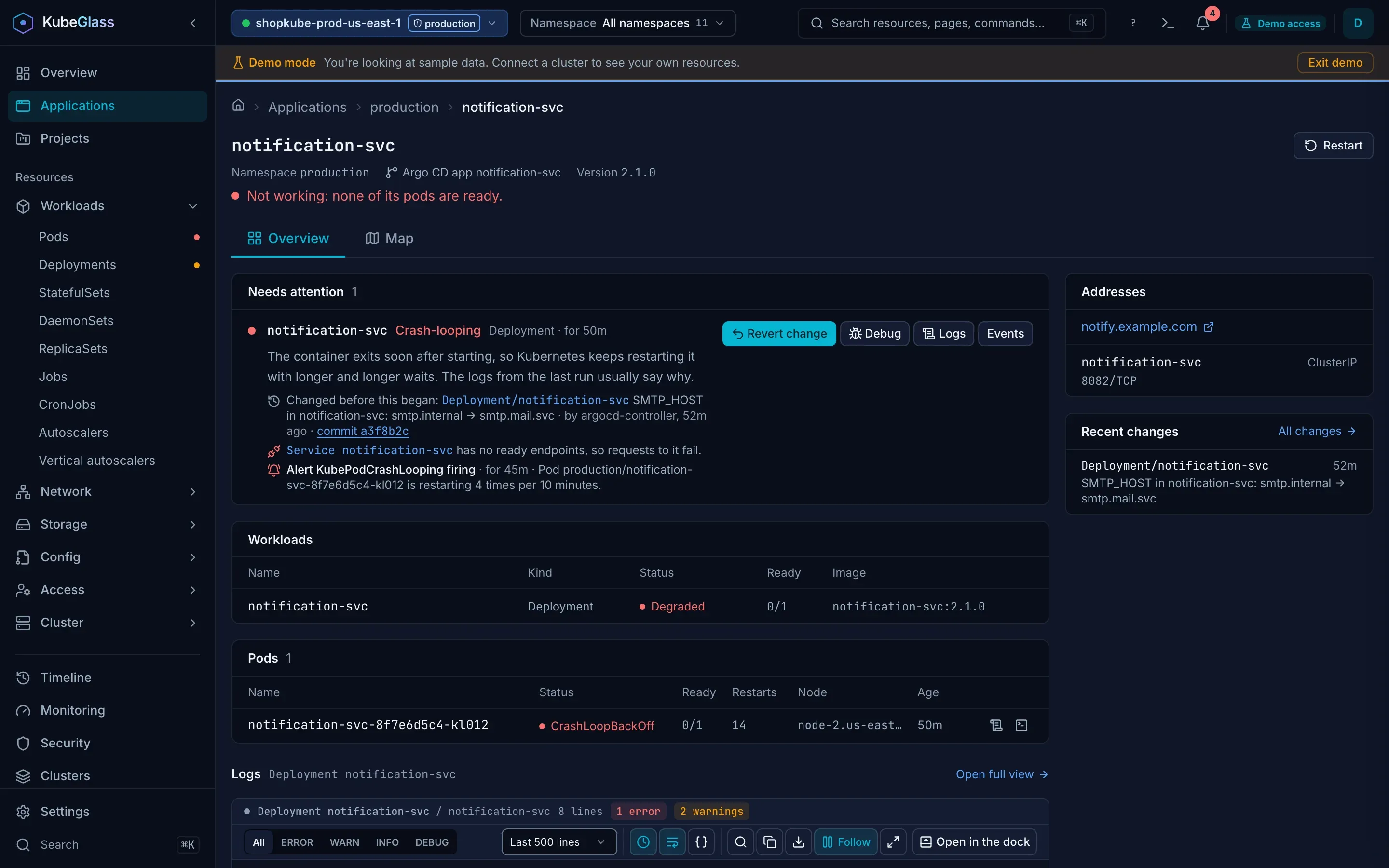
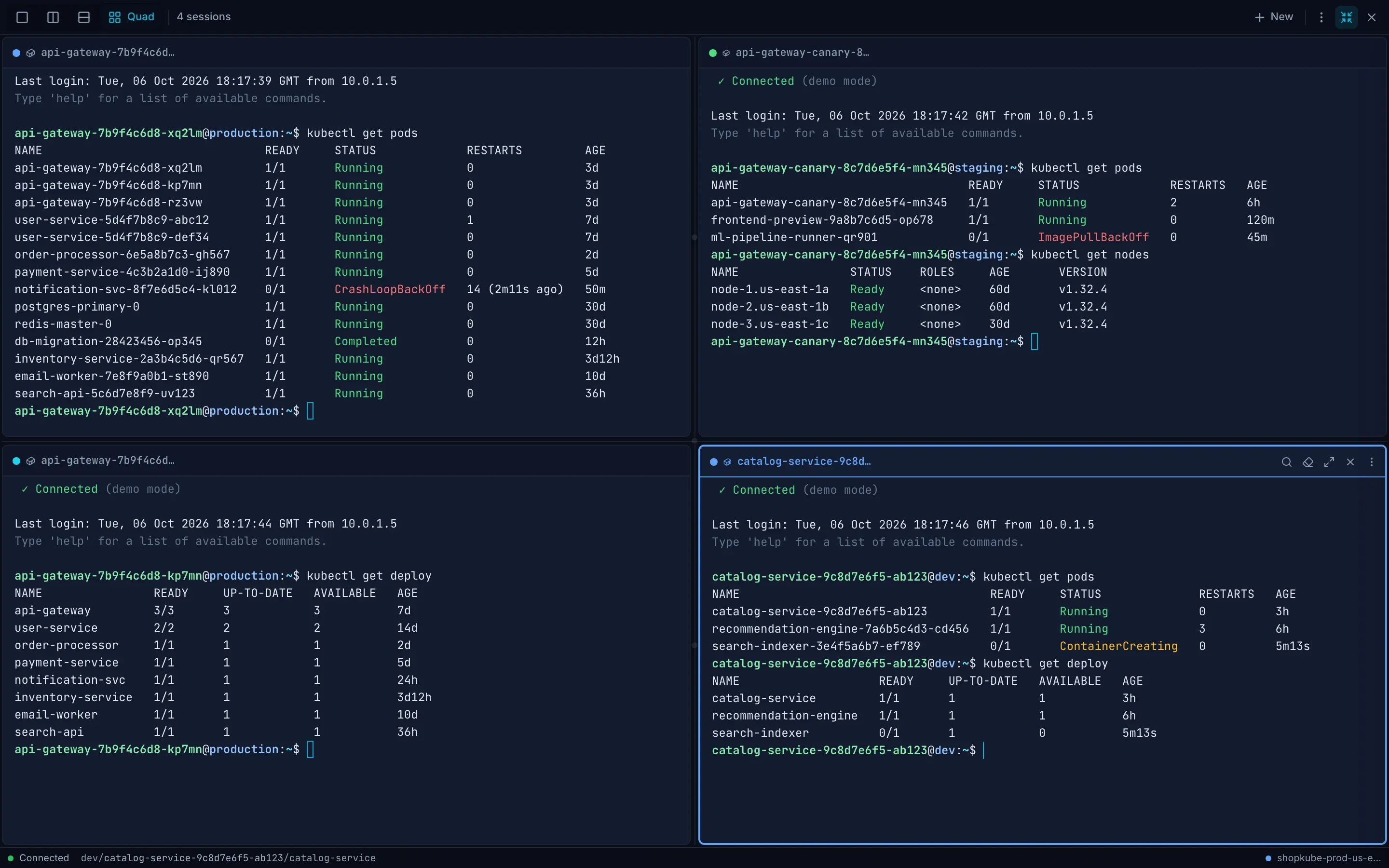
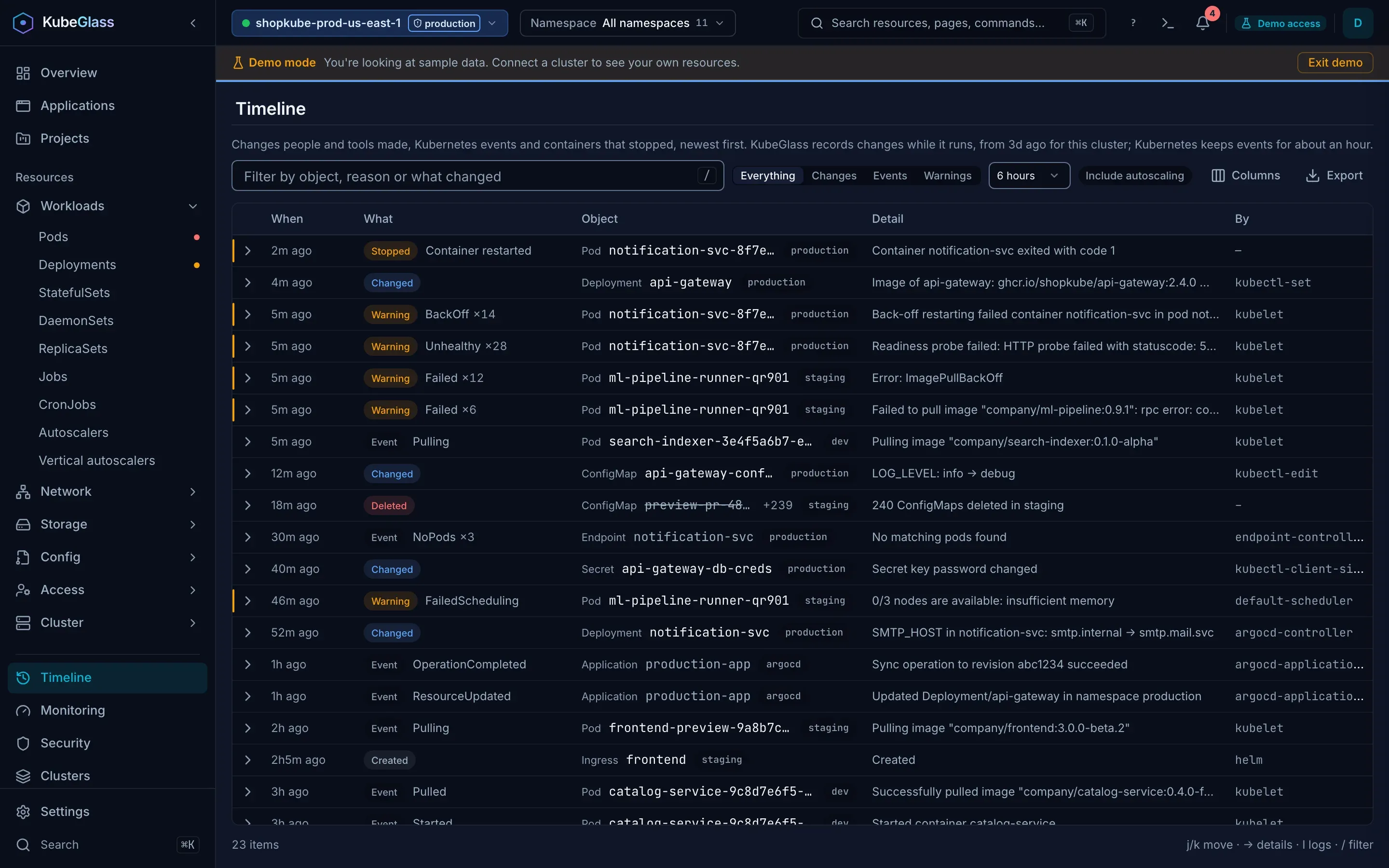
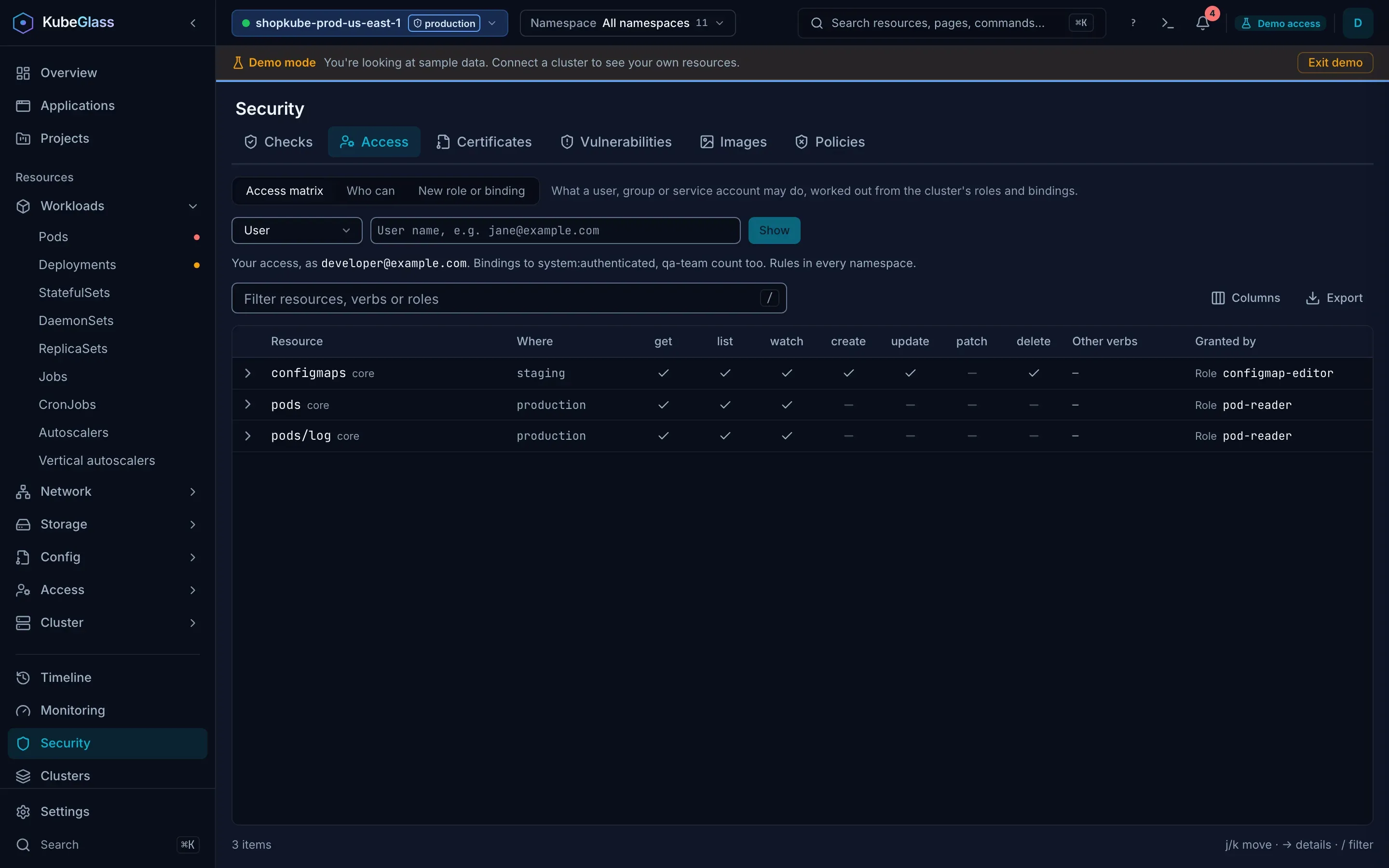
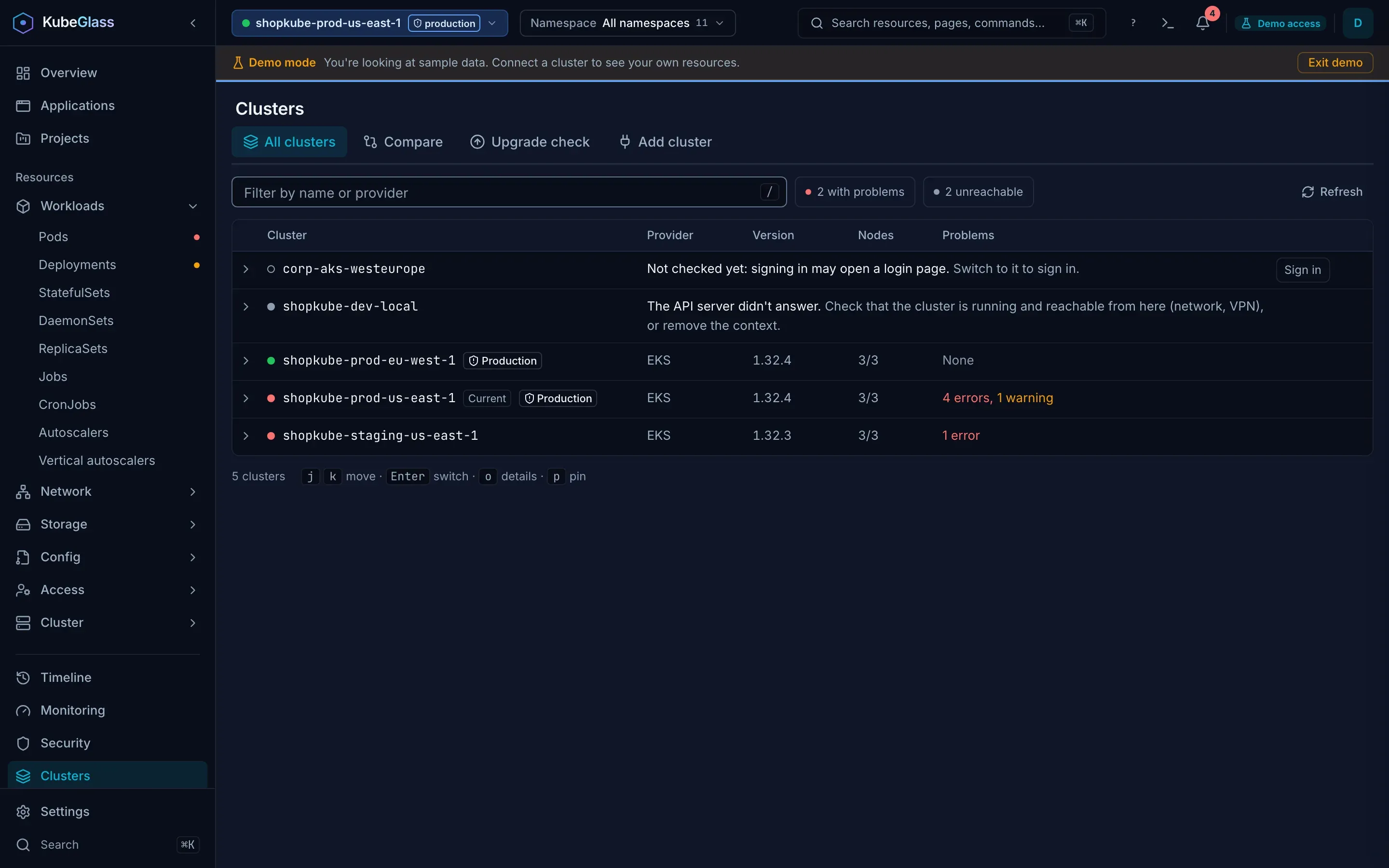
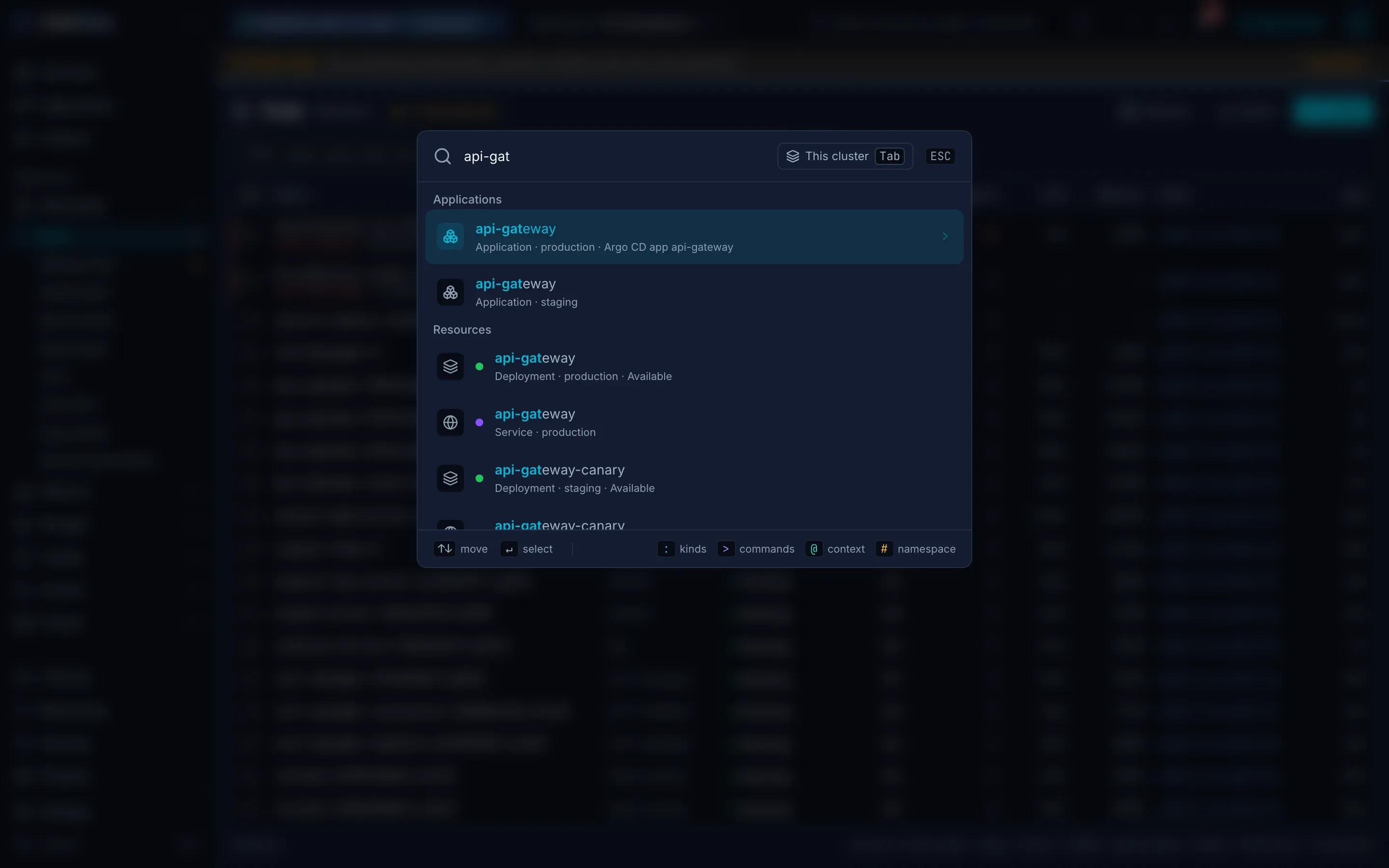
Screenshots of the demo, which runs the real UI on sample data.
What you can do with it
See what needs attention
The Overview lists every object with a problem, errors first and then the newest, with the reason in plain words. An object's page says what is wrong and checks for the likely cause.
Fix it where it shows
Revert the change made just before a problem, give a container more memory, change an image, roll back, run a CronJob again or sync an Argo CD application, from the problem itself.
Every kind, one list
Built-in kinds and custom resources get the same live list and detail page: status from the server, label filters, sorting, bulk actions and k9s keys. On a wide screen an object opens beside its list.
See how it connects
The map lays out Ingresses, Services, workloads, pods and what they mount, and marks the chain that leads to a broken object, such as an Ingress whose Service has no ready endpoints.
Read the logs
Follow one pod's logs, or a Deployment's pods merged in time order. Filter by text, regex or level, expand JSON, and read the run before a restart.
Change it, see what changed
Edit YAML with a dry run and a diff, or a Secret's or ConfigMap's values decoded, then scale, restart, roll back, cordon and drain. KubeGlass records each change field by field, with who made it, and can undo one. From the first launch the history also holds the rollouts and Helm revisions the cluster kept from before.
Open a shell
Pod and node shells in split panes, each in its cluster's color, with statuses such as CrashLoopBackOff colored. Broadcast to several clusters and record sessions. A debug container gets into images without a shell. Browse a container's files, download them and upload files of up to 256 MiB. Start with --local-shell for a shell on your own computer.
Check access
What you or any user, group or ServiceAccount may do, who a binding lets do something, and a form that writes Roles and bindings.
Applications, Helm and GitOps
Workloads grouped by Helm release, Argo CD application or labels, each with its own page. Helm releases and a chart catalog, Argo CD, Flux and Argo Rollouts.
Work across clusters
Every cluster in one list with its problems and its own color, lists and search across several clusters, production and read-only marks, a diff between clusters, drift detection and an upgrade check.
Group by team
A project is the namespaces that share one label, such as a team's dev, staging and prod, with their problems, applications, map and access on one page. Projects made in Headlamp show up too.
CPU and memory history
Pod, workload and node pages chart the last day of CPU and memory against requests and limits, from Prometheus or, without it, from metrics-server samples KubeGlass keeps.
Monitoring and security
Pods that keep restarting, Alertmanager alerts and silences, rightsizing, PromQL, best-practice checks, certificates, vulnerabilities, images and policy violations.
Hear when something breaks
The bell lists the problems that started since you last looked. Turn on a toast, a chime or a desktop notification, with quiet hours.
Add your own
One YAML file adds actions, keys, sidebar links, Grafana panels, list columns and palette names. Import your k9s plugins, hotkeys and aliases into it.
Ask from your editor
The MCP server lets AI clients such as VS Code and Claude Desktop query your clusters through KubeGlass. Its 41 tools only read.
Who it's for
Developers
See your Deployment's rollout and pods, read the logs of all its pods together, open a shell, and edit YAML with a dry run and a diff before you apply it.
On call
The Overview lists what is failing, errors first and then the newest, with the reason and the change made just before it began. Revert that change, roll back or restart from the problem, and see who changed what in the Timeline.
Platform teams
Every cluster in one list with its problems and its own color. Mark production and read-only clusters, compare two clusters, detect drift on a schedule, check upgrade readiness, and see Helm, Argo CD and Flux together.
Security
See what any user, group or ServiceAccount may do, who may do something, and the role that grants it. Checks, certificates, vulnerabilities, policy violations and a log of every change.
How it compares
KubeGlass next to the Kubernetes UIs people most often weigh it against.
| Feature | KubeGlass | Headlamp | k9s | Lens | Freelens | Kubernetes Dashboard |
|---|---|---|---|---|---|---|
| License | AGPL-3.0 | Apache-2.0 | Apache-2.0 | Proprietary | MIT | Apache-2.0 |
| Free, with no account | Yes | Yes | Yes | Partialpaid above $10M revenue; Lens ID required | Yes | Yes |
| Maintained | Yes | Yes | Yes | Yes | Yes | Noarchived on 21 January 2026 |
| Runs as | Local binary with a browser UI, or in a cluster | Desktop app, or in a cluster | Terminal UI | Desktop app | Desktop app | In a cluster |
| Shared install with per-user sign-in | Yesbuilt-in OIDC, token or auth proxy | YesOIDC, token or auth proxy | No | No | No | Yesbearer token |
| Several clusters | Yesfrom a kubeconfig | Yes | Partialone at a time | Yes | Yes | Noone per install |
| Logs of a workload's pods in one view | Yes | Yes | Yes | Yesa Deployment's pods in one stream | Pluginthird-party | Noone container at a time |
| Helm releases | Yes | Pluginbundled with the desktop app; off by default in a cluster | Partialno install or upgrade | Yes | Yes | No |
| Argo CD and Flux | Yes | PluginArgo CD in alpha | Plugincommunity | Paid | PluginArgo CD third-party | No |
| Who can do what | Yesaccess matrix, who can | Norole and binding lists | Partialone subject's rules | Norole and binding lists | Norole and binding lists | Norole and binding lists |
| Prometheus metrics | Yes | Pluginbundled with the desktop app and the image | No | Yes | Yes | Nometrics-server only |
| Plugins or extensions | Partialactions, keys, panels, columns, k9s import | Yes | Yescommands bound to keys | PaidPlus, Pro or Enterprise | Yes | No |
| Keyboard-driven | Yesk9s keys, command palette | Partialsearch, a few shortcuts | Yes | Partialcommand palette, shortcuts | Partialcommand palette, shortcuts | No |
| Relationship map | Yes | Yes | PartialXRay tree | Not documented | Plugin | Partialrelated objects on detail pages |
| Change history with undo | Yes | No | No | No | No | No |
Checked on 5 October 2026 against each tool's own docs, release notes and source. Sources and details
Kubernetes Dashboard was archived on 21 January 2026. Moving from Kubernetes Dashboard to KubeGlass
Runs as the person using it
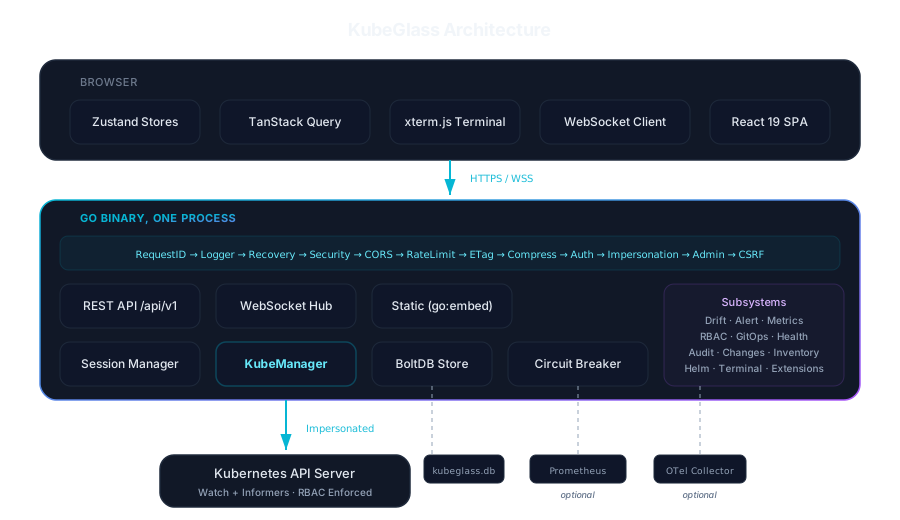
KubeGlass works for one person with a kubeconfig and for a team sharing one deployment. In a shared deployment people sign in with your identity provider or through your reverse proxy, and KubeGlass impersonates them on every Kubernetes call, reads included. The API server applies their RBAC, so nobody sees or changes more than they could with kubectl.
Only admins can add clusters, change server settings or read everyone's audit log. "Act as" shows the cluster as another user or ServiceAccount, if your own RBAC lets you impersonate them.
- Sign-in
- Your identity provider (OIDC), a Kubernetes token, a reverse proxy such as OAuth2 Proxy, or none on your own machine
- Permissions
- Kubernetes RBAC through impersonation; KubeGlass keeps no permission model of its own
- Identity
- Checked on every request, from a server-side sign-in session or the proxy's headers
- Read-only
- --read-only refuses every change; any cluster can be marked read-only or production in the UI
- Images
- Signed with cosign, with an SBOM and build provenance
How it is built
- The Go server embeds the React UI, so the binary or the container image is the whole product.
- It reads your kubeconfig and discovers the API groups each cluster offers, CRDs included.
- Lists stay current through Kubernetes watches streamed over WebSocket, and the server works out each object's status.
- A bbolt file in the data directory holds drift results and the change history. There is no database server to run.
- It recognises 29 distributions, including EKS, GKE, AKS, OpenShift, k3s, Talos and kind. Any conformant cluster works.
Install
brew install kubeglass/tap/kubeglass
kubeglassdocker run --rm -p 8090:8090 \
-v ~/.kube/config:/home/nonroot/.kube/config:ro \
-v kubeglass-data:/home/nonroot/.kubeglass/data \
ghcr.io/kubeglass/kubeglass:latesthelm install kubeglass oci://ghcr.io/kubeglass/charts/kubeglass \
--namespace kubeglass --create-namespace \
--set config.authMode=local
kubectl -n kubeglass port-forward svc/kubeglass 8090:8090git clone https://github.com/kubeglass/kubeglass.git
cd kubeglass
make build
./bin/kubeglassThen open localhost:8090. On your own machine KubeGlass listens only on 127.0.0.1, because anyone who reaches it gets your cluster access. Before you share a deployment, read Running for a team. All the options are in the installation guide.
Open source. Community driven.
KubeGlass is built in the open: read every line and run it anywhere. It costs nothing, needs no account, and the AGPL keeps it open source. Contributions are welcome and appreciated.
Questions
What is KubeGlass?
An open-source Kubernetes dashboard and web console. One binary serves a web UI for every cluster in your kubeconfig: what needs attention and why, live lists of every kind including custom resources, logs, shells, YAML editing with a dry run, Helm releases, Argo CD and Flux, and RBAC.
How is KubeGlass different from Headlamp, k9s and Lens?
Headlamp is a Kubernetes UI that runs as a desktop app or in a cluster and grows through plugins. k9s is a terminal UI for one person. Lens is a desktop app with paid plans for larger organizations, and Freelens is its free fork. KubeGlass is a web console that runs as one binary on your computer or in a cluster, with Helm, Argo CD and Flux, an access matrix and a change history with undo built in.
Is KubeGlass free?
Yes. It is open source under the GNU Affero General Public License v3.0, with no paid tier and no account to create.
Do I have to install anything in my cluster?
No. Run kubeglass on your computer and it opens in your browser with the clusters in your kubeconfig, using your own permissions. For a team, the Helm chart runs it in a cluster and people sign in with your identity provider, a Kubernetes token, or through a reverse proxy.
Which Kubernetes distributions does it work with?
Any conformant Kubernetes cluster. KubeGlass recognises 29 distributions by name, including Amazon EKS, Google GKE, Azure AKS, OpenShift, K3s, RKE2, Talos and kind.
How do I install KubeGlass?
Install it with Homebrew (brew install kubeglass/tap/kubeglass) and run kubeglass: it opens in your browser with the clusters in your kubeconfig. There is also a Docker image, a Helm chart for running it in a cluster, and the source to build yourself.
Can it show several clusters at once?
Yes. Run on your computer, KubeGlass lists every context in your kubeconfig with each cluster's problems, and you can switch between them, compare them and give each a color. Lists can show several clusters' objects together, each row with its cluster, and the command palette can search every cluster. Installed in a cluster, it shows that cluster.
What replaced Kubernetes Dashboard?
Kubernetes Dashboard was archived on 21 January 2026 and gets no more fixes. The Kubernetes project suggests Headlamp. KubeGlass is another open-source web UI that installs in a cluster with a Helm chart and can take the same bearer tokens on its sign-in page.
Can I keep my k9s keys and plugins?
Yes. KubeGlass's lists use k9s's keys: j and k to move, l for logs, s for a shell, y for YAML and : to open a kind. Running on your computer, it can import your k9s plugins, hotkeys and aliases into its extensions file.
Is it safe to share one KubeGlass with a team?
KubeGlass impersonates each signed-in person on every Kubernetes call, reads included, so the API server applies their RBAC and nobody sees or changes more than they could with kubectl. Started with --read-only, it refuses every change.
Does it work with custom resources?
Yes. KubeGlass discovers the API groups each cluster serves, so custom resources get the same live list and detail page as built-in kinds.
Can I use it from an AI assistant?
Yes. KubeGlass includes an MCP server, so clients such as VS Code and Claude Desktop can query your clusters through it. Its tools only read.