
Architecture overview
KubeGlass is one Go binary with the React UI embedded at build time. It reads a kubeconfig (or the in-cluster ServiceAccount), discovers the cluster’s API groups including CRDs, and serves the UI, the REST API and WebSockets on one port, 8090 by default.
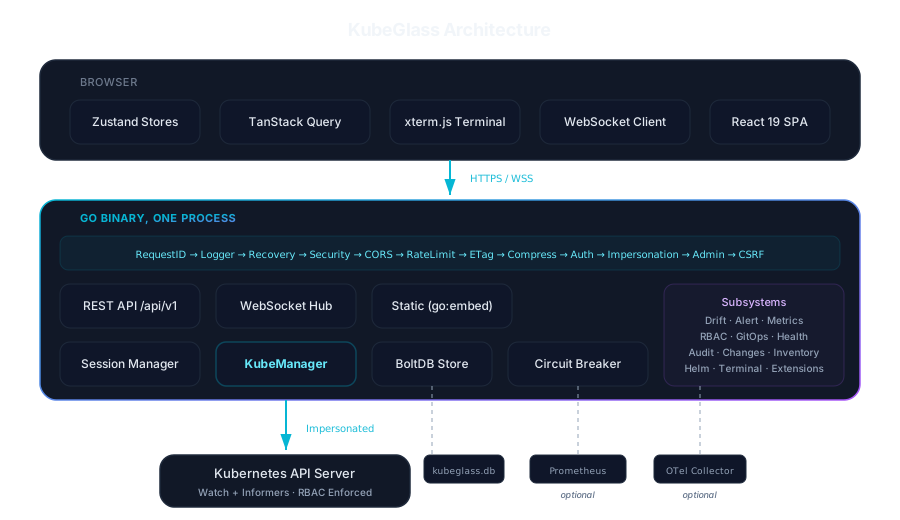
Startup
Section titled “Startup”- Read the flags, then load configuration: defaults, then the config file, then
KUBEGLASS_*environment variables. - Set up logging (JSON in a pod, readable text or a log file at a terminal) and optional OpenTelemetry tracing.
- Bind the port, before any cluster is contacted, so an unreachable cluster doesn’t delay startup.
- Build the Kubernetes client. If no kubeconfig works, KubeGlass starts in setup mode and the UI asks for one.
- Run API discovery and cache the result, then start the metrics, the background health check and, if
enable_pprofis set, the profiler onlocalhost:6060. - Open the store in
data_dir. - Start the HTTP server, with TLS if
tls_enabledis set (usingtls_certandtls_key), and open the browser when KubeGlass runs at a terminal.
On SIGINT or SIGTERM it stops background work, closes WebSockets, finishes in-flight requests and closes the store. KUBEGLASS_DRAIN_TIMEOUT (default 25s) bounds the whole shutdown, which fits inside Kubernetes’ default 30-second grace period.
Talking to Kubernetes
Section titled “Talking to Kubernetes”Each request runs as the signed-in person: KubeGlass sends Impersonate-User and Impersonate-Group headers, so the API server applies that person’s RBAC to reads, writes, exec, logs and Helm alike. In local mode KubeGlass uses your kubeconfig credentials directly.
Each browser session has its own cluster context, so two people (or two tabs) can look at different clusters at once.
Live data comes from Kubernetes watches. The UI subscribes to the resources on screen over WebSocket; each watch starts with a snapshot of every object, and KubeGlass then forwards ADDED, MODIFIED and DELETED events as they arrive.
Status and problems
Section titled “Status and problems”The server decides what state each object is in, so the UI doesn’t need rules for every kind. internal/status sums up any object in a few fields: a tone (ok, warn, error, progress or neutral), a state such as kubectl’s STATUS for pods or Available for a Deployment, a ready count, and, when something is wrong, a problem code with the cluster’s own message. Lists from /api/v1/objects, single-object GETs and watch events carry these summaries. Pods follow the same rules as kubectl get pods; built-in workloads, nodes, volumes, autoscalers, disruption budgets, namespaces, cert-manager Certificates and Argo CD Applications have rules of their own, and any other kind is judged by its Ready, Available, Healthy or Synced condition.
internal/problems builds the Overview from the same summaries: every object with a problem, with pods rolled up to the workload that owns them. /api/v1/contexts/problems does that for every context in the kubeconfig.
Changes and undo
Section titled “Changes and undo”internal/changes records changes to the kinds people change on purpose (Deployments, StatefulSets, DaemonSets, CronJobs, Services, Ingresses, ConfigMaps, Secrets and HorizontalPodAutoscalers) in each cluster someone uses, with KubeGlass’s own identity. When it starts it also reads what the cluster keeps of its past: workload revisions from ReplicaSets and ControllerRevisions, Helm’s release records, and when config was last written, from managed fields. A recorder starts the first time a request uses a cluster and stops after a day without use; at most 16 run at once. For each update it keeps the fields that changed and, to undo it, a merge patch back to the earlier values together with the values the change set; for a delete, the object as it was. Undo data is capped at 64 KiB per change and 16 MiB per cluster, oldest dropped first, and Secret values are kept only as hashes, so changes to them can’t be undone. A revert runs as the person asking, checks that the fields still hold what the change set, and sends the object’s resource version with the patch so a change in between makes the API server refuse it.
Extensions
Section titled “Extensions”internal/extensions reads one YAML file (extensions_file) that adds actions, keys, hotkeys, sidebar links, panels, list columns and command palette names to the UI. It reads the file again when its size or modification time changes, looking at most every 2 seconds, keeps the entries that are valid and reports the others. The server never runs an action’s command on its own: the browser copies it, or, when KubeGlass was started with --local-shell, types it into a local shell in a terminal tab after showing it in a dialog.
The MCP server isn’t part of the server process: kubeglass mcp runs as a separate process, started by an AI client, that calls a running KubeGlass’s HTTP API.
A circuit breaker tracks whether the API server of the cluster KubeGlass started on is reachable, opening after three failed health checks in a row. While it is open, watches and log streams of that cluster wait instead of retrying in a tight loop, and resume when it answers again. Other clusters’ watches and log streams back off on their own.
Stored state
Section titled “Stored state”KubeGlass keeps its own data in a bbolt file, kubeglass.db in data_dir:
- Drift scan results and drift policies.
- The change history of each cluster KubeGlass has recorded, with what it takes to undo each change.
- A day of CPU and memory samples per cluster from metrics-server, for the Usage cards without Prometheus.
- Sign-in sessions in
oidcandtokenmodes, sealed with AES-256-GCM. - Each signed-in user’s cluster settings: display names, colors, production and read-only marks and allowed namespaces.
Drift results and changes are kept for 30 days by default. Settings changed in the UI are saved to config/settings.json in the data directory. UI preferences such as theme and table columns stay in the browser.
Without a persistent volume, all of this resets when the pod restarts; the cluster is unaffected.