
Introduction
KubeGlass is a web console for Kubernetes. You point it at a kubeconfig and get a browser UI for every context in it.
What you can do with it
Section titled “What you can do with it”- See what needs attention: the Overview lists every object with a problem, errors first and then the newest, with the reason in plain words and the cluster’s own message. The other clusters in your kubeconfig show their problem counts next to it, and the bell lists the problems that started since you last looked.
- Fix it where it shows: a problem can come with a fix, such as reverting the change made just before it, giving a container more memory, changing an image, rolling back, running a CronJob again or syncing an Argo CD application.
- Browse every kind the same way: built-in kinds and custom resources get the same live list, with filters, label selectors, sorting, bulk actions and k9s-style keys, and the same detail page, beside the list on a wide screen.
- Find out why something is broken: an object’s page says what is wrong, and its Checks look for the likely cause step by step.
- Change things: edit YAML with a dry run and a diff, scale, restart, roll back, cordon and drain, all through your own RBAC.
- See what changed and undo it: KubeGlass records changes to workloads, Services, Ingresses, config and autoscalers, field by field, reads rollouts, Helm releases and config writes from before it ran from the cluster’s own records, names the KubeGlass user who made them, and can revert a change after a dry run.
- Group workloads into applications by Helm release, Argo CD application or labels, each with its own page.
- Get a shell: pod exec and node shells in split panes, with broadcast to several clusters and session recording, a debug container for an image without a shell, and a shell on your own computer if you start KubeGlass with
--local-shell. - Check access: what you or any user, group or ServiceAccount may do, and who a binding lets do something.
- Run Helm, Argo CD, Flux and Argo Rollouts from one place.
- Work across clusters: one list of every cluster with its problems, a color for each cluster, a resource diff between clusters, scheduled drift detection and an upgrade check.
- Read usage from metrics-server or Prometheus, alerts from Alertmanager, and rightsizing suggestions for requests and limits; check certificates, Trivy vulnerability reports, images and policy violations.
- Mark a cluster production, so deleting, draining or scaling to zero asks for its name first, or read-only, so KubeGlass changes nothing there; or run all of KubeGlass with
--read-only. - Add actions, keys, sidebar links, cards such as Grafana panels, columns and palette names of your own with the extensions file, or import your k9s plugins, hotkeys and aliases.
What it isn’t
Section titled “What it isn’t”- It doesn’t deploy your code. Use your CI/CD or GitOps tool for that; KubeGlass shows what they did.
- It doesn’t store metrics. It reads them from metrics-server or Prometheus.
- It doesn’t replace kubectl. It runs the same API calls, and the terminal is there when you want kubectl itself.
Who it is for
Section titled “Who it is for”KubeGlass works for one person on a laptop with their own kubeconfig, and for a team sharing one deployment. In a shared deployment people sign in, and every request runs as them, so each person sees and changes only what Kubernetes RBAC allows. See Running for a team.
How it is built
Section titled “How it is built”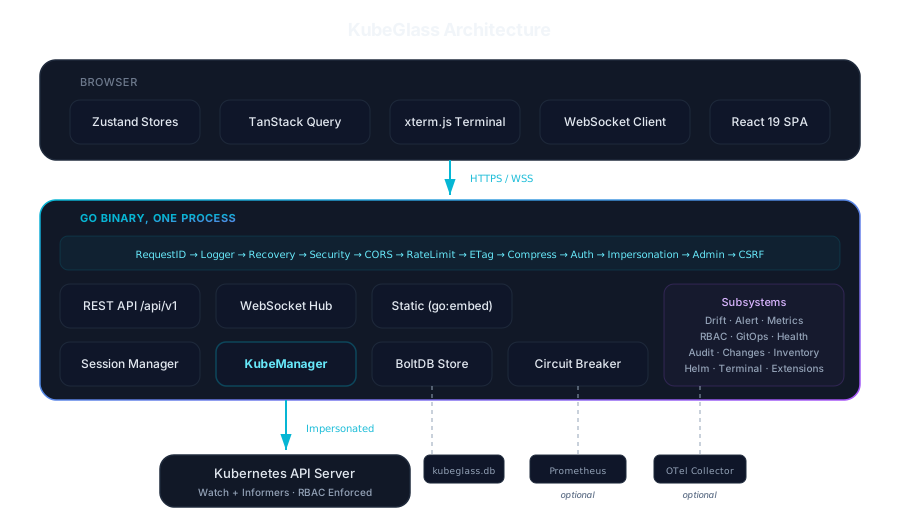
The Go server embeds the React UI, so a single binary (or container image) is the whole product. It reads your kubeconfig, discovers the API groups each cluster offers (including CRDs), and listens on port 8090. Live updates reach the browser over WebSocket. The server also works out each object’s status and problems, so every list, the Overview and the MCP server’s list_problems tool say the same thing about it. Its own state is in one bbolt file in the data directory, kubeglass.db, which holds drift policies and results and the change history. There is no database server to run.
KubeGlass recognises 29 Kubernetes distributions, including EKS, GKE, AKS, OpenShift, k3s, Talos and the usual local ones. Any conformant cluster works; recognising the distribution only changes which extras the UI shows.