
Data flow
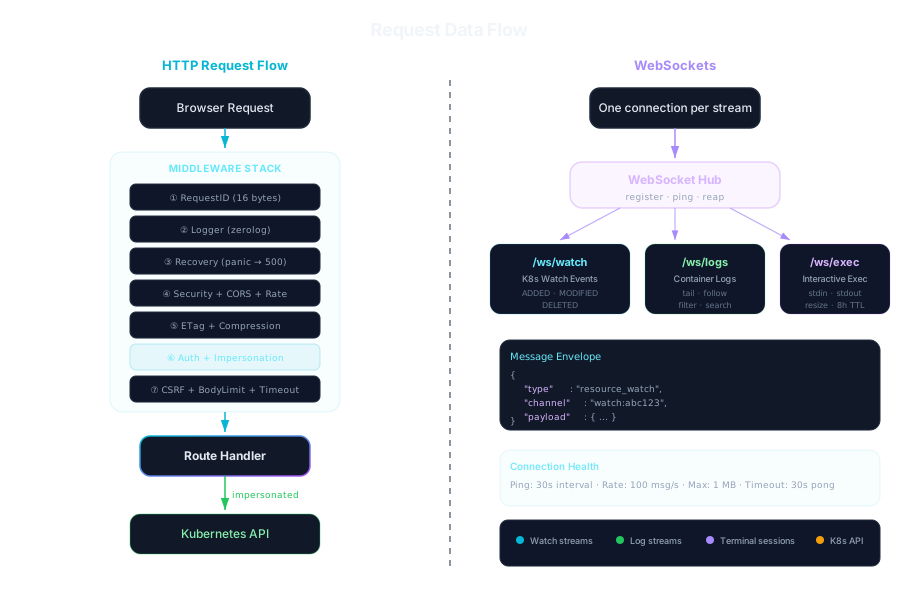
HTTP requests
Section titled “HTTP requests”Every request goes through these steps, in order:
RequestID random ID, returned in X-Request-ID and logged with every lineTracing OpenTelemetry span, if tracing is onLogger method, path, status, durationRecovery a panic becomes a 500 instead of a crashHostGuard in local auth mode, only localhost, IP addresses and allowed_hostsSecurityHeaders a fixed Content-Security-Policy, HSTS behind TLS, frame and content-type rulesCORS only origins in cors_allowed_originsRateLimiter per client IP, 100 requests/s with bursts of 200 by defaultETag 304 Not Modified when the client already has the responseCompression gzip for larger responsesRequests under /api/ then continue through:
APISecurityHeaders a Content-Security-Policy of default-src 'none' for API responsesRouteMetrics request counts and durations per route, for /metricsAuth who is this? (sign-in session, bearer token or proxy headers, per auth_mode); with a session, changes must be same-origin and carry its CSRF tokenImpersonation reads an "Act as…" request, if there is oneReadOnly in read-only mode, or with X-KubeGlass-Read-Only, refuses changesRequireAdmin admin-only routes return admin_required for everyone elseCSRF mutations need a header a plain form can't sendMaxBodySize 1 MiB by default (max_request_body_size); 5 MiB (max_dynamic_body_size) for a manifest or a YAML apply; an upload to a pod is limited to 256 MiB in its handler insteadTimeout 30s for every request but file uploads and downloads, which get 15 minutes once their check has passed, and downloads streamSession the browser session: its chosen clusterClients Kubernetes clients for that cluster, acting as the user (or, after checking that they may, as the identity they chose with "Act as…")Audit mutations are written to the audit log; dry runs aren'tWebSocket upgrades under /ws/ go through Auth, Impersonation, ReadOnly (which refuses the endpoints that run commands), Session and Clients.
Endpoints that take credentials (/api/v1/connect/token, /connect/kubeconfig, /connect/serviceaccount and /connect/sso) have a stricter limit of 2 requests per second per IP.
Sign-in itself is under /auth/, outside this chain: /auth/session (who is signed in, and the CSRF token), /auth/login and /auth/callback (OIDC), /auth/token (token mode, limited to 2 requests per second per IP) and /auth/logout.
| Path | Sign-in needed |
|---|---|
/healthz, /livez, /readyz, /metrics |
No |
/auth/… |
No |
/api/v1/… |
Yes |
/ws/… |
Yes |
| Everything else (the UI) | No |
WebSockets
Section titled “WebSockets”Live data uses WebSockets, authenticated like the API:
| Path | Carries |
|---|---|
/ws/watch |
Watch events for one resource type, optionally in one namespace or for one object. It starts with a snapshot of every object, unless the URL carries the version of the list the page already has and that list is still current. Each object comes with its status summary |
/ws/logs |
One container’s log stream |
/ws/exec |
An interactive shell in a container |
/ws/local-shell |
A shell on the KubeGlass host, when enabled |
Each stream has a connection of its own. Messages from the server carry a type (resource_watch, log_stream, error and so on) and a payload. A shell’s output comes as binary messages of the bytes it wrote, so a character split between two reads arrives whole, and the UI sends a paste in pieces of at most 65,536 characters.
Browsers can’t set headers on a WebSocket, so the UI puts in the URL what its HTTP requests send as headers: the tab’s session as sid, the cluster the tab shows as ctx, another cluster the socket is for as cluster, a read-only mark as ro=1 and “Act as…” as as and asGroup. The server closes a socket whose ctx isn’t its session’s cluster with code 4409, a shell on a read-only cluster with 4423, and a socket refused for another reason with 4000 plus the HTTP status; the UI says why. HTTP requests carry the cluster the tab shows in X-KubeGlass-Context, and one whose session is on another cluster gets 409 context_mismatch, so a change made on one cluster’s page can’t reach another.
Watch events update the UI’s query cache in place, so a list changes without being fetched again, and its statuses stay current with it.
The server pings every 30 seconds and closes a connection that hasn’t answered within another 30. Each connection may send 100 messages per second (bursts of 200), and a single message may be up to 1 MB. Terminals close after 30 minutes without input or output, and exec sessions in pods end after 8 hours whatever their activity.
Sessions
Section titled “Sessions”The auth step works out who you are on every request: from the sign-in session’s cookie in oidc and token modes (or a bearer token), from the proxy’s headers in impersonation mode. The sign-in session is kept on the server, encrypted in the data directory; see Sign-in. The browser session holds per-tab state: the cluster you chose. The namespace is in the page’s address (?ns=) and in the browser. Its ID is a random UUID in an X-Session-ID header, in the sid parameter of WebSocket URLs, or in the kubeglass-session-id cookie (HttpOnly, SameSite=Strict, Secure over HTTPS). A session belongs to the user who started it: someone else who presents its ID gets a new session. Sessions are kept in memory, at most 1,000, and at most 100 for one signed-in user, who loses their own least recently used one first; without sign-in (local mode) only the 1,000 apply. When a tab’s session is gone (KubeGlass restarted, or dropped it), its new session starts on the cluster the tab names if a switch there would be allowed and the person’s credentials work for it, so the tab comes back where it was. One closes after session_max_age without activity, 4 hours by default.
Validated bearer tokens are cached for a minute (up to 10,000 entries) so each request doesn’t verify the JWT again.