
Clusters
KubeGlass works with every context in your kubeconfig. Each person’s current cluster is their own: in a shared deployment, switching clusters doesn’t affect anyone else.
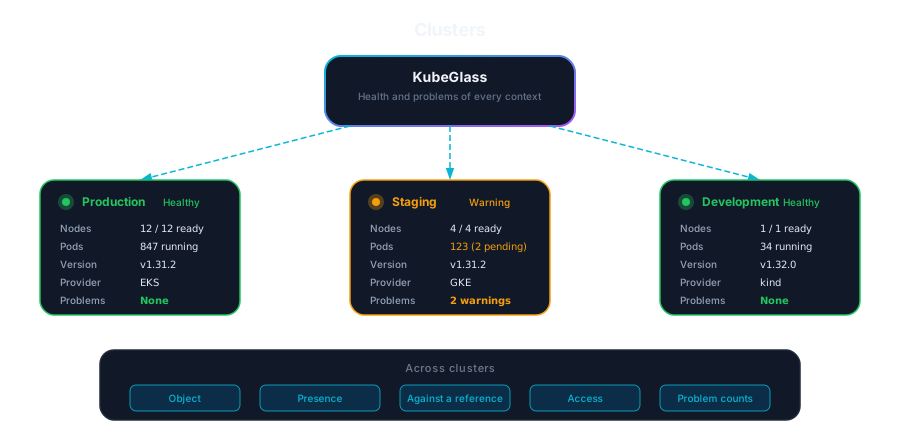
Clusters has six tabs: All clusters, Compare, Drift policies (for admins, see Drift policies), Upgrade check, Port forwards and Add cluster.
All clusters
Section titled “All clusters”All clusters is one list of every context, pinned ones first, then by name. Each row shows the provider, the Kubernetes version, ready nodes, and how many errors and warnings the cluster has. The counts come from the same problems as the Overview, checked as you, a few clusters at a time; a cluster that doesn’t answer within a few seconds doesn’t hold up the rest. Under Act as… only the current cluster is checked as that identity, since switching ends it; the others are checked as you. Each cluster’s check is kept for 30 seconds for the identity it ran as, so nobody sees what another user may see.
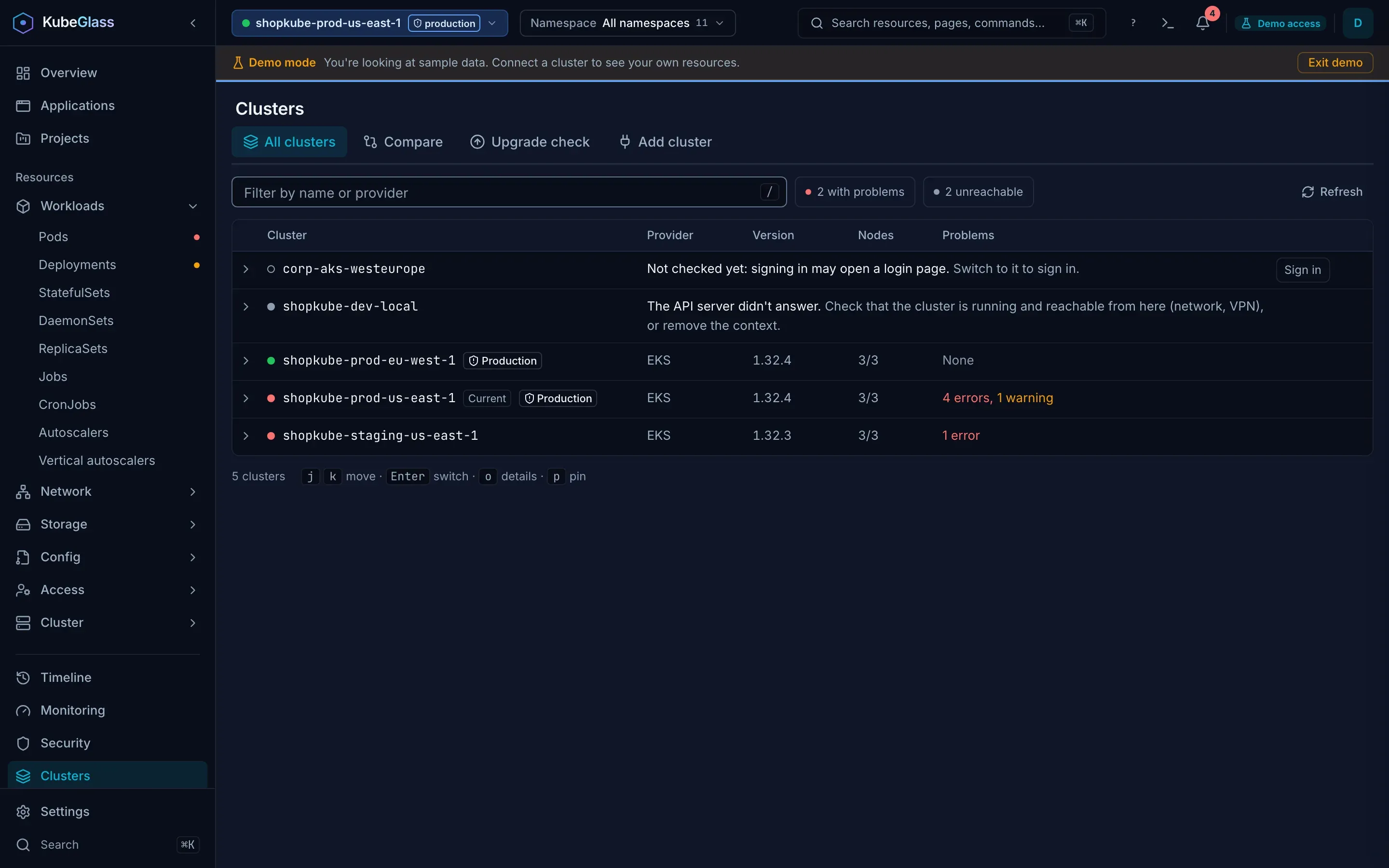
For a cluster that isn’t checked, the row says why and what to do next:
- KubeGlass can’t use the kubeconfig entry: fix the entry or remove the context.
- The API server didn’t answer: check that the cluster runs and is reachable from where KubeGlass runs (network, VPN). For contexts that sign in through a plugin, such as the AWS or gcloud CLI, the sign-in may have expired.
- The API server refused the credentials (Credentials refused): the kubeconfig entry’s token or certificate isn’t valid there any more, or a plugin’s sign-in expired.
- The API server refused your user (No access): it answered, but your user may not read the cluster’s health there.
- KubeGlass’s credentials may not act for you (Can’t act for you): the API server answered, but the credentials KubeGlass has for the cluster may not impersonate you. An admin has to grant them
impersonateon users and groups. - Token for another cluster: in
tokenmode your token works on the cluster you signed in to only. - Not checked yet: contexts whose credential plugin may open a login page, such as kubelogin, aren’t checked in the background. Switching to one starts the sign-in.
Open a row for its details. For a cluster that answers, they list its worst problems, each linking to the object in that cluster, then its firing alerts that name no object, and a link to its Overview. For one that doesn’t answer, they test each step of reaching it in order (its server name, the connection, the credentials, the permissions) and mark the one that fails; Check again asks again. Admins can remove a context there, which deletes it from the kubeconfig, along with its cluster and user entries if no other context uses them.
The filter matches name, provider and version, and the words problems, unreachable and pinned filter by state. The buttons next to it do the same for the clusters with problems and the ones that don’t answer. Keys:
| Keys | Does |
|---|---|
j k or the arrow keys |
Move down and up |
gg / G |
First / last row |
Enter |
Switch to the cluster (for one that doesn’t answer, show why) |
o or Space |
Open or close the details |
l or → / h or ← |
Open / close the details |
p |
Pin or unpin |
/ |
Filter |
Esc |
Close the details, then clear the filter |
Switching
Section titled “Switching”Switch from All clusters, from Other clusters on the Overview, with the cluster switcher in the top bar (⌘⇧K), or by typing @ and the name in the command palette. The current cluster is in the address as ?ctx=, so a link opens the same cluster for whoever follows it.
The switcher shows each cluster with a state dot and one line: its error and warning counts, Healthy, Checking…, why it doesn’t answer, or that it needs a sign-in, then its provider and version when the cluster reports them. Pinned clusters come first. In a list of eight or more, the clusters you used recently come next, and you can show only the ones with problems or the ones that don’t answer. Type to filter by name, provider or version. Production and Read-only tags follow a cluster’s name in the switcher and in All clusters.
Several clusters in one list
Section titled “Several clusters in one list”Lists show the current cluster only, until you pick others. In the switcher, Choose clusters (next to “Lists show”) turns the clusters into checkboxes: Enter or a click picks one or takes it out again, the Only button goes back to the current cluster alone, and Done or Esc goes back to switching. The current cluster is always in. The cluster pill in the top bar then shows how many more clusters lists show, such as +2, and the choice is kept in this browser. Switching to one of the picked clusters keeps the same set.
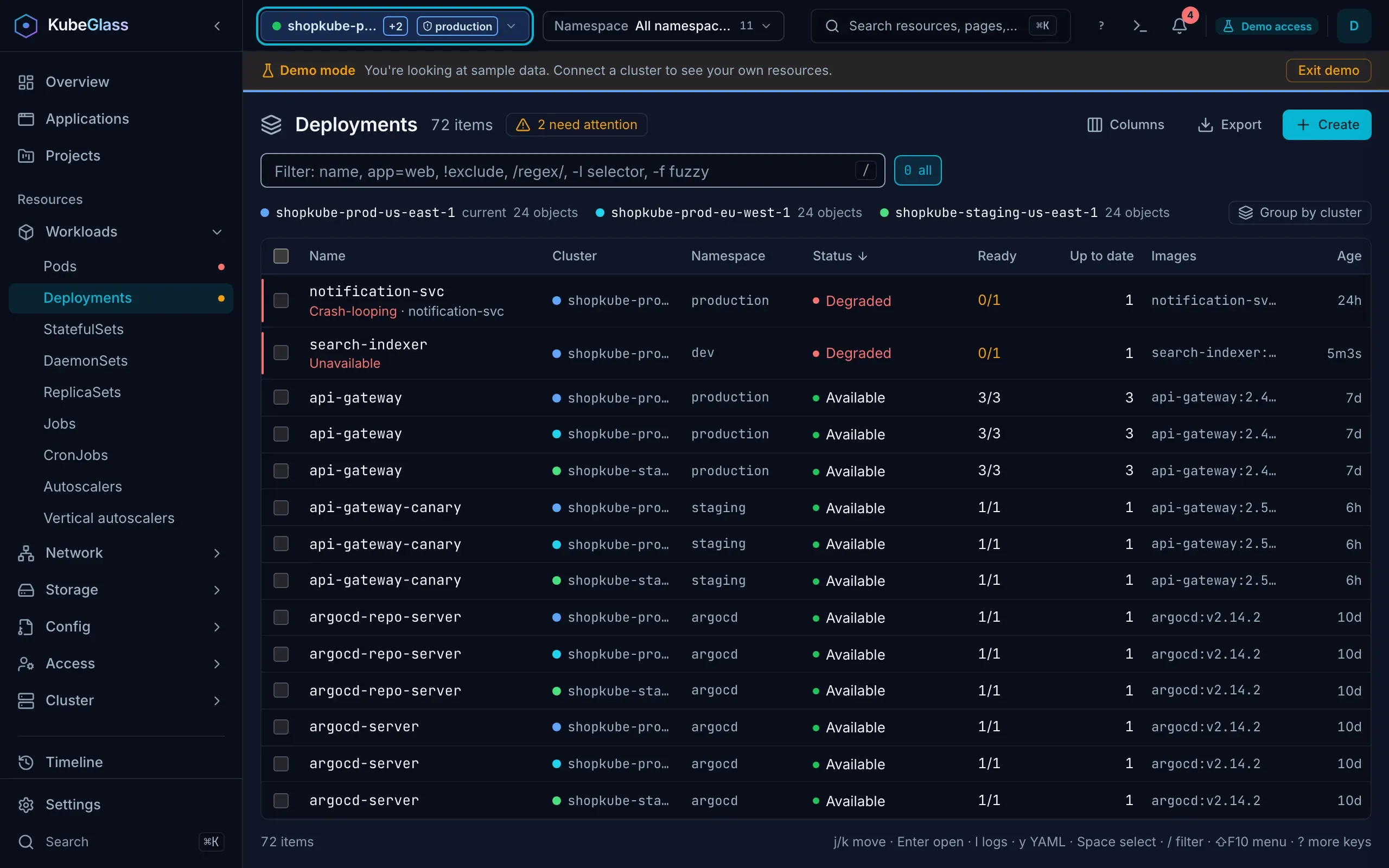
Then every list loads and watches each cluster on its own, so a slow one holds up none of the others:
- A Cluster column, with the cluster’s color, says where each row is from, and the filter matches cluster names. Over the list each cluster has its count, or why it has no rows: no access to the list, it didn’t answer, or it isn’t in the kubeconfig. Group by cluster puts each cluster’s rows under its name.
- Restart, delete, force delete, scale, set image, CronJob run, suspend and resume, and cordon, uncordon and drain run on each row’s own cluster, with one confirmation that names the cluster when it isn’t the current one, or every cluster a selection spans. Production and read-only marks apply per cluster: deleting on a production cluster asks for the name even when the current cluster isn’t production, and a read-only cluster’s rows offer no changes.
- Opening a row of another cluster, its logs, its shell or its YAML switches to that cluster first; the address names it (
?ctx=), so the link works in a new tab too. Its other actions (roll back, port forward, show a Service’s pods) are there once you have switched. - Actions from the extensions file follow the row’s cluster as well:
{context}is the row’s cluster, andwhen: contextsis matched against it. A command that doesn’t name{context}is left off another cluster’s rows, becausekubectlin a local shell starts on the current cluster. - The Overview’s Needs attention lists the problems of every cluster lists show, each with its cluster, and says which clusters didn’t answer. Fixes for another cluster’s problem are offered on its own cluster.
The command palette can also search every cluster: see Command palette.
Production and read-only clusters
Section titled “Production and read-only clusters”A cluster’s row in All clusters links to its settings, where you mark it, pick its color, give it a name and a default namespace, and set its Prometheus URL; see Settings › Clusters. The marks and colors are yours: your browser keeps them, or the server does when several people sign in.
- Production: the cluster picker in the top bar is marked production, a stripe in the cluster’s color runs above its pages, every confirmation says you’re changing a production cluster, and deleting, draining, evicting, scaling to zero or uninstalling a Helm release asks you to type its name first (the cluster’s name when you act on several objects). Until you choose, a cluster counts as production when its name contains
prod,productionorprdas a word, soshop-prod-eudoes andpreproddoesn’t; the confirmation offers to correct a wrong guess. - Read-only: KubeGlass hides the actions that change that cluster and opens no shells or port forwards there, and the server refuses changes from the UI to it. Changes to KubeGlass itself, such as settings or the kubeconfig, still work. The top bar shows Read-only while you’re on it.
The command palette can set both for the current cluster: type production or read-only. For a KubeGlass that should change nothing on any cluster, run it with --read-only.
Cluster colors
Section titled “Cluster colors”Each cluster has a color, used for the cluster picker in the top bar and for the stripe above a production cluster’s pages, so you can tell clusters apart at a glance. Pick it from ten colors under Settings › Clusters › Color. Until you pick one, the cluster’s name chooses one of eight, never red or gray, so the same name always gets the same color.
Production has no color of its own: red means something is failing everywhere else in KubeGlass. If you want production in red, pick red for it.
Compare
Section titled “Compare”Compare puts clusters side by side. It has four views; each runs when you press Compare and keeps nothing:
- Object: pick two clusters, a kind and a name to see the fields that were added, removed or changed. Fields that change on every write (
resourceVersion,managedFieldsand similar) are ignored. When only one cluster has the object, or neither, the page says so. - Presence: pick clusters and a kind, with an optional namespace and label selector, to see which objects exist where. A cluster that gave nothing is named with why: you may not list the kind there, it doesn’t have the kind, or it didn’t answer.
- Against a reference: pick a reference cluster, target clusters and kinds. Every object of those kinds in each target is compared field by field with the same object in the reference, and each difference gets a severity. An object of the reference that a target lacks is listed as missing, which is critical, unless a controller owns it (a Deployment’s ReplicaSets have other names in each cluster, and the Deployment is compared). A target that didn’t answer, or a kind you may not list there or that the cluster doesn’t have, is named with why, and the page says only that what could be compared matches.
- Access: compare one subject’s RBAC permissions between two clusters, listing what is only in one or the other. It counts what the subject gets through its groups, as the API server’s RBAC does (every user and ServiceAccount is in
system:authenticated, exceptsystem:anonymous, which is insystem:unauthenticated; a ServiceAccount also insystem:serviceaccountsandsystem:serviceaccounts:<namespace>), and a RoleBinding that names a ServiceAccount without a namespace means one in its own namespace, and tells a rule limited to some objects by name, or on URLs such as/metrics, from one on every object. A ServiceAccount is named with its namespace, in the Namespace field or asnamespace/name, and its RoleBindings in every namespace count; for a user or group, the Namespace field limits the RoleBindings compared to that namespace.
The kinds come from the current cluster; Other kind takes an API group, version and resource typed in. To check clusters on a schedule and keep the results, use Drift policies.
The dock’s broadcast mode can also send the same command to shells on several clusters at once.
Upgrade check
Section titled “Upgrade check”Upgrade check says what stands between the current cluster and the next Kubernetes minor version, starting with a one-line verdict: how many things to fix before the upgrade, that nothing blocks it (and how many warnings to look at first), or that the cluster already runs the latest release KubeGlass knows of. Only failed checks block the upgrade; a control plane more than two minor versions behind the newest release is a warning, since upgrading is the cure. It needs cluster-wide read access.
- The checklist, worst first: the control plane version, node version skew, deprecated API versions, deprecated custom resource versions, an etcd backup reminder and a PodDisruptionBudget review.
- Deprecated API versions: each one the cluster serves, the release that removes it, what to use instead, and whether anything still requests it. That last column needs permission to read the API server’s
/metrics; without it the page says it can’t tell. - Node versions: each kubelet’s version, how far it is behind the control plane, and whether it stays within the supported skew after the upgrade.
The removal dates come from the Kubernetes API module KubeGlass is built with. See Upgrade readiness in the API reference.
Port forwards
Section titled “Port forwards”Port forwards lists the forwards you started from a pod, Service or workload (a KubeGlass admin sees everyone’s), with the local address to open, what each one reaches, how long it has left, and Stop and Restart. A forward listens on the computer KubeGlass runs on, so the tab is there only when KubeGlass runs on your own computer, outside read-only mode. Port forwards covers starting one, the dialog and what each status means.
Add cluster
Section titled “Add cluster”Add cluster starts by saying how many clusters KubeGlass has, with a link to All clusters. The ways to add one are on the left, in two groups; the address keeps the one you picked (?method=).
One cluster:
| Way | What you do |
|---|---|
| Kubeconfig | Paste a kubeconfig, drop the file on the box or choose it, for example one downloaded from Rancher or a cloud console. KubeGlass checks each context as opening it will connect, with its credential plugin, TLS server name and proxy, and adds them to the kubeconfig it reads. A context whose plugin may open a sign-in page, such as kubelogin, isn’t checked: it signs in when you open it. One whose plugin doesn’t answer within the 11 seconds a check takes is added unchecked |
| EKS, GKE or AKS | Copy the cloud CLI’s command (aws eks update-kubeconfig, gcloud container clusters get-credentials or az aks get-credentials) and run it on the computer KubeGlass runs on; the CLI has to be installed and signed in there. Look again checks for the new context. If KubeGlass runs elsewhere, run the command where you are and paste your kubeconfig instead |
| API server and token | The API server’s address and a bearer token. For OpenShift, copy the token from the web console’s Copy login command |
| ServiceAccount token | Make token creates a token, valid for one hour, for a ServiceAccount in the current cluster, to use in another tool or under API server and token. KubeGlass doesn’t keep it, so copy it |
| In the cluster, with Helm | For a cluster this computer can’t reach: the commands to install KubeGlass in the cluster itself, where it runs with its own ServiceAccount and shows only that cluster |
Several clusters:
| Way | What you do |
|---|---|
| Several kubeconfigs | Paste several kubeconfig files, with a line of three dashes (---) between them |
| A list of clusters | One cluster per line, each with its API server address and token. KubeGlass checks that each one answers unless you turn that off |
| A folder on the server | Read every kubeconfig in a folder on the computer KubeGlass runs on, such as files Terraform or Ansible wrote |
| Single sign-on (OIDC) | Sign in once with your identity provider (Entra ID, Okta, Google, Keycloak, Dex and so on) and add the clusters that trust it. Open sign-in page opens the provider’s page; Copy link lets you open it in another browser |
| Agent accounts | Use short-lived tokens to create a kubeglass-agent ServiceAccount in each cluster, then connect with its token, which doesn’t expire. This creates a Namespace, ServiceAccount, ClusterRole, ClusterRoleBinding and Secret in each cluster, so your token must be allowed to create them |
The ways the server doesn’t offer aren’t listed. After adding, the page lists each cluster with its server and whether it answered. KubeGlass merges new entries into the kubeconfig it reads and leaves the existing ones alone: a cluster or user whose name the kubeconfig already gives a different one, or that one of its contexts still names after the entry was deleted, is saved as <context>-cluster or <context>-user, and a context whose name is taken as <context>-2, with the next number when that is taken too, and the page lists what it saved under another name. Importing the same file again adds nothing. A context may name a cluster and a user your kubeconfig already has, as a fragment does, but not pair one of its file with one of your kubeconfig: your kubeconfig’s credentials go only to your kubeconfig’s clusters, so such a context is left out and the page says why. A file’s copy of one of your kubeconfig’s clusters or users, the same apart from its extensions, counts as your kubeconfig’s. Adding a cluster again by API server and token, or by single sign-on, for the same user at the same server, as to rotate a token or after a sign-in expired, replaces the credentials of the context KubeGlass made the first time, in the kubeconfig file they were in, and the page says so. The context keeps its namespace unless you give another; KubeGlass marks the contexts it makes with a kubeglass extension naming that user, the one the cluster’s check found. Adding a list of clusters or agent accounts never replaces credentials, though they use tokens too: each saves the new context beside the old. An imported kubeconfig never replaces anything either, and a kubeglass extension in it is dropped. Only admins can add and remove clusters (for anyone else, Add cluster says so and its forms are off before anything is typed), and nothing can be added in read-only mode. A cluster marked read-only doesn’t stop you adding others: adding a cluster changes the kubeconfig, not the marked cluster, and the ServiceAccount token way only asks the current cluster for a token, which changes none of its objects.