
Access
Security › Access answers two questions: what may this user, group or ServiceAccount do, and who may do this. It also creates Roles and bindings. The RBAC objects themselves (ServiceAccounts, Roles, RoleBindings, ClusterRoles and ClusterRoleBindings) are lists under Resources › Access, like every other kind; a ServiceAccount’s row shows the roles bound to it.
Both questions are answered from the cluster’s Roles, ClusterRoles, RoleBindings and ClusterRoleBindings, read as you. With a namespace picked, the access matrix and Who can read only that namespace’s Roles and RoleBindings besides the cluster-wide ones. If you may not read some of them, see When you may not read roles and bindings.
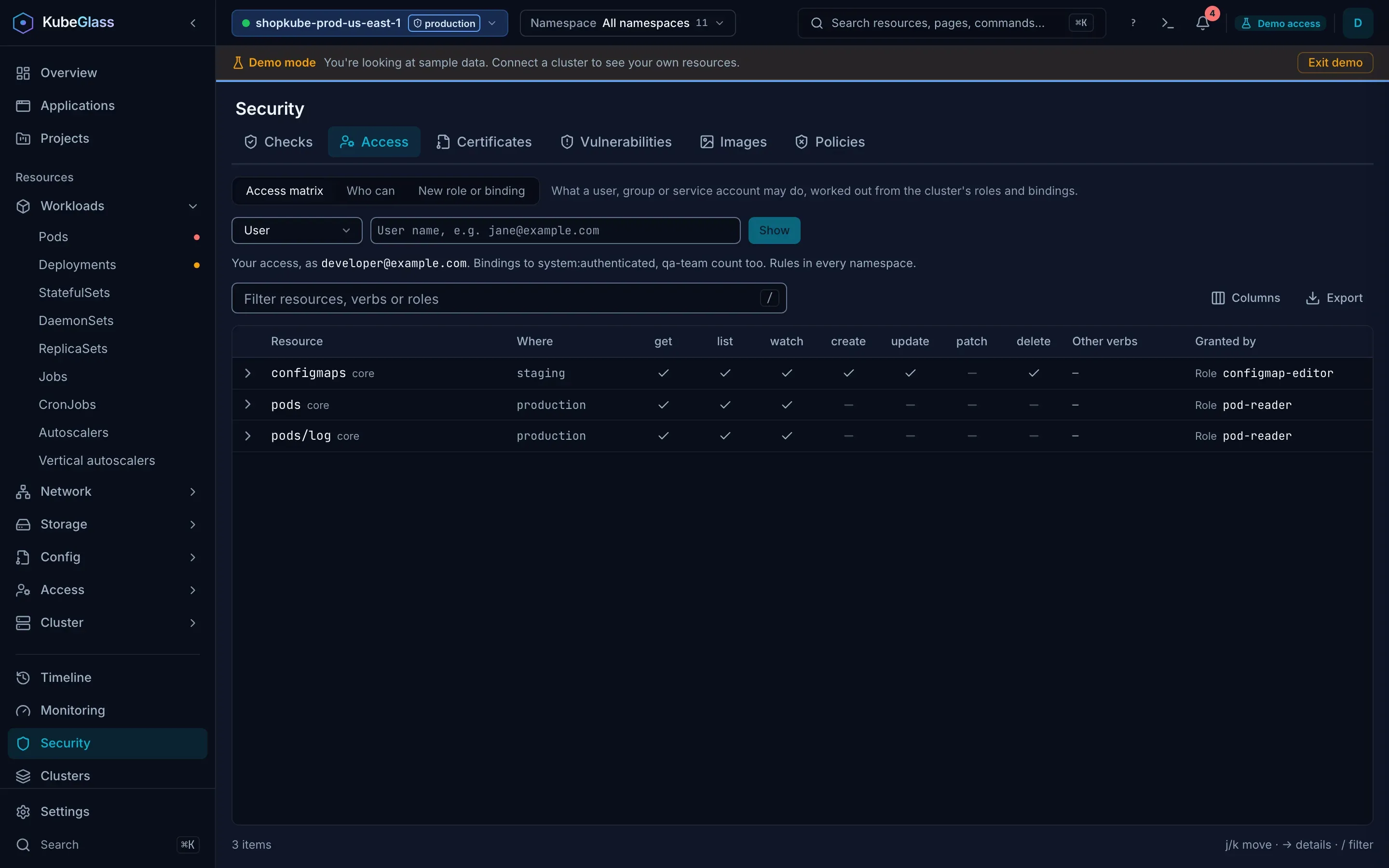
Access matrix
Section titled “Access matrix”The matrix opens on your own access: the user and groups the cluster takes you for, from a SelfSubjectReview (Kubernetes 1.28 and later). In local mode that is your kubeconfig’s user. To see someone else’s, pick User, Group or ServiceAccount, enter the name (and a ServiceAccount’s namespace) and choose Show; Show my access goes back to yours. The subject is in the address, so you can send the link.
Each row is one resource in one place: every namespace, or the namespace of the RoleBinding that grants it. The columns are the verbs get, list, watch, create, update, patch and delete; other verbs a role grants, such as deletecollection, bind or impersonate, are listed together, and * shows as every verb. A row limited to some objects by resourceNames says so. Granted by links to the role; open a row to see every role and binding behind it.
With a namespace picked in the top bar, the matrix answers for that namespace alone: what is granted there and what is granted everywhere, merged into one row per resource.
The matrix is read from the cluster’s roles and bindings:
- Bindings to the groups the API server puts everyone in count:
system:authenticatedfor users and ServiceAccounts, plussystem:serviceaccountsandsystem:serviceaccounts:<namespace>for a ServiceAccount. - A binding that names a ServiceAccount as the user
system:serviceaccount:<namespace>:<name>counts for that ServiceAccount. - For your own access, bindings to each of your groups count. KubeGlass can’t know another user’s groups, so for them only bindings to the user by name and the groups above count.
- Aggregated ClusterRoles count with the rules the aggregation controller has written into them.
- Authorizers other than RBAC, such as a webhook, aren’t part of it. To check one action against all of them, use
kubectl auth can-i.
When you may not read roles and bindings
Section titled “When you may not read roles and bindings”Many users may not: the built-in view, edit and admin ClusterRoles don’t let you list ClusterRoles or ClusterRoleBindings, and view and edit don’t let you list Roles or RoleBindings either.
- If you may list neither RoleBindings nor ClusterRoleBindings where you look, the matrix says you can’t see who has access there, with the API server’s reasons under Details. In its place is your own access in the namespace: what the API server says you may do there (a SelfSubjectRulesReview, which it answers for anyone), a row of verbs per resource. Without a namespace picked it asks you to pick one, since the API server answers for one namespace at a time. Its list covers RBAC; when the API server says another authorizer, such as a webhook, can allow more, the page says so, and when it couldn’t read some of your rules (a binding to a role that doesn’t exist, say), the page says that, with its words under Details.
- If you may list some of them, a namespace admin’s case, the page names the lists it couldn’t read and the bindings that give roles you may not read. For your own access in a namespace it shows the API server’s list, as above; for anyone else, the matrix of what it could read.
- Who can works the same way: refused in the same words when you may list neither list of bindings, and otherwise the subjects the lists you may read give, under the same note.
Who can
Section titled “Who can”Pick a verb and a resource and choose Find to list the users, groups and ServiceAccounts a binding gives that access, with the role, the binding and where it applies. Roles are matched as the API server’s RBAC matches them. A resource without its API group is in the group kubectl picks for it, pods in the core group and deployments in apps, so a rule over every resource of the core group counts for pods and one over metrics.k8s.io’s pods doesn’t; name another group as kubectl does, for example pods.metrics.k8s.io. A rule limited to named objects (resourceNames) gives the access to those only: its subjects are listed with “only tls-cert” under the role. RBAC can’t limit create or deletecollection of a resource by name, since the request names no object, so for those such a rule gives nothing and isn’t listed, which the page says; a subresource’s create, such as pods/exec, names its pod and is limited. The resource is read in any case, Pods as pods; a name the cluster serves no resource by, such as the short name deploy, gets a note that says so, with the resource it stands for (deployments.apps) and a button to ask about that, instead of a list. You may, above the list, counts rules the same way. With a namespace picked, the list has ClusterRoleBindings and that namespace’s RoleBindings; without one, RoleBindings in every namespace. Groups are listed as groups, since the cluster doesn’t say who is in them.
New role or binding
Section titled “New role or binding”New role or binding creates a Role or ClusterRole with rules, or a RoleBinding or ClusterRoleBinding that gives a role to users, groups or ServiceAccounts; Namespaced or Cluster-wide decides which. Each rule’s resources and verbs are picked from the common ones, and each resource comes with its API group: a rule with pods, deployments and jobs is written as one rule per group (the core group, apps and batch), as kubectl create role writes it, and the review shows each with its group. For anything else, create the role and then edit its YAML. Review and confirm shows what it will create before it creates it, and it creates it as you, so you need the RBAC rights to do so. It isn’t there in read-only mode or on a cluster you marked read-only.
Comparing clusters
Section titled “Comparing clusters”Clusters › Compare › Access compares one subject’s permissions between two clusters. See Clusters.
What KubeGlass itself needs
Section titled “What KubeGlass itself needs”In a shared deployment KubeGlass makes the requests behind these views as the signed-in user, on the cluster their session is on, so they show what that person may see. The server keeps a matrix for 30 seconds per cluster and user, and the page asks again every 30 seconds, so a binding you create shows in it within a minute. Changes made through KubeGlass are in Timeline › Audit log, for admins.