
Terminal
The dock, the panel at the bottom of the window with shells, logs and YAML in tabs, opens with ⌘` on a Mac and Ctrl+` on Linux and Windows. Its terminals run on xterm.js and talk to the server over WebSocket. Its keys work with the focus in the dock; the shortcut list has them for both platforms.
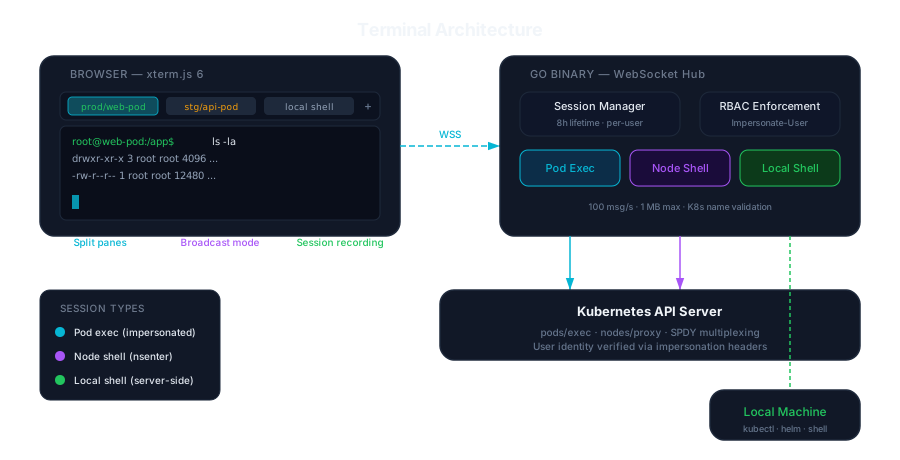
Kinds of session
Section titled “Kinds of session”New terminal (the + on the tab bar, ⌃⇧T on a Mac, or Ctrl+Shift+` on Linux and Windows, as in VS Code) asks where the shell should run:
| Session | Open it from | What you get |
|---|---|---|
| Pod exec | A pod’s Shell tab (s on its row), or New terminal, then Pod exec |
A shell in a running container. Pick the container when the pod has several |
| Node shell | New terminal, then Node shell | A root login shell on the node: bash, or sh where the node has no bash, in the node’s namespaces through a privileged debug pod and nsenter. Off unless the server sets KUBEGLASS_ENABLE_NODE_SHELL=true (nodeShell.enabled in the Helm chart) |
| Local shell | New terminal, then Local shell | A shell on the computer KubeGlass runs on. Off unless KubeGlass was started with --local-shell; see below |
The line under each terminal says whether it is connected, what it is a shell in (a pod’s container, a node or this computer) and on which cluster.
Uploading files
Section titled “Uploading files”The Files view, beside Terminal in a pod’s Shell tab, lists the container’s folders and downloads files from them. Upload in its toolbar, or files dropped on the listing, copies files from your computer into the folder it shows, one at a time, with each file’s progress and a button to cancel it. Before a file is sent, KubeGlass asks the container whether it can go there, so a container without a shell, a read-only folder or a file of that name says so first; a file with the same name is replaced only after you confirm. The file goes through the exec API as you: KubeGlass streams it into tar in the container, or into cat when the image has no tar, under a hidden temporary name, and moves it into place once all of it has arrived, so a cancelled upload leaves nothing behind. A replaced file keeps its mode, so a script stays executable, and its owner when the container user may set it (root may); otherwise the container user owns it. A file can be up to 256 MiB; behind ingress-nginx, raise its body limit too (see Operations).
Downloads are listed with the uploads, with their progress, and the browser saves the file once all of it has arrived. They carry the tab’s cluster and Act As identity, as every request of the page does. A download that breaks off midway shows as failed rather than as a shorter file. A folder downloads as a tar archive; files in it that the container user can’t read are left out, as tar leaves them out, and the server’s log names them. Up to six uploads and downloads run at once for one user.
Debug containers
Section titled “Debug containers”Distroless, scratch and Chainguard images have no shell to exec into, and a container that crash-loops is gone before you can look inside. A debug container gets you in: KubeGlass adds an ephemeral container with tools to the pod, as kubectl debug does, and opens its shell in the dock.
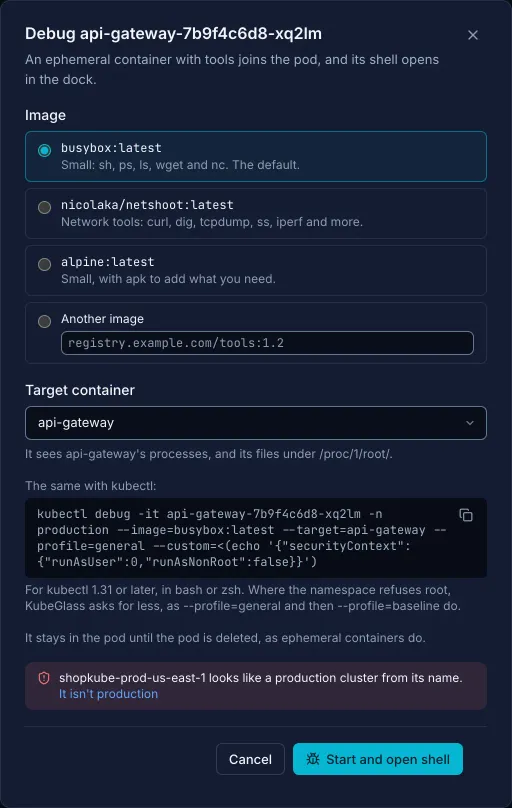
Debug is in a running pod’s header, and among the fixes on the problem of a pod that crash-loops, or that isn’t ready and runs a distroless, Chainguard or pause image. The dialog asks for:
- The image:
busybox:latest(the default, withsh,ps,ls,wgetandnc),nicolaka/netshoot:latestfor network tools such ascurl,digandtcpdump,alpine:latestto add packages withapk, or any other image. - The container to target. The debug container shares its processes and sees its files under
/proc/1/root/. A container that isn’t running, such as one between crashes, can’t be targeted, since the debug container would fail to join it and isn’t started again; then the dialog picks None, and the debug container shares only the pod’s network.
It shows the same kubectl debug command, with a copy button. Start and open shell adds the container, waits up to five minutes for it to start while saying what it waits for (an image pull, say), and opens its shell in the dock. An ephemeral container stays in the pod until the pod is deleted, so when one with the same image and target already runs, the button reads Open its shell and opens that one.
When a shell finds no shell in its container, in a pod’s Shell tab or in the dock, it says so and offers Debug container, Files and Logs. Debug container starts a busybox debug container that targets that container and opens its shell in place; Files opens the Files view through it. Until the page reloads, KubeGlass remembers that the container has no shell, so its Shell tab and Files open in the debug container already running for it; for a distroless or Chainguard image they do that from the start.
Files through a debug container
Section titled “Files through a debug container”The Files view runs commands in the container (sh to list a folder, head, cat and tar to show and download files), so it needs a container that has them. For one that doesn’t, pick its debug container in the Files view’s container list, where it reads debugger-1a2b3c4d (debugs api). A debug container that can read its target’s files opens at /proc/1/root/, the target’s root; one that can’t opens at its own root and says why (see the next section).
What a debug container needs
Section titled “What a debug container needs”patchonpods/ephemeralcontainersin the pod’s namespace, andcreateonpods/execfor its shell. Debug, and the Debug container and Files buttons of a shell that finds no shell, aren’t offered without them, nor in read-only mode or on a cluster you marked read-only.- To read the target’s files, the debug container has to run as the target’s user and group or have the
SYS_PTRACEcapability, and arunAsUserset for the whole pod (distroless images run as 65532) applies to it too. So with a target, KubeGlass first asks for root withSYS_PTRACE, which only Pod Security’s privileged level allows. When the namespace’s admission refuses that, KubeGlass asks forSYS_PTRACEalone (for a policy that refuses root but allows the capability), then for no more than the pod’s defaults, and last for what Pod Security restricted allows. - Under Pod Security baseline the third of those starts: the debug container runs as the pod’s user, its shell sees the target’s processes, and it reads the target’s files only if that is the target’s user and group too.
- Under Pod Security restricted the last one starts, as
kubectl debug --profile=restrictedasks for it:allowPrivilegeEscalation: false, every capability dropped,runAsNonRootand theRuntimeDefaultseccomp profile. It runs as the target’s user and group when the pod’s spec names them, and then reads the target’s files; otherwise it runs as user and group 65532, since busybox and most tool images run as root, which restricted refuses, and it sees the target’s processes but not its files. A debug container without a target gets the same last try. - The dialog says before you start, from the namespace’s
pod-security.kubernetes.io/enforcelabel, whether the debug container will read the target’s files; a notice as its shell opens and the Files view say it again.
When admission refuses even the last try, the dialog and the no-shell panel show what the policy said, for example Pod Security "restricted:latest" refused this change to pod "api-7d4b9c-x2k8p": allowPrivilegeEscalation != false (container "api" must set securityContext.allowPrivilegeEscalation=false), and what to do. Pod Security checks the whole pod when a container joins it, so a pod whose own containers don’t meet the namespace’s level (one created before the label was set) takes no debug container, from kubectl debug either, until its spec meets the level or a cluster admin lowers it. A webhook (Kyverno, Gatekeeper) or a ValidatingAdmissionPolicy that refuses it is named in the message.
The command the dialog shows asks for what KubeGlass ends up with in that namespace. Where its label sets no level, or privileged, that is what KubeGlass asks for first: with a target, --profile=general with --custom adding root, which needs kubectl 1.31 or later (in PowerShell the custom JSON goes through a temporary file); without one, --profile=baseline. Under baseline it is --profile=baseline, and under restricted --profile=restricted with --custom setting the user. For example:
kubectl debug -it api-7d4b9c-x2k8p -n shop --image=busybox:latest --target=api \  --profile=general --custom=<(echo '{"securityContext":{"runAsUser":0,"runAsNonRoot":false}}')
kubectl debug -it api-7d4b9c-x2k8p -n hardened --image=busybox:latest --target=api \  --profile=restricted --custom=<(echo '{"securityContext":{"runAsUser":65532,"runAsGroup":65532}}')
The shell on this computer
Section titled “The shell on this computer”The local shell runs commands as the KubeGlass process, so anyone who can open KubeGlass could use it. It is off unless you start KubeGlass with --local-shell (or set KUBEGLASS_ENABLE_LOCAL_SHELL=true, enable_local_shell in the config file), and even then KubeGlass turns it on only when all of these hold:
auth_modeislocal, so the only person who can reach KubeGlass is the one who started it;- KubeGlass runs outside a cluster, not in a pod;
- KubeGlass isn’t read-only.
Otherwise it logs Local shell not turned on with the reason, and the shell stays off. Settings › Terminal › Shell on this computer says whether it is on.
The shell is your $SHELL when that is /bin/zsh, /bin/bash or /bin/sh, and otherwise the first of those that exists. It gets a small environment of its own (home directory, path, locale, editor and terminal settings) instead of the server’s, so variables set for KubeGlass don’t reach it. KUBECONFIG points first at a file that only sets current-context to the cluster you have open, followed by your own kubeconfig, so kubectl, helm and k9s start on that cluster; the file holds no credentials. The shell starts in the server’s working directory unless you pick another under Settings › Terminal › Local shell start directory (Root, Home or a path of your own). KubeGlass colors kubectl and helm output there; turn that off with Settings › Colors › Color shell output.
With KUBEGLASS_ENABLE_TMUX=true (enable_tmux), each local shell runs inside a tmux session, so closing the tab doesn’t stop what runs in it. If tmux isn’t installed, KubeGlass logs a warning and opens a plain shell.
Panes and tabs
Section titled “Panes and tabs”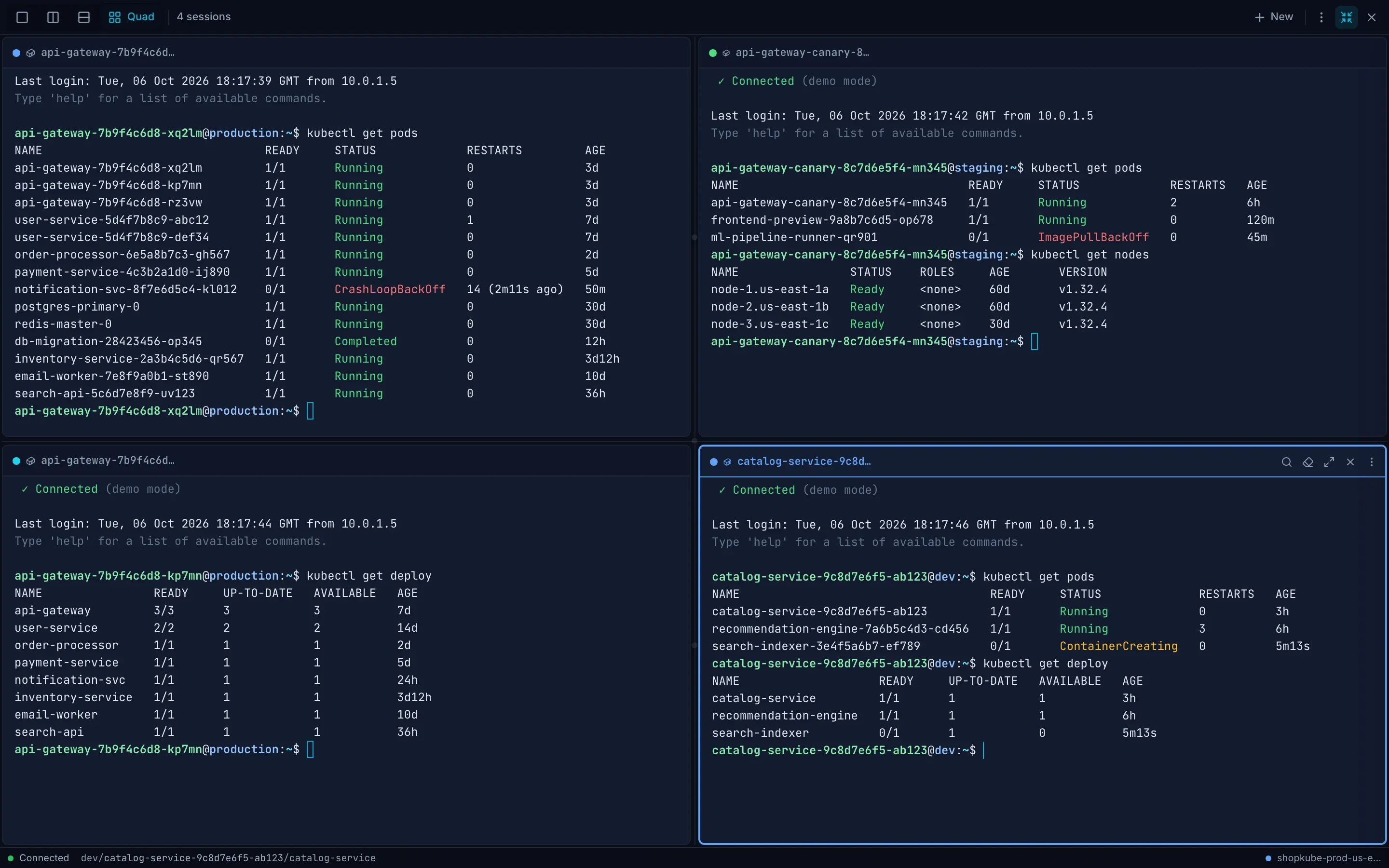
The toolbar switches between Single, Split (side by side), Stack and Quad (four terminals). ⌘D splits side by side and ⌘⇧D stacks. Move between panes with ⌘[ and ⌘], or, when the focus isn’t in the terminal itself, with Alt and the arrow keys or with Ctrl and H J K L. On Linux and Windows read ⌘ as Ctrl, but a shell keeps its Ctrl keys (Ctrl W, Ctrl K, Ctrl D…), so with the focus in one only the keys with Shift work, such as Ctrl+Shift+F to search and Ctrl+Shift+D to stack. Zoom one pane with ⌘⇧Enter. With the focus in the dock, ⌘1 to ⌘9 switch to that tab, and ⌃⇧[ and ⌃⇧] (Ctrl+Shift+[ and Ctrl+Shift+]) go to the previous and next one. Browsers keep ⌘⇧[, ⌘⇧], ⌘T and ⌘W on a Mac, and Ctrl+T, Ctrl+W and their Shift forms elsewhere, so the dock doesn’t use them.
A shell stays on the cluster it was opened on, and its tab and pane show that cluster’s color (the one picked under Settings › Clusters), so shells on different clusters are easy to tell apart. Changing the layout, zooming a pane or switching the cluster the page shows keeps every shell running, with its scrollback.
A tab’s context menu renames, duplicates or pins it, splits it, disconnects or reconnects it, moves it left or right, and closes the other tabs or those to its right. A pinned tab can’t be closed until you unpin it.
Everything you can drag also works without dragging:
- The dock’s height: drag its top edge, use the arrow keys on it, or choose Small, Medium or Large under Dock height in the More menu.
- Tab order: drag a tab, or choose Move left or Move right in its menu.
- Pane size: drag the divider, or use Pane size − and + in the pane’s quick actions.
On a focused tab, Delete closes it (or unpins a pinned one) and Shift F10 opens its menu.
The More menu also has Quick commands (⌘⇧P, or Ctrl+Shift+P on Linux and Windows, with the focus in the dock), a bar of common commands for the system, files, processes, the network and Kubernetes, plus commands of your own.
A pod’s Shell tab has its own terminal, with a tab per container and room for several side by side. Its toolbar has search, clear, Maximize and Open in the dock; its More menu has the shell to use, the layout (with more than one container open), quick commands, command history, recording, Reconnect and its height (Small, Medium or Large, besides dragging its bottom edge).
Broadcast
Section titled “Broadcast”⌘⇧B turns broadcast on: what you type in one terminal also goes to every other open terminal session, and the toolbar shows Broadcast. The sessions can be on different clusters, so one command can run on several clusters at once. Press ⌘⇧B again to stop.
Recording and history
Section titled “Recording and history”Start and stop a recording from the More menu, in the dock or on a pod’s Shell tab. A recording keeps what the shell shows at the terminal’s size, and its resizes; it doesn’t keep what you type, as asciinema rec keeps it only with --stdin, so a password typed at a prompt stays out of the file. Once it stops, the More menu has Download recording, an asciicast v2 file you can replay with asciinema play, and Download as text; in the dock :export downloads it too. A recording stops by itself at 2,000 pieces of output, and says so.
Command history lists the commands you typed in the tab since the page loaded. A line is added when you typed it with printable keys and pastes (Backspace is fine), the shell echoed it, the text before it ends like a shell’s prompt ($, #, %, >, ❯, ➜ or λ and a space, or where shell integration’s OSC 133 marks the prompt’s end), and the shell then ran it. The entry is what you typed; text on the screen never becomes one. Left out: a line you type with a space first, which bash (with ignorespace or ignoreboth, the default on Ubuntu and Debian) and zsh (with HIST_IGNORE_SPACE) keep out of their own history; a line you changed with an arrow key, Tab, Home, End, Ctrl+R or another editing key (Ctrl+L is fine), so a command brought back with Up or completed with Tab isn’t added; a command over continuation lines, and a paste of more than one line; a line at a prompt that names a password, passphrase, PIN, token, secret, credential, API, license or encryption key, MFA or one-time code, whatever mark ends it, or at a bare ❯ under a row that names one; a line typed where no such prompt ends the row: after a prompt that ends in a newline, or after a prompt that ends otherwise, as oh-my-zsh’s default ➜ src git:(main) does, unless shell integration marks it; and what you type in a program that takes the screen, such as vim, less or top. A line at another program’s prompt that ends the same way, such as python’s >>>, counts as a command. The check is a guess from the screen, so a secret that is echoed as you type it can be recorded: at a prompt that names none of those words, or typed ahead of a prompt, such as sudo’s, onto a row that ends like one, such as a progress line ending in 100% . It is on the screen already. Entries are kept in the page’s memory only, never saved, and signing out clears them. A click on an entry types it at the prompt without running it, so you see it all and press Enter to run it. Each shell keeps its own history too, as it does in any terminal.
Colon commands
Section titled “Colon commands”Colon commands are modelled on vim and k9s. Open them from the dock’s More menu (Colon commands), or press : while the focus is in the dock but not in a terminal (anywhere else, : opens the command palette). Type one, or the start of one, and press Enter. Any other word, such as :po kube-system, :helm or :ctx prod, opens the command palette with it typed in, so it does what it does from the page:
| Command | Does |
|---|---|
:filter app=web |
Filter the list on the page by a label or by text |
:split, :vsplit |
Split the terminal side by side, or stack it |
:tabnew, :tabclose (:tabc), :tabonly (:tabo) |
New tab, close the tab, close the other tabs that aren’t pinned |
:clear |
Clear the terminal |
:export |
Download the current recording |
:w |
Copy the scrollback |
:wq |
Copy the scrollback and close the dock |
:q, :quit, :qa |
Close the dock |
:theme |
Switch between dark and light |
:help |
List the shortcuts |
Statuses in the output
Section titled “Statuses in the output”In every shell, KubeGlass colors the Kubernetes statuses in what commands print, so a kubectl get pods reads at a glance: Running, Completed and Ready in green, Pending and ContainerCreating in yellow, CrashLoopBackOff, ImagePullBackOff, Error and NotReady in red. It paints over the screen, so the output stays as the program wrote it and copied text is plain, and it leaves alone programs that take over the screen, such as vim, top and k9s. Settings › Terminal › Color Kubernetes statuses turns it off.
This is separate from Settings › Colors › Color shell output, which colors whole rows of kubectl and helm output in the shell on this computer.
Limits and permissions
Section titled “Limits and permissions”- Pod exec runs as the signed-in user, so Kubernetes RBAC decides who may open it (
createonpods/exec). The Files view, and its uploads, need the same. - A debug container also needs
patchonpods/ephemeralcontainers; see What a debug container needs. - A node shell needs
createonnodes/proxyfor that node. KubeGlass then creates the debug pod as you in thekubeglass-systemnamespace (creating the namespace if needed;node_shell_namespacenames another). The pod only waits; while node shells are on, each terminal on it, and a terminal that reconnects, starts the shell on the node in it. Any terminal on a pod in the node shell namespace named as a node shell pod, whatever command it names and whether node shells are on, needscreateonnodes/proxyfor the pod’s node as well aspods/execon the pod, since a shell in its privileged container reaches the node; KubeGlass reads the pod as you to learn its node (geton it) and refuses the terminal when it can’t. - Anyone who may
createpods/execin the node shell namespace can enter the node shell pods there with kubectl, and through them the nodes, whatever KubeGlass checks. Grant it there only to those who may have node shells. KubeGlass deletes the pod, as you, a minute after its last terminal closes, and when KubeGlass stops; in its first 5 minutes, while its image may still be pulled, it stays. Kubernetes ends it after 30 minutes at most, and its terminals with it.KUBEGLASS_NODE_SHELL_IMAGEsets its image, which needsnsenterandsleep. - Each KubeGlass labels its node shell pods with an ID,
KUBEGLASS_INSTANCE_IDor else one it keeps in its data directory, and at start deletes those it left behind, such as after a crash: in the node shell namespace, the pods named and labeled as its node shells that it made before it started. Another KubeGlass’s on the same cluster stay. It deletes them with its own credentials, which needlistanddeleteon pods in that namespace. The Helm chart’snodeShell.enabledturns node shells on and grants those two there, with a Role, and the chart sets the ID per release, since its data directory is lost with the pod. The namespace (nodeShell.namespace) has to exist before you install with it on, with a Pod Security level that allows privileged pods. The chart refusesnodeShell.enabledinlocalmode, where node shells would run as KubeGlass’s ServiceAccount: it gets neithercreateon pods nornodes/proxy, since everyone who reaches KubeGlass would then have a root shell on every node. In a rolling update the new pod also deletes the node shells still open in the old one, seconds before the old one would. A terminal open on a pod keeps it only for someone who may exec into it. - A session closes after 30 minutes without input or output, with a warning at 24 minutes. Pod exec sessions also end after 8 hours whatever their activity, with a warning 5 minutes before.
- In read-only mode, and on a cluster you marked read-only, KubeGlass opens no shells and takes no uploads.
- Command history and recordings stay in the page, not in browser storage or on the server: a reload ends them, and signing out clears the command history.
Settings
Section titled “Settings”Settings › Terminal sets the font size, line height, cursor and cursor blink, scrollback lines, the bell (none, visual or sound), copy on select, Color Kubernetes statuses, Notify when commands finish (a desktop notification for commands that run longer than a threshold you set, while you aren’t looking at KubeGlass (another window, or another tab of the browser, is in front); the shell has to mark its commands with OSC 133) and the word separators that end a word on double-click. Terminal settings in a More menu goes there. See Settings.