
Drift policies
Clusters › Drift policies compares target clusters with a reference cluster and reports where they differ. Use it to keep staging and production alike, or to check that every cluster in a fleet runs the same add-ons.
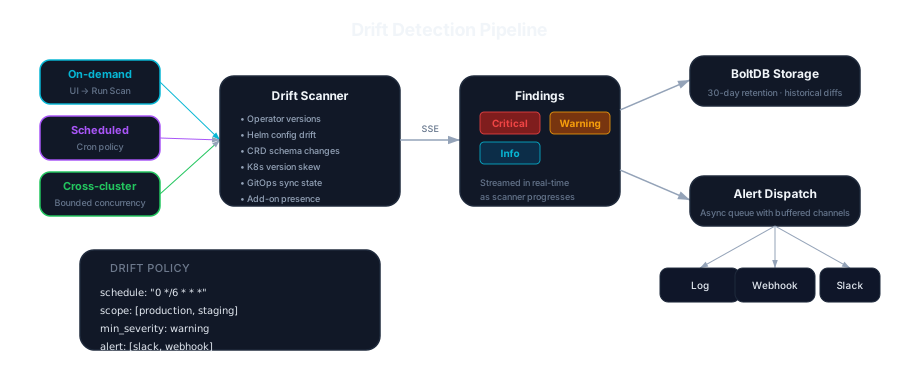
Policies
Section titled “Policies”A policy names a reference cluster, one or more target clusters and, optionally, a five-field cron schedule (*/30 * * * * runs every 30 minutes) or one of the descriptors a CronJob takes: @hourly, @daily (or @midnight), @weekly, @monthly and @yearly (or @annually), which run at the start of the hour, day, week (Sunday), month and year. Without a schedule it runs only when you press Run scan.
The schedule reads as cron reads one, in the server’s time zone: month and day names in any case (0 9 * * MON-FRI), 0 or 7 for Sunday (a Kubernetes CronJob takes only 0), steps counted from the start of the field or range (*/2 in the day of month is the 1st, 3rd, 5th and so on; 5/15 in the minute is 5, 20, 35 and 50), and when both the day of month and the day of week are given, either one (0 9 1 * 1 runs on the 1st and on every Monday). A day field with * or ? in it and no step above 1, such as */1 or *,1, isn’t given, as for a CronJob: 0 9 */1 * 1 runs on Mondays only. A schedule that doesn’t parse is refused, saying why, when you create the policy. A policy an earlier KubeGlass saved with such a schedule never runs on it: the policy list says so under it, with why, and the server logs a warning once. Run scan still runs it; to schedule it, create it again with a schedule that parses. The reference cluster isn’t one of its targets.
Each run compares:
| Check | Looks for |
|---|---|
| Operator versions | Operators installed at different versions |
| Helm releases | Releases missing from a target or at a different chart version, each at its latest revision, as helm list takes it. While the latest revision is being installed, upgraded, rolled back or uninstalled, when helm list hides the release, the deployed revision counts. A cluster whose Secrets KubeGlass may not list is left out of this check, and the result names it under the clusters not compared in full |
| CRDs | CRDs missing from a target or stored at a different version |
| Kubernetes version | Clusters on different minor versions; a warning past the supported skew |
| GitOps sync | Applications out of sync, degraded, or on a different revision than the reference |
| Add-ons | Components present on the reference but missing on a target |
A part KubeGlass may not list on a cluster (its CRDs, its OLM operators, its Argo CD or Flux applications, Helm’s Secrets) is left out of that check for that cluster, and the result names the cluster under the clusters not compared in full; a list that fails otherwise leaves the cluster unscanned, so nothing reads as missing that wasn’t read.
Findings are critical, warning or info. Results keeps each run with its findings. A finding about a Helm release or a GitOps application has Open in, which switches to the cluster that has it (the target, or the reference when the target lacks it) and opens the release or the application there; operators, CRDs, add-ons and the Kubernetes version have no page of their own.
Quick scan
Section titled “Quick scan”Quick scan, above the policies, runs the same checks once between a reference and target clusters without saving a policy. Its findings appear under Results.
To compare the objects of chosen kinds field by field instead, use Clusters › Compare › Against a reference (see Clusters). It keeps nothing and doesn’t run on a schedule.
Notifications
Section titled “Notifications”When a scan finds warnings or critical drift, KubeGlass sends them to the webhook or Slack channel set under Settings › Server (or the KUBEGLASS_ALERT_* variables). That goes for every scan: on a policy’s schedule, run by hand, or a quick scan.
Storage
Section titled “Storage”Policies and results are kept in the bbolt database in the data directory. Results older than 30 days are pruned (KUBEGLASS_DRIFT_RESULT_RETENTION). Give the data directory a persistent volume if results should survive restarts.
Drift detection reads every cluster with KubeGlass’s own identity, so only admins see the Drift policies tab, and only admins can create, change and run policies.