
Helm
KubeGlass includes the Helm 4 library, so you don’t need the helm CLI on the server. Every Helm action runs as you, so it fails with “forbidden” when your RBAC doesn’t allow it, as helm would. In read-only mode, and on a cluster you marked read-only, the actions that change something are hidden.
Releases
Section titled “Releases”Applications › Helm releases lists the cluster’s releases with their namespace, chart and chart version, app version, revision, status and age. Failed releases are marked red and pending ones amber. Helm keeps its releases in Secrets, so the list needs permission to list Secrets in every namespace; without it, the page says your permissions don’t allow listing Helm releases in all namespaces. The namespace picked in the top bar narrows the list; clicking a release’s namespace switches to it, as picking it there does. Select releases to uninstall several at once, or use Uninstall on a row.
Update available shows a newer version of a release’s chart, such as 6.7.0 → 6.15.0, from the repository the release came from: the one you last installed or upgraded it from in this browser, else a repository configured where KubeGlass runs that has the installed version, else the only one with that chart. A release on a pre-release is offered newer pre-releases too. KubeGlass reads the indexes that helm repo update last fetched; Check for updates fetches them again, as helm repo update does, and the list says how long ago they were checked. The repositories are the server’s and every user’s, so with sign-in only admins check for updates. Upgrade in that column opens the upgrade at the newer version.
Click a release to open it. The address then names it (?release=<namespace>/<name>), so a link opens the same release, and Applications links to it from an application made by Helm. The browser’s Back closes the release and shows the list again, as Helm releases above it does. The release’s page shows its chart, namespace, app version, revision, when it was last deployed and any update available, and has four views:
- History: every revision, newest first, the current one marked, each with its status and age. Open a revision for its chart, app version and Helm’s description of what happened.
- Values: User-supplied shows the values given at install or upgrade, as
helm get valuesdoes, and Computed the values the chart rendered with, its defaults with the user-supplied ones on top, ashelm get values --alldoes. Revision picks any revision, and Compare with lists the values that changed between two revisions and shows both side by side. With no values set, the release uses the chart’s defaults. - Notes: what the chart printed after its last install or upgrade.
- Manifest: every object the release made, with a filter for lines and Copy. Secret values show as a short hash of each (
sha256:…), so you can tell which changed without seeing them. Show values, there when you may read Secrets in the release’s namespace, shows them.
Its status is Helm’s: deployed says Helm applied the manifest, not that what it made runs. For a release with workloads, Objects and pods opens its application, with the workloads, their pods and Services, and whether they are ready; a release of other objects alone, such as CRDs or ConfigMaps, has no application, and the page says so. Which it is comes from the release’s manifest. A release Flux’s helm-controller installed opens its application with Flux as its source, as its workloads carry Flux’s labels.
The view is in the address too (&view=values). Installs, upgrades, rollbacks and uninstalls left running in the background are listed above the releases until they finish, and stay there with Helm’s message if they fail.
Upgrade, roll back and uninstall
Section titled “Upgrade, roll back and uninstall”Upgrade asks for the chart, the repository (an https:// repository URL or an oci:// reference) and the version. KubeGlass fills in the repository it last used for that release or chart, then a repository on the server that has the chart, then the usual one for well-known charts, and remembers your choice in the browser. Version lists the repository’s versions, newest first, each with its app version and, where it applies, installed, pre-release or deprecated; pre-releases stay hidden until you tick Show pre-releases. It starts at the newest stable version, or at the one Update available offered. When the repository can’t list its versions, type one, or leave it empty for the latest.
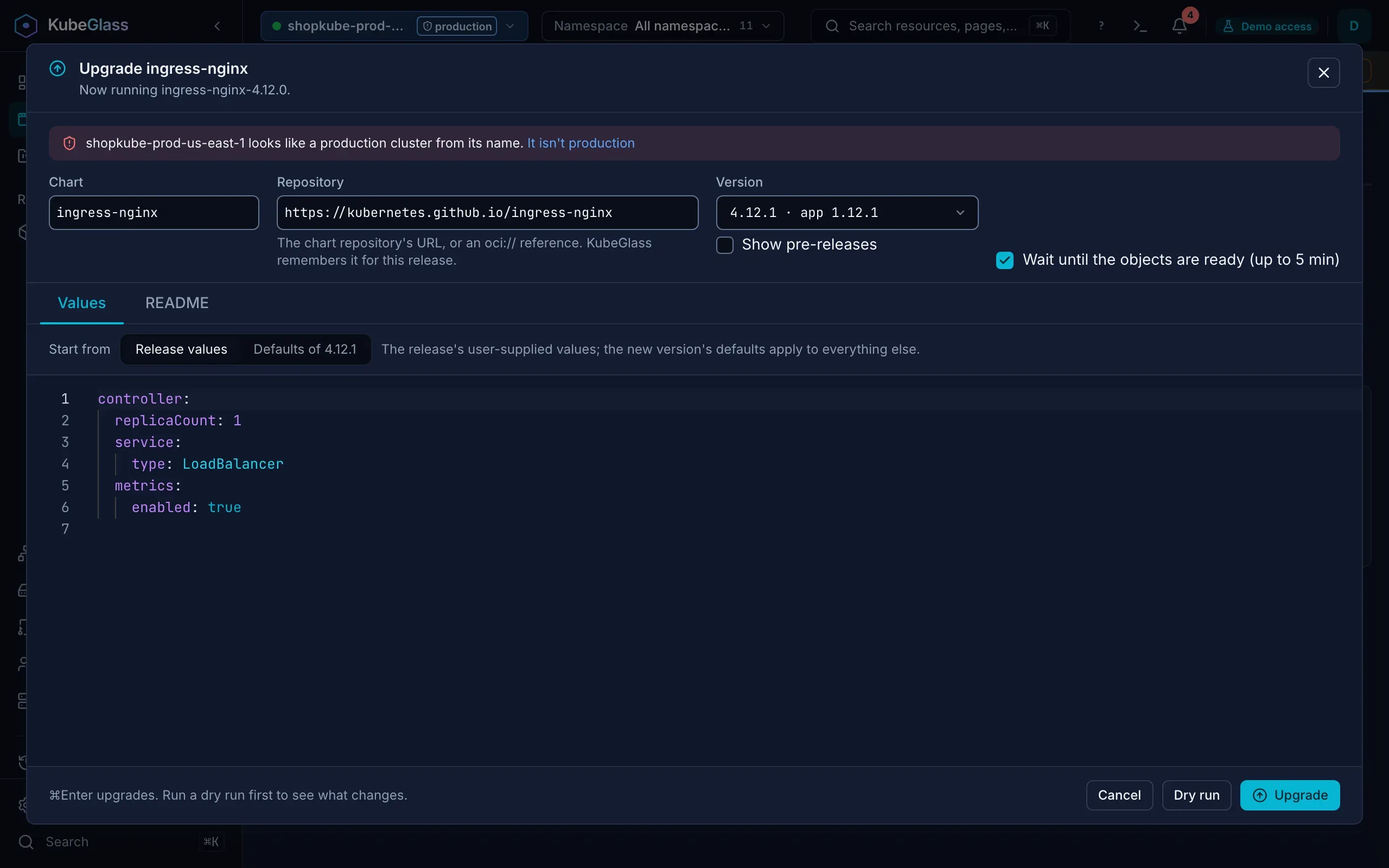
The Values tab is an editor, and Start from picks what it holds to begin with:
- Release values: the release’s user-supplied values. The new version’s defaults apply to everything else.
- Defaults of
<version>: the chosen version’s default values in full. Only what you change is stored with the release.
Either way the upgrade starts from the new version’s defaults, as helm upgrade --reset-values does, and applies the values from the editor on top. Switching between the two after you edited asks first, because the editor starts over. The README tab shows the version’s README. Wait until the objects are ready (up to 5 min) is on to start with. Dry run shows what would change, and Upgrade, or ⌘Enter (Ctrl+Enter), runs it.
To roll back, open a revision under History and choose Roll back to this revision. KubeGlass shows the current and the target revision side by side, with Roll back to revision N, and under them what the rollback would change: the objects added, changed or removed, the user-supplied values that change, and the manifest and values diffs.
Uninstall removes the release and every resource it created, after asking. On a production cluster you type the release’s name first. Rollbacks and uninstalls run in the background, and a notification says how they ended.
Chart catalog
Section titled “Chart catalog”Applications › Chart catalog installs charts from your Helm repositories. It starts with the charts of every repository the server already has, including any added with helm repo add where KubeGlass runs, sorted by name with their repository, and the search box above them searches all of them at once (?q= in the address). It searches the index each repository has cached on the server; a repository without one, added but never fetched, is named above the charts with Update repositories, and its charts are left out until it has one. A few popular repositories are one click away, and Add repository adds any other by name and URL, as helm repo add does. A name another repository already has, at another URL, is refused, so a mirror and its credentials stay as they are: pick another name, or choose Update to fetch that repository’s index instead. Adding a repository again under its own name and URL keeps its credentials and fetches its index again. With sign-in only admins add repositories or update their indexes, since every user’s catalog and Update available read them. Pick a repository to see only its charts.
Install opens a dialog for the chart:
- Release name starts as the chart’s name. KubeGlass checks it as Helm does (at most 53 characters; lowercase letters, digits,
-and.) and says so when the namespace already has a release by that name. - Namespace starts as the one picked in the top bar, else
default. For a namespace that doesn’t exist yet, Create the namespace if it doesn’t exist is ticked. - Version lists the repository’s versions, as for an upgrade, starting at the newest stable one.
- Wait until the objects are ready (up to 5 min) is on to start with.
- The Values tab holds the version’s default values in an editor, as the chart’s
values.yamlhas them, comments included. Only the values you change are sent, so the release’s values stay small and later chart defaults still apply. Changes lists what you changed, Reset to defaults starts over, and picking another version keeps your edits. - The README tab shows the version’s README as text, with its headings in bold. A README over 1 MiB is cut off there, and default values over 1 MiB aren’t shown, though what you write is still applied on top of them.
Install, or ⌘Enter (Ctrl+Enter), installs the chart. The notification that says it’s done has Open, which goes to the release.
Dry runs
Section titled “Dry runs”Dry run, in the install and upgrade dialogs, has Helm render the release on the server and then sends each object it would make to the API server as a server-side apply dry run, under Helm’s field manager. Validation, admission webhooks, quotas and your permissions answer before anything changes, so an invalid field or an immutable selector shows up here instead of halfway through the real install. Nothing in the cluster changes. While it runs, the keyboard’s focus stays in the dialog, and when it ends it moves to the verdict, or to what went wrong.
The check takes over fields that other field managers own only where the real run would. Helm applies a release it installed itself (every release KubeGlass installs) with server-side apply, and its upgrade fails on a field the chart sets that another tool owns, such as replicas after kubectl scale or a Scale in KubeGlass. The result names each such field and who owns it. Check again, taking over these fields runs the dry run again taking them over, as helm upgrade --force-conflicts does, and ticks Take over fields other tools own, so the upgrade takes them over too; the keyboard’s focus moves to the new result. A release installed by Helm 3 is upgraded with a three-way merge, which overwrites those fields, and the check does the same.
The result starts with “The API server accepts every object.” and what the release would be, or lists the objects the cluster refused, each with its message, under “The cluster refused 1 object, so the upgrade would fail:”. Objects in a namespace that doesn’t exist yet can’t be checked until the install creates it, and the result says so. When the chart has kinds the cluster doesn’t serve yet, such as ones from its own CRDs, the result says the objects couldn’t be checked, and why.
- For an install, the Dry run tab lists the objects and hooks it would make, each hook with when it runs, the whole YAML, the notes and the values it would send.
- For an upgrade, the Changes tab compares the release now with the upgrade. Summary counts the objects changed, added, removed and unchanged, lists each one, and lists the user-supplied values that change; Manifest diff and Values diff show the YAML side by side, Now against After with their revision numbers.
If you change anything after a dry run, the result says to run it again.
While Helm works
Section titled “While Helm works”Installs, upgrades, rollbacks and uninstalls run on the server, apart from the request that started them: the page asks for the answer at once (Prefer: respond-async, see the API reference), and then how the operation is going until it ends. No request waits as long as Helm does, so a proxy in front of KubeGlass that gives up after 60 seconds can’t cut one off, and the browser going away (a reload, a closed tab) doesn’t stop Helm halfway and leave the release pending.
While an install or upgrade runs, the dialog shows the steps Helm takes, read from Helm’s log, such as Getting the chart, Creating N objects, Applying changes to N objects and Waiting for N objects to be ready, then the object that isn’t ready yet with its status, and how long it has run. Close and keep running leaves it going: a notification shows while it runs and says how it ended, with Helm’s message if it failed. Opening the upgrade dialog again while an operation on the release runs, or the install dialog of a chart being installed, shows that operation, and Roll back is off meanwhile: Helm refuses a second operation on a release while one runs. After a reload the page goes on following what it started and says how it ended.
If KubeGlass restarts while Helm works, the page says it lost track of the operation: check the release’s status and history to see how it ended. When KubeGlass shuts down it waits for running operations, and stops the installs and upgrades still running a few seconds before it must exit, so Helm marks them failed and the next upgrade or rollback works (see Shutdown).