
Security model
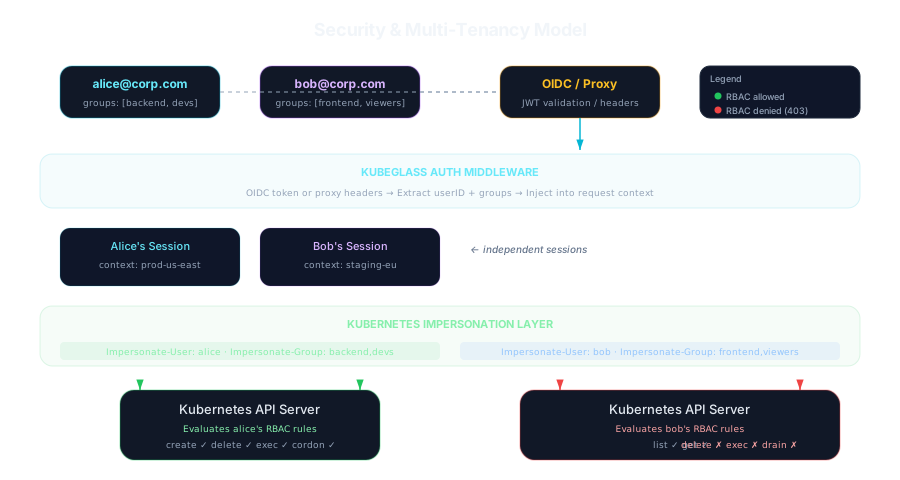
Signing in
Section titled “Signing in”auth_mode |
Who the user is |
|---|---|
local |
You. Every request uses the kubeconfig’s credentials. For running on your own machine |
oidc |
Signed in with your identity provider: the authorization code flow with PKCE, state and nonce. The user and groups come from the ID token’s oidc_user_claim and oidc_groups_claim, with their prefixes. Scripts can send a JWT from the provider as a bearer token instead |
token |
Whoever the API server says owns the Kubernetes token pasted on the sign-in page (or sent as a bearer token). Requests send that token, so no impersonation is involved |
impersonation |
The X-Forwarded-User and X-Forwarded-Groups headers from a reverse proxy. They are believed only from addresses in KUBEGLASS_TRUSTED_PROXIES, and KubeGlass doesn’t start in this mode without it |
In oidc and token modes the browser holds only an httpOnly, SameSite=Lax cookie (Secure, with the __Host- prefix, over HTTPS) with a random 256-bit session ID. The ID token, refresh token or pasted token stay in the session on the server, sealed with AES-256-GCM before they reach the data directory, and are never put in a URL or a log line. A session ends after session_max_age without use (a request, or typing into a shell), session_lifetime after sign-in, when the provider refuses to refresh it, or when its token expires. Signing out ends it and, when the provider supports RP-initiated logout, signs the person out there too. Sign-in has the details.
In impersonation mode KubeGlass works out who you are on every request from the proxy’s headers, and signing out goes to logout_url, your proxy’s sign-out page. In every mode a random session ID keeps your chosen cluster: the UI sends it as a header, and as sid on WebSocket URLs, where the logs show it as redacted; a kubeglass-session-id cookie (HttpOnly, SameSite=Strict, and Secure over HTTPS) holds it for requests without one. A session works only for the user who started it. Those sessions live in memory: up to 1,000, and up to 100 per signed-in user, closed after session_max_age of inactivity (4 hours by default). At a limit, the sessions used only once (a script or kubeglass mcp that sends no session ID gets one per request) make room first, so they don’t move an open tab to the default cluster.
Whose permissions
Section titled “Whose permissions”In oidc and impersonation modes, every Kubernetes call is made with KubeGlass’s ServiceAccount impersonating the signed-in user and their groups. (In token mode it is made with the person’s own token.) That covers reads as well as writes: lists, watches, logs, exec, port-forwards, Helm and GitOps actions. The API server applies the user’s RBAC, so KubeGlass never shows or does more than the person could with kubectl.
Permission checks that decide which buttons to show use SelfSubjectAccessReviews, answered by the API server for the same identity.
“Act as…” lets a user view the cluster as someone else, like kubectl --as. The ServiceAccount can impersonate anyone, so before honouring it KubeGlass asks the API server whether the signed-in user may impersonate that user and each group. If not, the request fails with act_as_forbidden. In token mode the impersonation headers go out with the person’s token, and the API server checks them itself. Act As is for the session’s cluster, where it was chosen: other clusters are read and changed as the signed-in user, by the pages that check every cluster (the cluster switcher, Other clusters, the Clusters page with its diagnosis, the search across clusters, and the cross-cluster compare, diff, drift and RBAC diff), and by requests and terminals that name another cluster.
Because the ServiceAccount impersonates whoever the identity provider names, oidc mode refuses identities that would act as someone the provider doesn’t vouch for: user names starting with system: or equal to local-user, an email the provider marks unverified when the email is the user name, and groups starting with system: (dropped). impersonation mode applies the same rules to the proxy’s headers: a reserved user name gets 403, and system: groups are dropped.
A few features use KubeGlass’s own identity because they gather data across users or clusters: drift detection, the audit log, and adding clusters. Only admins (admin_users, admin_groups) can use them. The change recorder also watches as KubeGlass, and shows each change only to people who may list that kind in its namespace; undoing a change runs as the person asking. Prometheus and Alertmanager queries are limited to users with cluster-wide read access, since those systems see the whole cluster.
In oidc and impersonation modes the chart’s ClusterRole grants impersonate on users, groups and ServiceAccounts, so KubeGlass’s ServiceAccount can act as anyone. Protect the KubeGlass namespace, make sure only the proxy can reach the pod in impersonation mode, and, if you can list who may be impersonated, set rbac.impersonation.resourceNames so the rule names only them. In token and local modes the rule is left out.
Read-only mode and the shell on this computer
Section titled “Read-only mode and the shell on this computer”With --read-only (read_only), the server refuses every request that would change a cluster or KubeGlass’s settings with 403 read_only, whatever RBAC allows, and refuses the WebSocket endpoints that run commands: pod exec, terminals and the shell on this computer. Dry runs, searches, permission checks and scans still work. A cluster you mark read-only in the UI gets the same treatment for your requests: the UI sends X-KubeGlass-Read-Only: 1, or ro=1 on a WebSocket URL, which can only refuse more.
The shell on the computer KubeGlass runs on runs commands as the KubeGlass process. It is off unless KubeGlass starts with --local-shell, and even then KubeGlass turns it on only in local auth mode, outside a cluster and not read-only, where the only person who can reach KubeGlass is the one who started it. The shell gets a small environment of its own, not the server’s.
Defences
Section titled “Defences”| Threat | What KubeGlass does |
|---|---|
| Cross-site request forgery | Mutating requests need Authorization, X-Requested-With, X-CSRF-Token or a JSON content type, which a plain form or image tag can’t send. With a sign-in session they also need the browser to say they are same-origin (Sec-Fetch-Site, or a matching Origin) and the session’s CSRF token in X-CSRF-Token. WebSockets accept only their own origin and those in cors_allowed_origins; other local web pages are refused too |
| Sign-in attacks | The OIDC sign-in uses PKCE (S256), a one-time state tied to the browser by a cookie, a nonce checked in the ID token, the exact configured redirect URI, and the RFC 9207 iss check when the provider supports it. The page to return to must be a path on KubeGlass. Each sign-in gets a new session ID |
| DNS rebinding | Without a login (local auth mode and the setup screen), KubeGlass answers only to localhost, names under .localhost, IP addresses and the names in allowed_hosts, so a page whose site name now points at 127.0.0.1 can’t use it |
| Script injection | The UI’s Content-Security-Policy allows scripts and workers only from KubeGlass itself, with no inline script and no eval, and frames only the origins in the extensions file’s allowedOrigins (frame-src 'none' when it lists none); API responses get default-src 'none'. Cookies are HttpOnly. The extensions file’s actions and links open only http and https addresses. Its panels frame other sites in a sandbox without forms or top navigation, never KubeGlass’s own origin. Its commands are copied, or with --local-shell run in a terminal tab after a dialog shows the exact command, with values from the object quoted for the shell |
| Framing and cross-origin use | frame-ancestors 'none', X-Frame-Options: DENY, Cross-Origin-Opener-Policy and Cross-Origin-Resource-Policy: same-origin, nosniff, a strict Referrer-Policy, and HSTS over HTTPS |
| Spoofed proxy headers | Forwarded headers are ignored unless the connection comes from an address in KUBEGLASS_TRUSTED_PROXIES. KubeGlass refuses to start when an entry there is neither a CIDR nor an address, so a typo can’t leave the list empty and the headers believed from anywhere |
| Path or name tricks | Kubernetes names and namespaces are validated before they reach a URL, watch or exec |
| PromQL injection | Label values are validated before they go into a query; queries have size and time-range limits |
| Leaked credentials | Tokens and kubeconfig secrets are never logged and are cleared from configs that are kept around. The change history keeps only hashes of Secret values |
| Floods | Per-IP rate limits (100/s, burst 200; 2/s on endpoints that take credentials, token sign-in included), at most 10,000 sign-ins in progress, 1 MiB request bodies (5 MiB for a manifest, max_dynamic_body_size, and 256 MiB for a file uploaded to a pod), at most 6 file uploads and downloads per user and 32 in all, bounded WebSocket message rates and sizes, 30-second API timeouts (15 minutes for a file upload or download, which starts only once the upload’s check has passed) |
| Slow clients | 5-second header and 15-second body read timeouts (an upload’s body gets the 15 minutes once its check has passed), 120-second idle timeout, 1 MB header limit |
The chart runs the pod as non-root with a read-only root filesystem and drops all capabilities. Its NetworkPolicy, on by default, allows ingress on the service port and egress to DNS and the Kubernetes API.
Supply chain
Section titled “Supply chain”Dependencies are pinned in go.sum and package-lock.json, the Dockerfile’s base images by digest and GitHub Actions by commit. Dependabot proposes updates a week after they are released; security updates come at once. CI runs govulncheck, npm audit and Trivy on the image, and zizmor checks the workflows. Release jobs restore no build cache.
Every release is signed with cosign, keyless, by the release workflow, and has SLSA build provenance:
- The image
ghcr.io/kubeglass/kubeglassis signed and has provenance and an SBOM attached. - The Helm chart
oci://ghcr.io/kubeglass/charts/kubeglassis signed and has provenance. - Each archive has provenance and an SBOM (
<archive>.sbom.json), andchecksums.txtis signed (checksums.txt.sigstore.json).
Verifying a release
Section titled “Verifying a release”Set version to the release you are checking:
version=1.2.3identity="https://github.com/kubeglass/kubeglass/.github/workflows/release.yml@refs/tags/v$version"issuer=https://token.actions.githubusercontent.com
# The image and the chartcosign verify "ghcr.io/kubeglass/kubeglass:$version" --certificate-identity "$identity" --certificate-oidc-issuer "$issuer"cosign verify "ghcr.io/kubeglass/charts/kubeglass:$version" --certificate-identity "$identity" --certificate-oidc-issuer "$issuer"gh attestation verify "oci://ghcr.io/kubeglass/kubeglass:$version" --repo kubeglass/kubeglassgh attestation verify "oci://ghcr.io/kubeglass/charts/kubeglass:$version" --repo kubeglass/kubeglass
# A downloaded archive, next to checksums.txt and checksums.txt.sigstore.jsoncosign verify-blob checksums.txt --bundle checksums.txt.sigstore.json --certificate-identity "$identity" --certificate-oidc-issuer "$issuer"sha256sum --check --ignore-missing checksums.txtgh attestation verify "kubeglass_${version}_linux_amd64.tar.gz" --repo kubeglass/kubeglass
To run exactly the image you checked, set the chart’s image.digest to its digest, which docker buildx imagetools inspect ghcr.io/kubeglass/kubeglass:$version prints.
To report a vulnerability, follow SECURITY.md rather than opening a public issue.