
Overview and resources
Finding your way
Section titled “Finding your way”The sidebar, from top to bottom:
| Item | Address | What it has |
|---|---|---|
| Overview | / |
What needs attention in the current cluster, the other clusters’ problem counts, recent changes |
| Applications | /apps |
Applications, the Map, Helm releases, the chart catalog, GitOps and, when installed, Argo Rollouts |
| Projects | /projects |
Namespaces grouped by team or product, with their applications, problems, changes and access; see Projects |
| Timeline | /timeline |
Changes, events and containers that stopped, in one list, and for admins the Audit log |
| Monitoring | /monitoring |
Restarts, Alerts, Rightsizing and PromQL |
| Security | /security |
Checks, Access, Certificates, Vulnerabilities, Images and Policies |
| Clusters | /clusters |
All clusters, Compare, Drift policies (admins), Upgrade check, Port forwards (when KubeGlass runs on your computer) and Add cluster |
| Resources | /resources/<kind> |
Every kind the cluster serves, in categories |
| Settings | /settings |
At the bottom of the sidebar: preferences for this browser and, for admins, the server’s settings. See Settings |
The top bar has the cluster picker, in the cluster’s color, the namespace picker, search, the keyboard shortcuts, the terminal, the bell and the user menu, which holds the theme, Act as…, Restart the tour and, when logout_url is set, Sign out.
Pages with tabs keep the tab in the address (/monitoring?tab=alerts), so a link opens the same tab. Tabs for tools that aren’t installed, such as Argo Rollouts or a policy engine, don’t appear, and neither do tabs your access doesn’t allow. The cluster and namespace are in the address too (?ctx= and ?ns=, which is all for all namespaces), so a link you share shows the other person the same view, and Back returns to the namespace a page was on.
Addresses from earlier versions redirect to the page that replaced them: /workloads?tab=deployments opens /resources/deployments, /changes opens the Timeline, /top opens Pods sorted by CPU, and /troubleshoot opens the Overview.
Resources
Section titled “Resources”Resources lists every kind the cluster serves, built-in or from a CRD, in these categories:
| Category | Kinds |
|---|---|
| Workloads | Pods, Deployments, StatefulSets, DaemonSets, ReplicaSets, Jobs, CronJobs, HorizontalPodAutoscalers |
| Network | Services, Ingresses, IngressClasses, NetworkPolicies, EndpointSlices, and the Gateway API kinds when they are installed |
| Storage | PersistentVolumeClaims, PersistentVolumes, StorageClasses, CSIDrivers, and VolumeSnapshots when they are installed |
| Config | ConfigMaps, Secrets, ResourceQuotas, LimitRanges, PodDisruptionBudgets, PriorityClasses, RuntimeClasses |
| Access | ServiceAccounts, Roles, RoleBindings, ClusterRoles, ClusterRoleBindings |
| Cluster | Nodes, Namespaces, Events, Leases, admission webhook configurations, APIServices, CustomResourceDefinitions |
| Custom resources | Every other kind, grouped by API group |
A category opens and closes with a click and stays that way. A red or amber dot next to Pods, Deployments or Nodes means some of them need attention. Kinds the cluster doesn’t serve aren’t listed, and a custom resource appears as soon as its CRD is installed. Kubernetes’ less common kinds, such as CertificateSigningRequests, aren’t in the sidebar; find them with the command palette or at /resources, which lists every kind the way kubectl api-resources does.
A kind’s address is its kubectl resource name: /resources/pods, /resources/deployments, and plural.group for custom resources, such as /resources/certificates.cert-manager.io. Short names work too: /resources/po opens Pods.
Every kind, built-in or custom, gets the same list. The server works out each object’s status and problem (see status summaries), so a crash-looping pod reads “CrashLoopBackOff” with the reason under its name, and a custom resource whose Ready condition is False says so too.
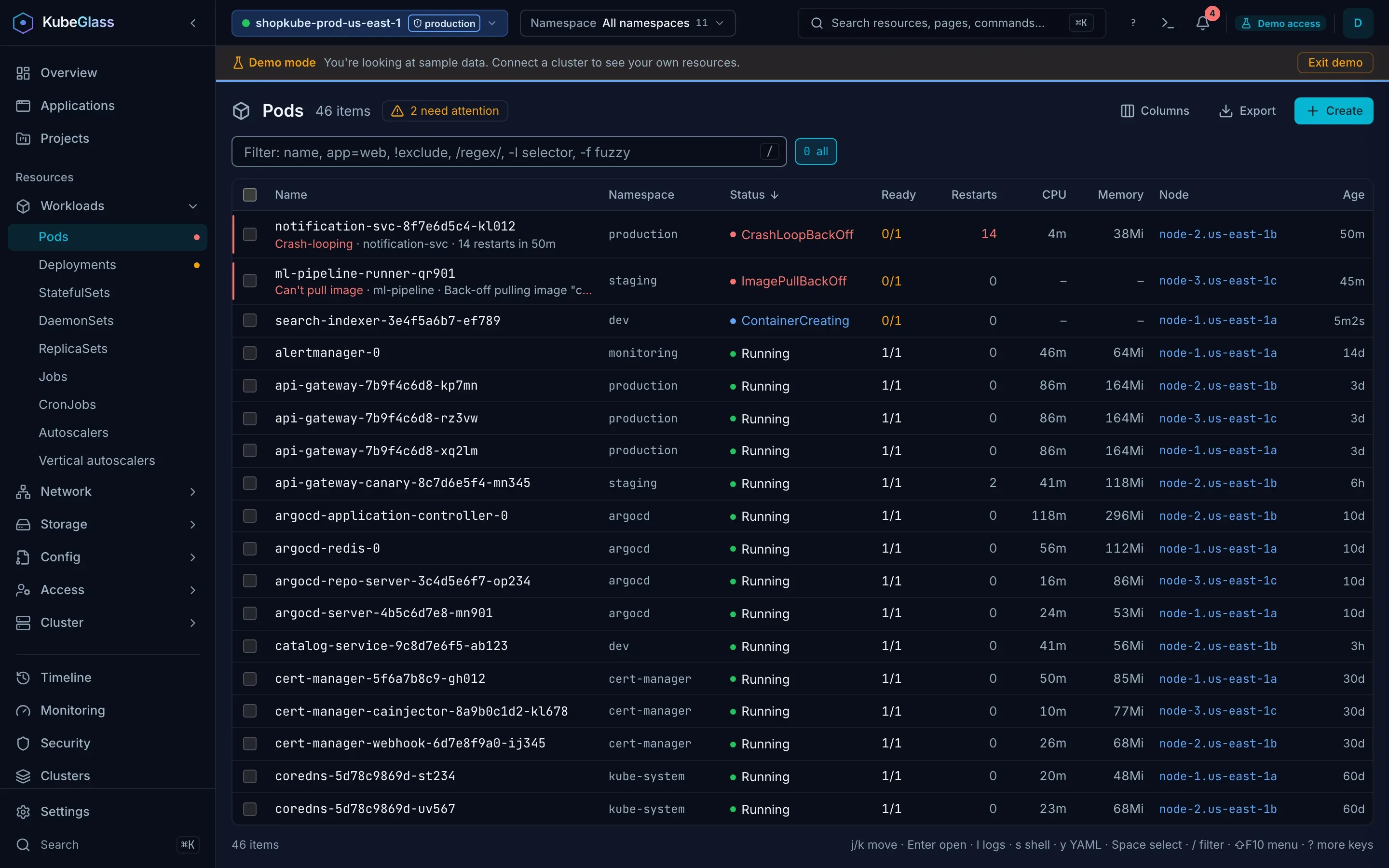
- Rows are links. Cmd-click or middle-click opens an object in a new tab, and you can copy its address.
- Lists stay current over watches, and the footer says “Live”. If the watch drops, or you work from a list of allowed namespaces, the list refreshes every 30 seconds instead.
- The filter matches name, namespace, status, problem and the visible columns. It also matches what people paste from a log line or an error, whether or not it is a column: a pod’s IP addresses and node, the addresses of Services, nodes, Ingresses and EndpointSlices, an Ingress’s hosts, and the images an object runs.
app=webandtier!=dbfilter by label.!textleaves out the rows that match the text, and-ltakes a label selector as kubectl and k9s do, which the API server applies:-l !canaryhides what carries thecanarylabel. Every term has to match, and the filter is kept in the address (?q=). - When some rows need attention, a button next to the count shows only those.
- Pods, Deployments, StatefulSets and DaemonSets open worst first, then by name. Jobs open newest first, Events with the latest seen first, ResourceQuotas with the most used first, PriorityClasses by value, and other lists by name. Click a header to sort, or press Shift and a column’s letter (see Keys). The sort and your column choices are saved per kind in your browser.
- Ages read the way kubectl prints them:
45s,5m30s,3h12m,2d5h,120d. - Columns shows or hides columns. Those marked wide are off until you turn them on, like
kubectl get -o wide. - Custom resources show the columns their CRD defines for
kubectl get. The extensions file can add columns to any kind. - Select rows with their checkboxes (Shift-click selects a range) to restart or delete them together, or to copy their names. Deleting 20 or more asks you to type how many.
- Hovering a row shows Logs and Shell where they apply, and a menu with View YAML, Copy name, Copy kubectl command, the kind’s own actions, the extensions file’s actions, Restart and Delete.
- Lists can show other clusters next to the current one, each row with its cluster; see Several clusters in one list.
Some kinds have actions of their own: Nodes can be cordoned, uncordoned and drained; a Service can show the pods it selects or copy its DNS name; a NetworkPolicy can show the pods it applies to. Every kind the cluster lets you create, custom resources included, has a Create button; see Creating and applying.
If you may not list a kind in the current namespace, the list says so and suggests picking a namespace you have access to. The namespace picker in the top bar (or n) chooses the namespace, and the chip next to the filter goes back to all namespaces.
Creating and applying
Section titled “Creating and applying”Create on a list opens the create dialog with a template for that kind: a written one for the common kinds, the smallest object of the kind for the rest. The button is greyed out, with the reason on hover, when your RBAC doesn’t allow creating that kind in the namespace. >create resource in the command palette opens the same dialog.
Instead of the template you can paste YAML, open or drop files (YAML or JSON, up to 2 MiB each), or use From URL. KubeGlass downloads the URL for you: it has to be HTTPS and on a public address, so for a file on GitHub use its Raw link. A manifest can hold many objects separated by ---, and kind: List. The namespace field is where objects that name no namespace go, like kubectl apply -n; it starts at the namespace you are looking at. The list next to the editor shows each object and where it goes, and YAML errors are marked on their line.
Validate runs a server-side dry run: each object gets its own answer, and for objects that already exist, What changes shows the live object next to what the API server would store. A dry run can’t check objects in a namespace, or of a kind, that the same manifest creates, and says so. Apply uses Server-Side Apply as you, like kubectl apply --server-side: Namespaces first, then CustomResourceDefinitions, then the rest in order. Each object reads created, configured, unchanged or failed, with the API server’s message and a mark on the line it’s about, and Open goes to an object that was applied. One failing object doesn’t stop the others. The lists show new objects as they appear.
When an object sets fields that another tool (Helm, Argo CD, kubectl) manages, the API server refuses it as a conflict. Apply and take over the fields applies it anyway, like --force-conflicts, and that tool may change the fields back. On a production cluster, Apply asks first.
The keys follow k9s.
| Keys | Does |
|---|---|
j k or the arrow keys |
Move down and up |
gg / G |
First / last row |
Enter |
Open the row on its own page |
/ |
Filter. ↓ or Enter goes back to the rows |
Space |
Select the row |
l |
Logs |
p |
Logs of the previous run (pods) |
s |
Shell into a pod, scale a workload, or suspend or resume a CronJob |
y |
YAML |
e |
Edit the YAML |
d |
Describe, the text of kubectl describe |
Shift F |
Forward a port of a pod, a Service, or a workload’s ready pod |
x |
Show a Secret’s values |
r |
Restart (Deployments, StatefulSets, DaemonSets), after asking |
c |
Copy the name |
Ctrl d |
Delete, after asking. With rows selected, r and Ctrl d act on the selection |
Shift N, A, S, R, C, M |
Sort by name, age, status, restarts, CPU or memory; again for the other way |
0, 1–9 |
All namespaces, or a favorite: the ones you starred in the namespace picker, then the others in the order you first used them. Each keeps its number, as in k9s; past nine, a new one takes the number of the one used least lately |
Esc |
Clear the filter, then the selection, then close the pane beside the list |
All shortcuts are in Keyboard shortcuts.
The pane beside a list
Section titled “The pane beside a list”On screens 1280 pixels wide or more, clicking a row opens the object beside the list instead of on a page of its own, and the address gets ?sel= with the object’s name. j and k move through the list and the pane follows the row you’re on. l, p, s, y and d open the pane on that tab. Enter opens the object on its own page, as does the pane’s Open on its own page button; Esc or the pane’s Close button closes it. In the pane, 1 to 9 pick namespaces as they do in the list, not the pane’s tabs.
The splitter between the list and the pane drags, or takes the arrow keys while it has the focus (with Shift for bigger steps, Home for the widest pane and End for the narrowest); a double click resets it. Change the width, in the pane’s header, steps through three widths. The width is saved in your browser. A link with ?sel= opened on a narrower screen goes to the object’s own page.
Turn the pane off under Settings › Appearance › Open objects beside the list.
Overview
Section titled “Overview”The Overview answers “is anything wrong?” for the current cluster and namespace. Next to the cluster’s name and Kubernetes version it says how many things need attention.
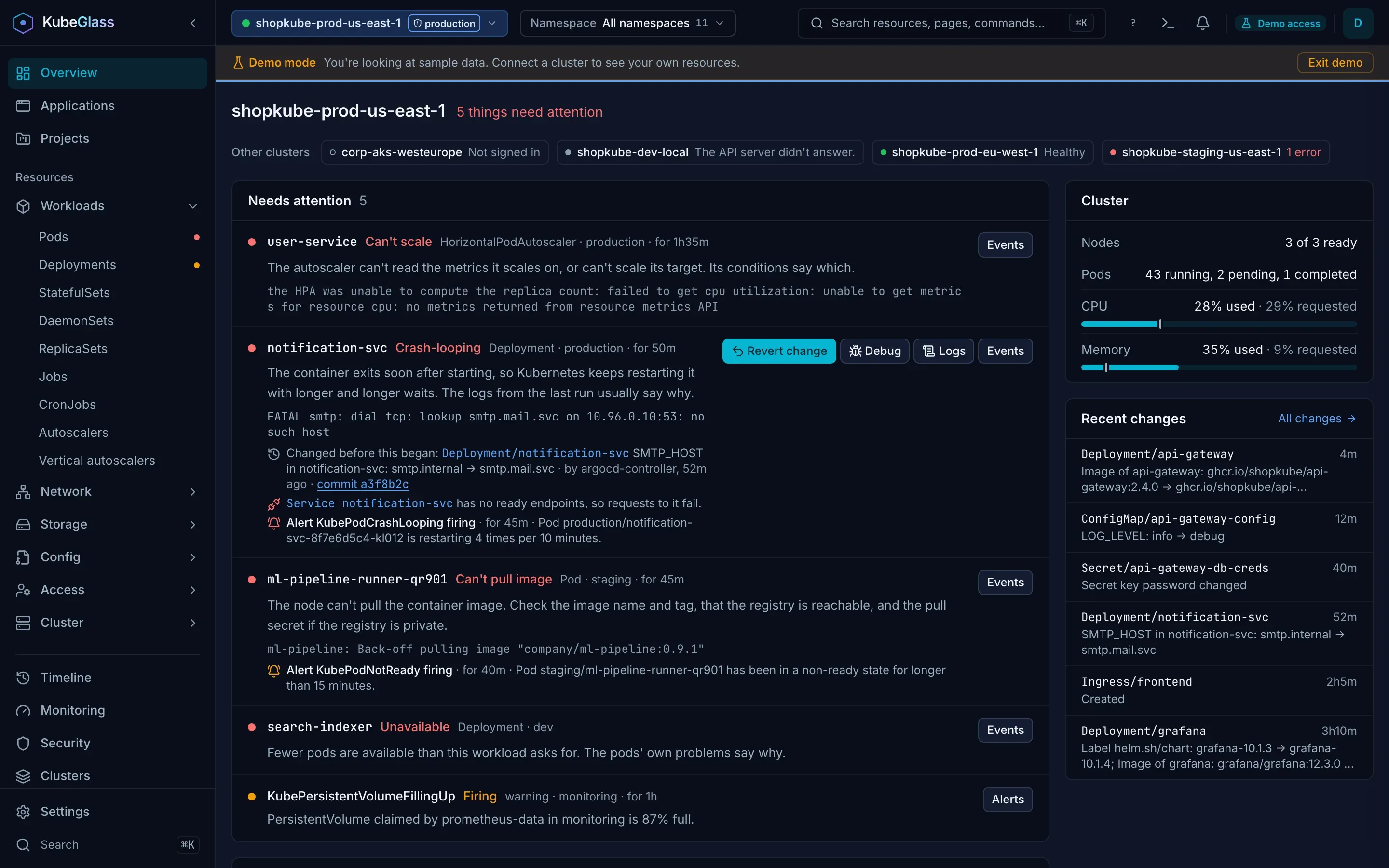
- Needs attention lists every object with a problem, one entry per object, errors first, then the newest. Pods are rolled up to their workload, so ten crashing replicas of one Deployment are one entry marked “10 affected”. Each entry names the problem and quotes the cluster’s own message. The first entry of each kind of problem also says what it means in plain words, after the entry’s own evidence; on the others, that explanation is the tooltip of the problem’s name. Besides pods it covers workloads, Jobs and CronJobs, nodes, PersistentVolumeClaims, autoscalers, disruption budgets, namespaces stuck terminating, and cert-manager Certificates and Argo CD Applications when they are installed.
- Under the problem, an entry shows what else KubeGlass knows about it:
- For a crash loop, an out-of-memory kill or a failed Job, the line of the last run’s log that says why (the first five such entries fetch it).
- The last change KubeGlass recorded to the object, to a ConfigMap or Secret its pods read, or to the Helm release it belongs to, in the day before the problem began, with who made it and a link to that object’s History. When Argo CD or Flux made the change, it names the Git commit.
- Services that select the object’s pods and have no ready endpoints, so requests to them fail.
- The object’s other problems, such as a second pod that can’t pull its image.
- Firing Alertmanager alerts of severity critical or warning whose labels name the object or one of its pods, with the alert’s summary and a link to Monitoring › Alerts. An object with only an alert gets an entry for the alert. Alerts that name no object come after the objects. KubeGlass reads one Alertmanager, so alerts appear only for the cluster it belongs to.
- Next to the entry are buttons for its logs and events, and up to two fixes (see Fixing a problem).
- Other clusters shows every other context in your kubeconfig with its problem count, or why it can’t be reached. Click one to switch to it.
- Cluster shows ready nodes, running pods, and CPU and memory use against capacity when metrics-server is installed.
- Recent changes lists the latest changes KubeGlass recorded, with a link to the Timeline.
When nothing is broken, the Overview has more to show. Each of these appears only when it has something in it:
- Rolling out: Deployments, StatefulSets and DaemonSets that are rolling out now, with their ready count.
- Worth a look: what is getting worse before it becomes a problem. Workloads whose pods restarted lately or failed a health check in the last hour but run now (each links to Monitoring › Restarts), and, if you can read the whole cluster, nodes using 85% or more of their CPU or memory, and APIs that the next Kubernetes version removes and that may still be in use (linking to Clusters › Upgrade check).
- Pinned namespaces: the namespaces you pinned in the namespace picker, each with its problem count. Click one to switch to it; the number next to it is the key that shows that namespace in a list.
- Recently opened: the last objects you opened, to pick up where you left off.
What the Overview shows depends on your access. If you may not list a kind, it says it couldn’t check that kind instead of reporting that nothing is wrong.
Fixing a problem
Section titled “Fixing a problem”Some problems come with a fix, as a button on the Overview entry, on an application’s page, and in the problem banner on the object’s page. The likeliest fix is first:
| Fix | Offered for |
|---|---|
| Revert change | The change KubeGlass recorded just before the problem began; see Undoing a change |
| Raise memory | A container killed for running out of memory. KubeGlass suggests half as much again as its memory limit now (at least 128Mi), or as its memory request when it has no limit |
| Change requests | A pod no node has room for (insufficient CPU or memory): its CPU and memory requests |
| Change image | An image that can’t be pulled. For a Deployment, the dialog lists images of the same repository that ran in earlier revisions |
| Roll back | A Deployment whose rollout is stuck, or that can’t pull its image and has an earlier revision |
| Run now | A failing CronJob, or a failed Job a CronJob started: starts a Job from the CronJob, as kubectl create job --from=cronjob does; the toast names the Job, and Open goes to it |
| Sync | An Argo CD Application that is out of sync |
| Debug | A pod that crash-loops, or that isn’t ready and runs a distroless, Chainguard or pause image: opens the Debug dialog for a debug container in the pod. It looks rather than fixes, so it is never the first button |
Raise memory, Change requests and Change image edit the container in the workload’s pod template (a Deployment, StatefulSet, DaemonSet or CronJob). The API server checks the change in a dry run before KubeGlass saves it, and saving rolls out new pods. Revert change shows what it puts back and the dry run’s answer before you confirm; Roll back, Run now and Sync ask first. On a production cluster, or when Argo CD or Flux manages the object, the dialog says so. There are no fixes in read-only mode.
The bell
Section titled “The bell”The bell in the top bar lists what needs attention in the current cluster, as the Overview counts it: the objects’ problems and the firing alerts that name no object. What started since you last looked comes first, marked New, then the others, worst first. Below them are the other clusters that have problems, each with a Switch button. The number on the bell counts the new ones. Closing the panel, or opening the Overview, counts what it showed as seen; a problem that goes away and comes back is new again. When KubeGlass couldn’t check the cluster, or some of it (kinds you may not list, lists that got no answer, allowed namespaces that didn’t answer), the panel says so, with Retry when nothing came, and says nothing needs attention only after a complete answer.
The panel links to the Overview, to the Timeline’s warnings and to Settings › Notifications, where you choose a toast, a chime or a desktop notification when a problem starts, and quiet hours. See Notifications.
The detail page
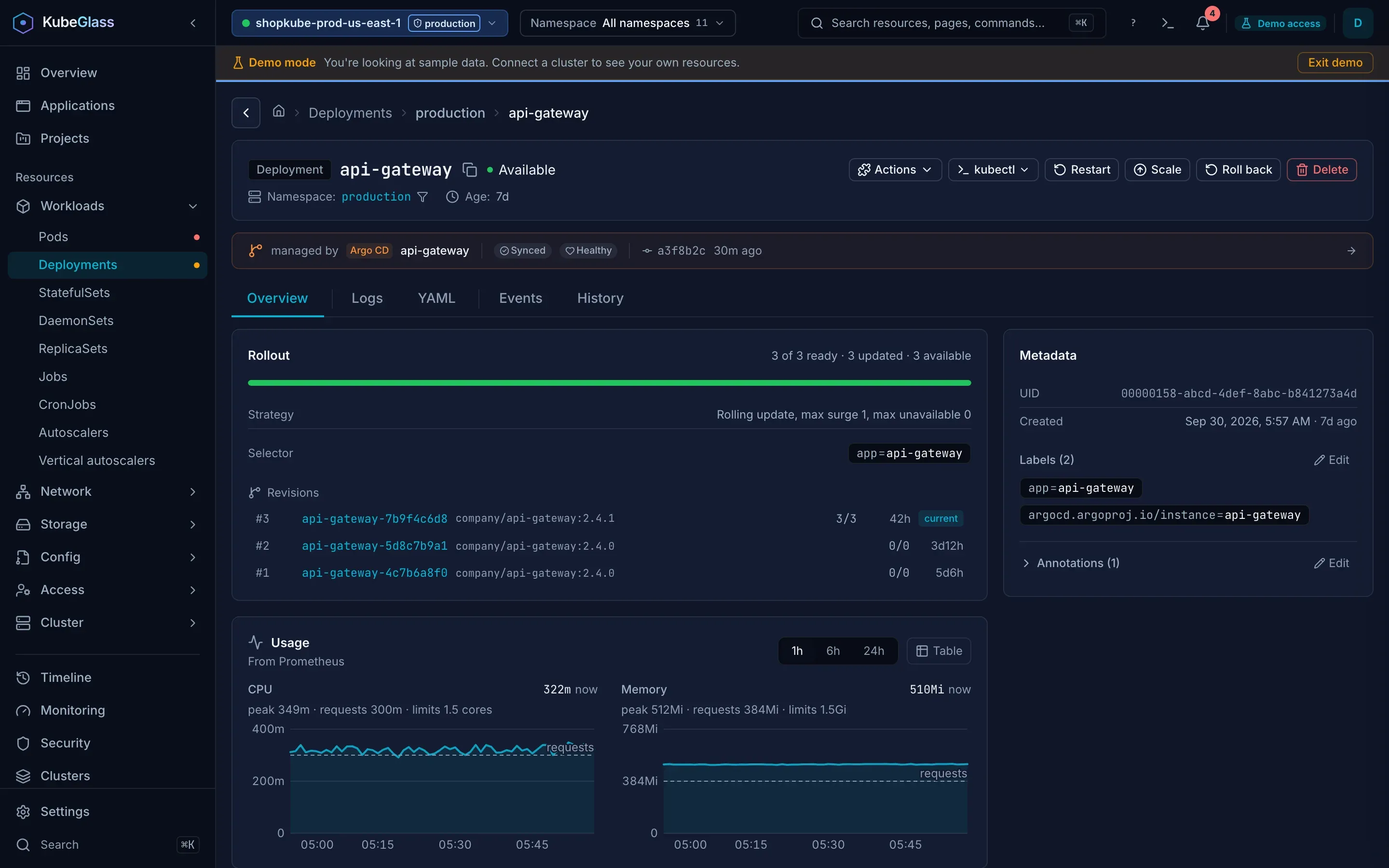
Section titled “The detail page”Opening an object shows the tabs that apply to its kind. 1 to 9 open the tabs in order, and Backspace goes back.
| Tab | Shows |
|---|---|
| Overview | What you usually open the page for: a pod’s containers with their usage against requests and limits, a workload’s rollout and its pods, the pods a Service selects or a node runs, a role’s rules, the role and subjects of a binding, a namespace’s quotas and limit ranges, an EndpointSlice’s endpoints. Then Checks, what the object is connected to, what uses it, its conditions, a pod’s resolved environment variables (for each container, native sidecar and init container; a value another source replaces is marked, and a Secret’s variable links to the Secret’s page with its values shown) and recent events. Labels and annotations, which you can edit, are in the side column: removing one has an Undo, and asks first on a cluster marked production |
| Logs | For pods, and for Deployments, StatefulSets, DaemonSets, ReplicaSets and Jobs with their pods’ logs merged by time, live, with a filter, levels and the run before a restart. See Logs |
| Shell | A terminal in one of a pod’s containers, or the Files view to browse, download and upload its files. For a container without a shell, both go through a debug container |
| YAML | The manifest in an editor, with an outline, validation and apply, and Diff with last applied for objects made with kubectl apply. The Describe view shows the same text as kubectl describe |
| Events | Events for this object. For a Deployment, ReplicaSet, StatefulSet, DaemonSet, Job, CronJob or Argo Rollout, also the events of its ReplicaSets, Jobs and pods, with a column saying which object each is about. That’s where image pulls, crashes and scheduling failures are reported |
| History | The changes KubeGlass recorded to this object, with Revert change on the ones it can undo (see Timeline) |
| Allocation | For nodes: the requests and limits of every pod that hasn’t finished against what the node can allocate, as kubectl describe node counts them |
When the object has a problem, a banner at the top says what it is, what it means and where to look next. For a crash loop, an out-of-memory kill or a failed Job it shows the last lines the container wrote, with the line that says why marked, and it lists what the Overview’s entry knows: the change before the problem began, the Services it breaks and the alerts about it. A pod of a workload shows its own problem with what its workload’s entry knows. The banner also offers the fixes that apply. Checks runs by itself when a Pod, Deployment, StatefulSet, DaemonSet or Job looks unwell, and on request for those and for Services and CronJobs; see Checks on an object.
Editing and actions
Section titled “Editing and actions”YAML changes are checked with a server-side dry run before you apply them, and What changes shows the difference the apply would make. Apply runs as you, so RBAC applies.
The YAML editor
Section titled “The YAML editor”The YAML tab, YAML tabs in the dock, Create or apply, the Helm values editor and the extensions file in Settings use the same editor, Monaco, which is VS Code’s. It has find and replace, folding with the arrows beside the line numbers, comment toggling, several cursors at once, moving lines up and down, go to line, the next and previous YAML mistake with its message on hover, and a right-click menu. The keys are in Keyboard shortcuts.
Show outline under the YAML tab’s editor lists the YAML’s keys as a tree. A click or Enter on one moves the editor to its line, and the arrow keys move through the tree and open and close its entries, which stay open or closed as you edit. The references under the editor, such as a ServiceAccount or Secret the object names, open a peek of that object and move the editor to the line that names it. Both follow your edits.
For an object made with kubectl apply, Diff with last applied under the YAML tab’s editor shows what the last apply sent (the kubectl.kubernetes.io/last-applied-configuration annotation) beside the live object, both as YAML. What the live object has on top of it is what changed since: defaults the API server filled in, fields controllers set, and changes such as a scale or a kubectl edit.
Depending on the kind, the detail page offers scale, restart, roll back to a revision you pick, run a CronJob now or suspend it, cordon, uncordon and drain a node, edit its taints, port-forward, debug a pod with a debug container, evict a pod, and delete or force delete. Destructive actions ask for confirmation. A port forward listens on the computer KubeGlass runs on, so it is there only when KubeGlass runs on your machine; installed in a cluster, use kubectl port-forward. After you delete an object from its page, or one object from a list, ⌘Z (Ctrl+Z) brings it back within 30 seconds by applying the copy KubeGlass kept, and the delete dialog says so; for kinds that can’t come back from their YAML, such as a pod a ReplicaSet owns, it says the delete can’t be undone. A scale of one object, from its page or a list, is undone the same way. With nothing to undo, ⌘Z says so.
Actions from the extensions file appear next to the page’s other buttons.
On a production cluster the confirmation says so, applying YAML asks first, and deleting, evicting or scaling to zero takes the object’s name. When Argo CD or Flux manages the object, scaling, rolling back, editing the YAML and deleting say that its next sync can put back what Git has, and the YAML tab says so above the editor. When Helm manages it on its own, they say that the next helm upgrade puts back what the release holds. Restart doesn’t, because it only stamps the pod template, which neither tool reverts.
In read-only mode, or on a cluster you marked read-only, the actions that change the cluster are hidden.
Secret and ConfigMap values
Section titled “Secret and ConfigMap values”Edit values on a Secret’s or a ConfigMap’s Overview edits its values decoded, without base64: one row per key, with the value in a text box (a Secret’s masked until you choose Show), Add key, a remove button that leaves the key listed to restore, and renaming by editing the key. A value that isn’t UTF-8 text, such as a keystore, shows as binary with its size, and you can replace it from a file or download it. Apply (⌘↵ or ⌘S, Ctrl+Enter or Ctrl+S elsewhere) saves through the same path as the YAML tab: a dry run first, then a confirmation listing the keys that are added, removed, renamed or changed, with a Secret’s values masked until you choose Show values, and the production and GitOps notices. A Secret keeps its values in data, base64 as before; a ConfigMap keeps text in data and bytes in binaryData. Esc cancels, asking first when there are changes. It needs update on the object, and for a Secret get on Secrets to read the values; an immutable object can’t be edited. The editor reads the object afresh when it opens, and a Secret near its 1 MiB fits: manifests may be up to max_dynamic_body_size.
Command palette
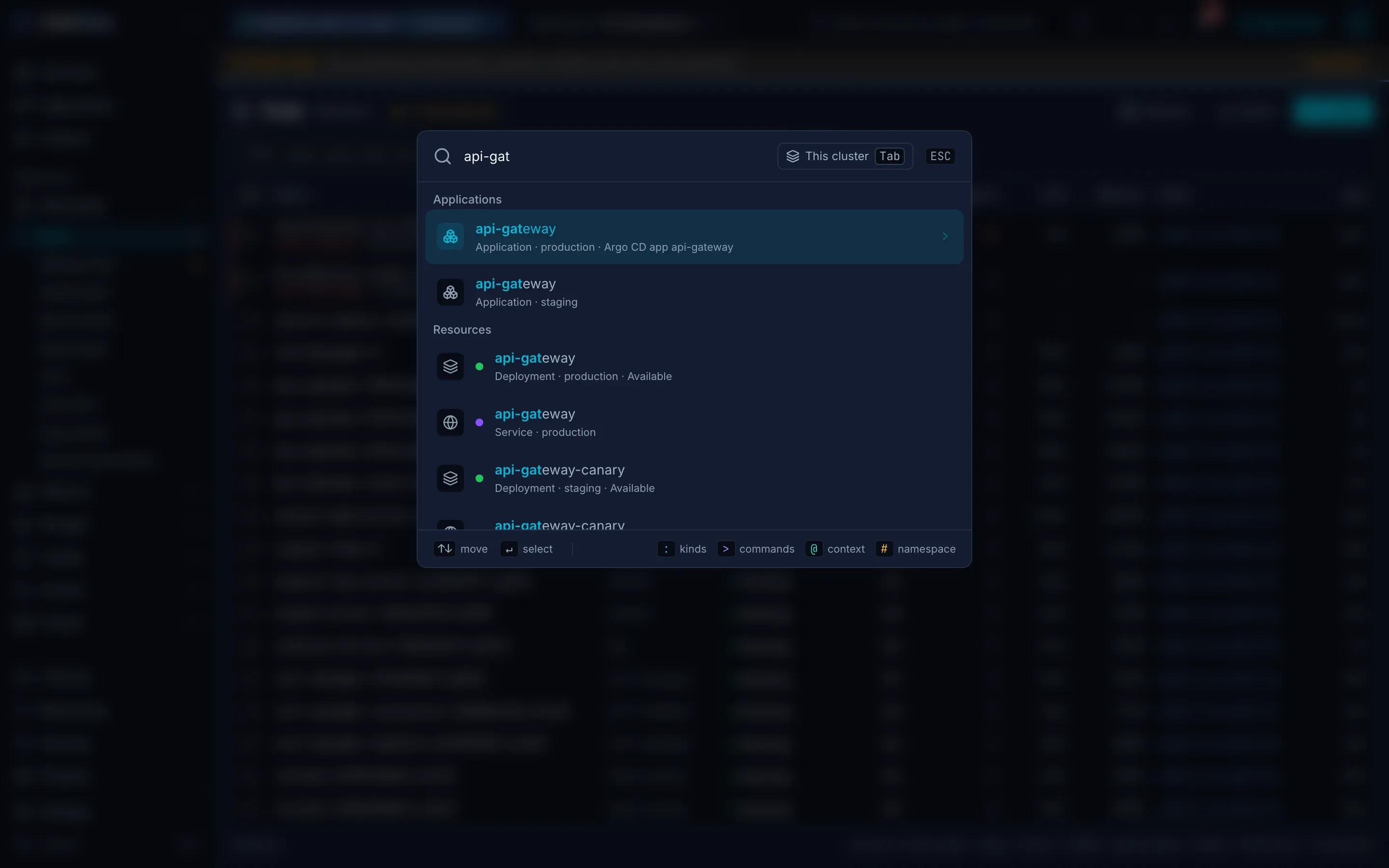
Section titled “Command palette”⌘K (Ctrl+K) searches pages, every kind, applications, and objects in every namespace you can read, with each object’s status. It matches an object’s state too, so crash, pending or oom finds the objects in that state, and an address: 10.42.0.17 finds the pod, Service, node or Ingress with that IP, and a node’s name or IP also finds the pods on it, after the node. app=web finds the objects with that label. A prefix changes what it does:
| Type | To |
|---|---|
: |
Open a kind or a page by name, as in k9s: :po, :deploy, :svc, :certificates, :helm, :alerts. Add a namespace to open the list there: :po kube-system, :po all; :po /web and :po app=web open it filtered, and :po @prod on that cluster, as in k9s. :ctx switches cluster, :ns shop switches namespace, :pulse, :popeye and :xray open the Overview, Checks and an object’s related resources, and :aliases lists every command |
@ |
Switch to another cluster |
# |
Switch to another namespace |
> |
Run a command: switching cluster or namespace first, then what you can do with the object whose page is open (logs, shell, YAML, events), then the rest, such as >terminal new, >create deployment or one you saved with >save command |
If your account may list some kinds only in some namespaces, the palette searches those kinds in the allowed namespaces from your cluster settings, or in the namespace in view, or else in your kubeconfig context’s namespace. It says under the results where it looked and which kinds it couldn’t search, and, without allowed namespaces, that setting them has those kinds searched there.
Tab in the search box, or the This cluster button next to it, searches every cluster in the kubeconfig instead: each cluster’s results arrive as it answers, each with the cluster’s name, and a cluster that couldn’t be searched says why: it didn’t answer, it refused the credentials, your user or KubeGlass’s credentials acting for you, or it needs a sign-in, which a search doesn’t start. Enter on another cluster’s object switches to that cluster and opens it. Tab again searches the current cluster only, as the palette does each time it opens.
The : commands come from the cluster’s own kinds, so a custom resource works by its plural, kind or short name, and the extensions file can add names of your own. Pressing : or > anywhere outside a text field opens the palette with that prefix, and Esc goes back out of it before it closes the palette. The best match is first and highlighted, so Enter opens it: an object whose name starts with what you typed comes before a page that only starts with it too, and stays first when the objects come after the typing. From the first time you move the pointer onto the list until it leaves the list, results that come later go below the rows shown, so none moves under it, and a row you pointed at keeps its place after the pointer leaves, until you type again. #shop and Enter switch to shop even before the namespace list has loaded. On a touch screen, Cancel closes the palette. All the palette’s commands are in Keyboard shortcuts.
How data reaches the page
Section titled “How data reaches the page”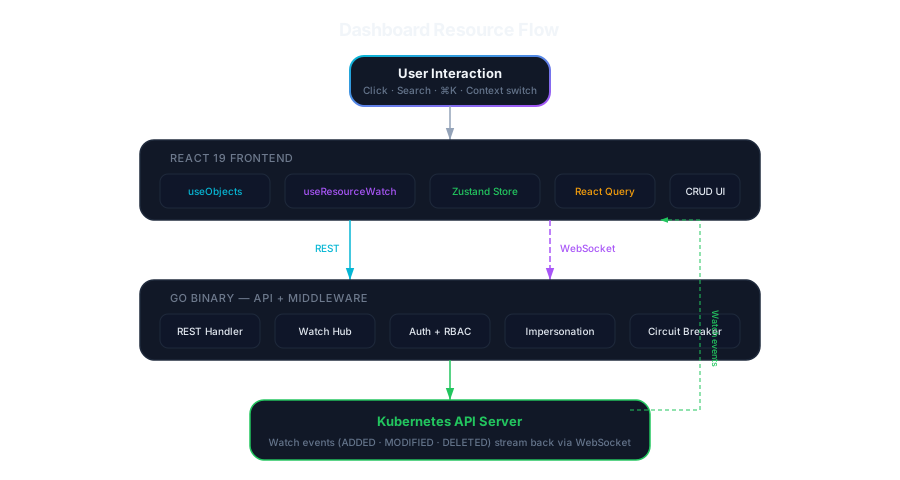
A list loads once from /api/v1/objects, with the server’s summary of each object. A watch over WebSocket then sends a snapshot and every change, and the UI applies them to the list in place instead of polling.