
KubeGlass vs k9s
k9s is a terminal UI for Kubernetes: one program per person, driven from the keyboard, with plugins that bind shell commands to keys. KubeGlass is a web console that runs as one binary on your computer or in a cluster, and its lists use k9s’s keys.
You can use both: k9s in a terminal, and KubeGlass when you want a browser, several clusters side by side, history or access reviews, or something to share with a team.
At a glance
Section titled “At a glance”| Feature | KubeGlass | k9s |
|---|---|---|
| License | AGPL-3.0 | Apache-2.0 |
| Runs as | A binary that opens the UI in your browser, a container, or a Helm chart in a cluster | A terminal program for Linux, macOS, Windows and FreeBSD; latest release v0.51.0, 6 June 2026 |
| Needs | A browser | A 256-colour terminal; kubectl on the PATH for shells and editing |
| Team use | One deployment in each cluster for everyone, each person signed in and acting as themselves | Each person runs their own copy |
| Several clusters | Run from a kubeconfig: every context in one list with its problem counts, lists and search across several at once, a diff between clusters and scheduled drift checks. Installed in a cluster: that cluster only | One context at a time; :ctx switches, and many settings can be set per context |
| Live updates | Watches | Watches |
| Logs | One container, all of a pod’s containers, or merged across a workload’s pods; previous run, search, JSON expansion | One container, all of a pod’s containers, or a workload’s pods; previous run, filter |
| Shells | Pod exec, debug containers for pods without a shell, node shells (opt-in), a shell on your computer (opt-in); split panes, broadcast to several sessions, recording | Pod shell, attach, node shells (opt-in), and debug containers through the community debug-container plugin |
| Files | Browse a container’s folders, download files and folders, and upload files of up to 256 MiB. A file goes either way in an image without tar | t on a pod copies a file in or out with kubectl cp, which needs tar in the image; no file browser |
| Port forward | Pods and Services, when KubeGlass runs on your computer | Pods, Services and containers, with benchmarks through hey |
| YAML | View and edit in the browser, with a server-side dry run and a diff. A Secret’s or ConfigMap’s values are edited decoded, one key at a time | View; e opens kubectl edit in your editor. x shows a Secret’s values decoded, but editing one means base64 |
| Helm | Releases, history, values, upgrade, rollback, uninstall, and a chart catalog to install from | Releases, values, history, rollback and uninstall; no install or upgrade |
| Argo CD and Flux | Built in, with sync, refresh and rollback | Community plugins in the k9s repository |
| Custom resources | Yes | Yes |
| Access review | An access matrix for any user, group or ServiceAccount, who can do something, and a form for roles and bindings | :can u:<user>, g:<group> or s:<serviceaccount> shows one subject’s rules |
| Metrics | CPU and memory from metrics-server or Prometheus, PromQL, Alertmanager alerts and silences, rightsizing | CPU and memory from metrics-server, and the Pulses view |
| Relationships | A tree on each object’s page, and a map of a namespace, application or project that marks the chain leading to a broken object | XRay, a tree for Pods, Services, Deployments, ReplicaSets, StatefulSets and DaemonSets |
| Vulnerabilities | Reads the Trivy Operator’s reports | Scans images when you turn it on (marked experimental) |
| Change history | Changes to Deployments, StatefulSets, DaemonSets, CronJobs, Services, Ingresses, ConfigMaps, Secrets and autoscalers, field by field, with revert after a dry run, and the rollouts and Helm releases from before KubeGlass ran. It lists those kinds, and Secrets for Helm, with KubeGlass’s own credentials: in every namespace, or in up to 25 namespaces when the credentials allow only some | No |
| Customizing | An extensions file for actions (links, and commands it runs in a local shell or copies), keys, hotkeys, sidebar links, Grafana panels, list columns and palette names, with an import of k9s plugins, hotkeys and aliases; light, dark and higher-contrast themes | Plugins that run commands, hotkeys, aliases, custom columns and skins |
| Read-only | --read-only for the server, or one cluster at a time |
--readonly, or readOnly per context |
| UI languages | 8 | English |
Choose k9s if
Section titled “Choose k9s if”- You work in a terminal, including on remote machines over SSH, and want nothing else running: no server, no port, no browser.
- You want plugins that run any command on a key straight away, ask for input or pipe their output. KubeGlass runs an extension’s command in a terminal tab only when started with
--local-shell, after showing it in a dialog, and otherwise copies it; plugins that ask for input or pipe their output don’t map. - You want skins and settings per context.
- You use attach, benchmarks with hey, or image scans run by k9s itself, which KubeGlass doesn’t have.
- You prefer the Apache-2.0 license.
Choose KubeGlass if
Section titled “Choose KubeGlass if”- You want the same keys in a browser, or something to give people who don’t use a terminal.
- A team should share one deployment in a cluster, with each person signed in and limited by their own RBAC.
- You want several clusters at once: one list with each cluster’s problems, the pods or Deployments of several clusters in one list, a diff between clusters, drift checks and an upgrade check.
- You want to know what changed before something broke, who changed it, and to revert it after a dry run.
- You want to edit a Secret’s values without base64, or to browse a container’s files and copy files in and out without
kubectl cp, also where the image has no tar. - You review access and need to know who may do something, not only what one subject may do.
- You install or upgrade Helm charts, or work with Argo CD, Flux and Argo Rollouts without plugins.
- You want Alertmanager alerts, PromQL and rightsizing next to the objects.
Moving from k9s
Section titled “Moving from k9s”KubeGlass reads the same kubeconfig and starts on its current context. Install it and run kubeglass:
brew install kubeglass/tap/kubeglasskubeglassThe keys in KubeGlass’s lists follow k9s. Where they differ, the table says so:
| In k9s | In KubeGlass |
|---|---|
:pod, :deploy kube-system |
The same: : opens the command palette at that kind, with an optional namespace, or all |
:pod /fred, :pod app=fred, :pod @ctx1 |
The same: the list opens filtered by text or label, or on that cluster |
:ctx |
@ in the command palette, or ⌘⇧K |
:ns |
# in the command palette, or n |
/ filter, /-l app=web |
/, where app=web and tier!=db filter by label, !text leaves out the rows that match the text, and -l takes a selector as in k9s, so -l !canary hides what carries the canary label |
j k, Enter |
j k move; Enter opens the object’s page |
l, p |
Logs and the previous run’s logs |
s |
A shell for pods; on a Deployment, StatefulSet or ReplicaSet s scales, as in k9s, from the row or the object’s page |
y, e |
y and e both open the YAML. KubeGlass edits it in the browser instead of your editor |
d |
Describe |
Shift F |
Forward a port of a pod, a Service or one of a workload’s ready pods |
c |
Copy the name |
Space |
Space selects; Shift Space or Shift-click selects a range. x shows a Secret’s values, as k9s’s x decodes one |
Ctrl d |
Delete, after asking |
Ctrl k |
Shift K force deletes a pod, with no grace period, after asking |
t on a pod |
Files, beside Terminal in the pod’s Shell tab: browse, download, and upload by button or drag and drop |
Shift D, with the debug-container plugin |
No key. Debug is on a pod’s page and on a crash-looping pod’s problem; see Debug containers |
Shift N, Shift A, Shift S |
The same sorts, plus Shift R, C and M for restarts, CPU and memory |
:xray |
The tree on each object’s page |
:pulses |
The Overview |
:helm |
:helm opens Helm releases |
? |
? lists the shortcuts |
Your k9s configuration moves over too. Running on your own computer, Settings › Extensions › Import from k9s reads plugins.yaml, hotkeys.yaml and aliases.yaml from your k9s folder, shows what each entry becomes, and adds the ones that map to the extensions file:
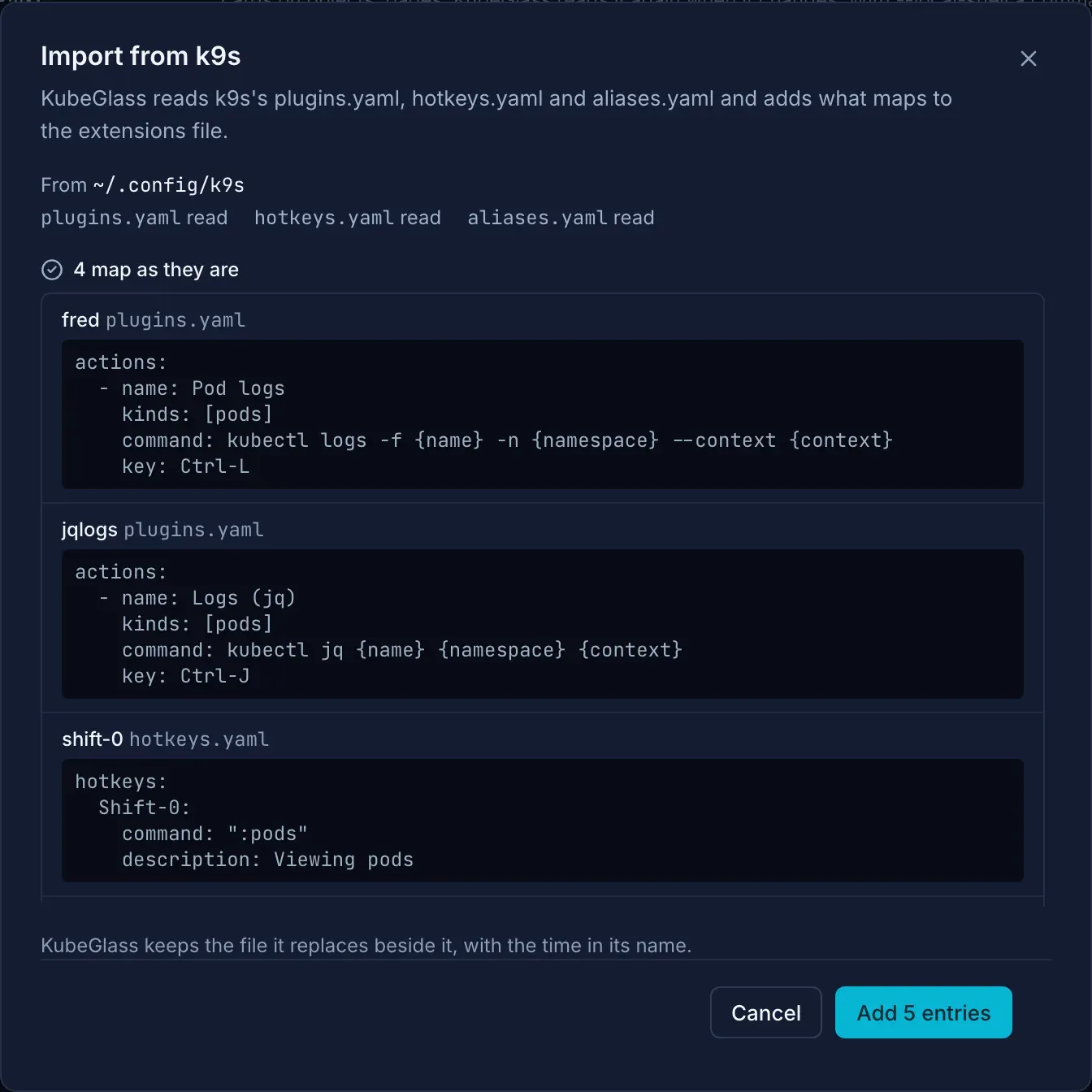
- A plugin becomes an action with its key, and
$NAME,$NAMESPACEand$CONTEXTbecome{name},{namespace}and{context}. Started with--local-shell, KubeGlass runs the command in a terminal tab after showing it; otherwise it copies it. - A plugin that asks for input (
inputs) isn’t added, since KubeGlass can’t ask for it. The community debug-container plugin is one; KubeGlass’s own Debug asks for the image and the target container instead. - A hotkey keeps its key and its command, such as
:pods. - An alias that names a kind becomes a palette name, so
:certcan open cert-manager’s Certificates. - Columns in
views.yamlbecomecolumnsby hand, each with a path such as.spec.issuerRef.name. - Skins have no equivalent.
To keep k9s at hand, start KubeGlass with --local-shell. Its terminal then opens a shell on your computer with KUBECONFIG set to the cluster you are viewing, so k9s starts there. See Terminal.
Sources
Section titled “Sources”Checked on 5 October 2026; files and Secrets on 9 October 2026.
- License, key bindings, plugins and install: k9s README and LICENSE
- Features (live tracking, RBAC reverse lookup, XRay, Pulses, metrics): k9scli.io
- Commands,
:ctx,--readonlyand XRay’s kinds: k9s commands - Plugins, hotkeys, aliases, columns and skins: plugins, hotkeys, aliases, columns, skins
- Image scans and per-context read-only: k9s configuration and release notes v0.29.0
- Shells and editing run
kubectl: exec.go at v0.51.0 - File transfer with
kubectl cpont: pod.go at v0.51.0 and issue 658, fixed in v0.28.0 - Editing a Secret without base64, still open: issue 1017
- Node shells: k9s shell
- Benchmarks: k9s bench
- Community plugins for Argo CD, Flux and debug containers: k9s plugins folder
- Latest release: k9s v0.51.0
- Helm releases view: release notes v0.19.3 and helm_history.go at v0.51.0 (rollback)
:can: command.go at v0.51.0- Logs of a workload’s pods: logs_extender.go at v0.51.0
- KubeGlass: keys in lists, command palette, Keyboard shortcuts, Extensions, Terminal and uploading files, Secret and ConfigMap values, Helm, Access, Timeline, Clusters