
Timeline
Kubernetes keeps only the current version of an object. KubeGlass records changes as they happen, so you can see what changed before something broke, and it reads what the cluster keeps of its own past, so rollouts, Helm releases and config writes from before it ran are there on the first start. Both use KubeGlass’s own credentials (your kubeconfig’s on your computer, its ServiceAccount in a cluster, which the chart sets up), and Secrets for Helm’s records. With credentials limited to some namespaces, such as a kubeconfig made for one team, it records and reads those namespaces (see Credentials limited to some namespaces). Timeline in the sidebar is one list, newest first, of:
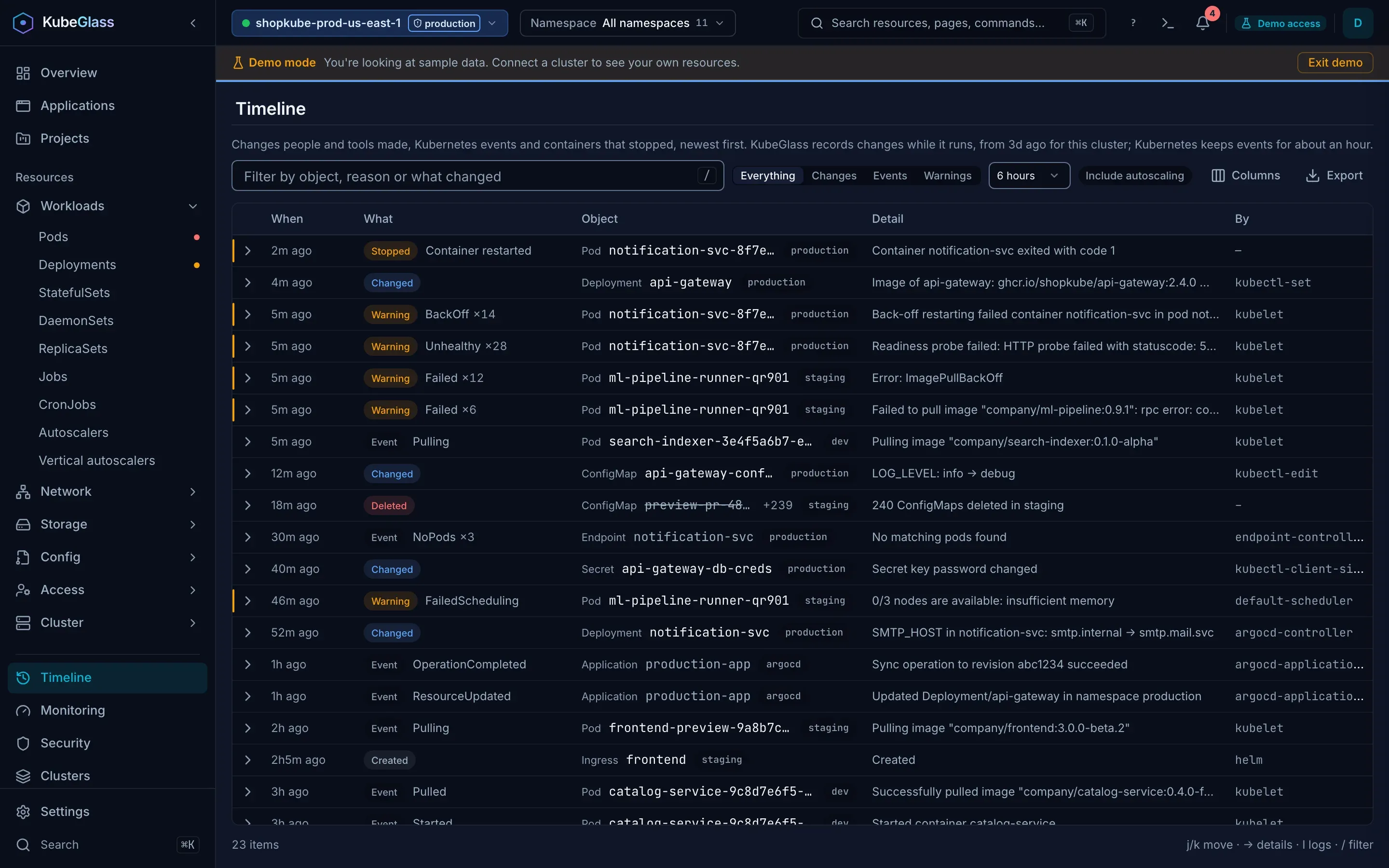
- the changes people and tools made, with what changed and who made them;
- the cluster’s events;
- containers that stopped, with how (an exit code, or killed for using too much memory): those restarted after it, and those that stopped with an error and weren’t run again, such as a Job’s. Init containers and sidecars count; a clean exit, a container stopped because its pod is being deleted, and a sidecar stopped when its pod finished don’t.
Show picks Everything, Changes, Events or Warnings (?show=events opens the Timeline on events), and How far back picks 1 hour, 6 hours (the default), 24 hours or 1 week. Kubernetes keeps events for about an hour, so further back the list is mostly changes. The list holds the newest 1,000 entries of what Show picks, counted after bulk changes are folded, so Warnings has every warning in the time picked even where a busy cluster writes thousands of other events, and the page says when it shows only the newest 1,000 of more. For admins, a second tab holds the Audit log. A project’s Timeline link, and that of an application in several namespaces, opens it on their namespaces (?namespaces=shop,blog) whatever the top bar has picked; the line above the list names them, with a link back to the top bar’s namespace.
A row about a pod or a workload has Logs, which opens its logs around the time of the event or change, on the container the event names; for a container that stopped, on the run that stopped. l on the row, and the “Logs at” link with the time in its panel, do the same. Rows about deleted objects and folded runs have no Logs.
The Overview puts the change that came before a problem on the problem itself (see Overview). The History tab on an object’s page shows the changes to that one object, and its Events tab the object’s events.
Changes
Section titled “Changes”Each change says when, which object, what changed and who changed it. Open it (click it, or press the right arrow) for every field that changed, with the old and new values, and Revert change when KubeGlass can undo it (see Undoing a change). Deleted objects are struck through; the others link to their page.
What is recorded
Section titled “What is recorded”KubeGlass watches Deployments, StatefulSets, DaemonSets, CronJobs, Services, Ingresses, ConfigMaps, Secrets and HorizontalPodAutoscalers. For each one it records when it is created, changed or deleted. For each change it keeps:
- the fields that changed, with the old and new values, shown in words where it can: “Image of app: 1.0 → 1.1”, “Replicas: 2 → 3”, “Restarted”, “LOG_LEVEL: info → debug”;
- the field manager that made the change, such as
kubectl-edit,helm,argocd-controllerorkubeglass. Kubernetes doesn’t record which person made a change, and when an object is deleted it doesn’t record who deleted it; - the KubeGlass user who made it, when it was made through KubeGlass. KubeGlass matches the change to its own audit log (the same cluster and object, a matching action, while the request ran); for a Helm install, upgrade or rollback, to the changes Helm made in the release’s namespace; and for an uninstall, to the release’s objects it deleted. The By column then shows the user, followed by the field manager; for a change made with Act as…, the user and the identity they acted as, such as alice as bob. Changes made with other tools show only the field manager;
- for a change Argo CD or Flux applied, the Git commit its application synced at the time, linked to the commit when the repository is on GitHub, GitLab, Bitbucket or a Gitea-style host.
Status updates and bookkeeping (resource versions, revision numbers, last-applied copies) aren’t changes. Pods, ReplicaSets and Jobs aren’t recorded either: controllers make them from the kinds above, and their churn would bury the changes behind it. What you delete through KubeGlass is the exception: a pod, a Job or an object of any other kind deleted there, one at a time or many at once, and a Helm release uninstalled there, is a change by you, from KubeGlass’s audit log. A delete the watch sees as well is listed once.
For Secrets, KubeGlass records which keys changed but never their values; it keeps a hash to tell that a value changed. ConfigMap values longer than 2,048 characters are kept the same way. Helm’s release records, ServiceAccount tokens and bootstrap tokens, which are Secrets, are left out.
Some changes are automatic: the Timeline hides them until you turn on Include automatic changes, and the History tab shows them marked automatic. Every other change counts as a person’s. KubeGlass tells them apart by the field manager that made a change:
- People’s tools: kubectl, Helm, KubeGlass, k9s, Headlamp, the Kubernetes Dashboard, Rancher, Argo CD, Flux (
kustomize-controller,helm-controller), Fleet, kapp, Terraform (which writes asHashiCorp), Pulumi, any field manager with “lens” in its name (Lens, OpenLens, Freelens) and a browser. Their changes are never automatic, but for one: a GitOps tool’s (Argo CD, Flux, Fleet, kapp) fourth or later update to one object within 10 minutes, outside a pod template, which is putting back what something else changes, as self-heal does. - Known controllers:
kube-controller-manager(and thek3sandkubelitebinaries),kube-scheduler,kubelet,cluster-autoscaler, controller-runtime’s defaultmanager, and any name that ends in-controller,-operatoror-controller-manager. Such a controller’s update to an object it updated within the hour before is automatic. - Any other field manager (curl, oc, a Go or Python client, a script) counts as a person’s tool, unless it acts as a controller: its fourth or later update to one object within 10 minutes is automatic. Making the object isn’t one of the updates.
And, for any field manager that isn’t a people’s tool:
- an autoscaler changing a workload’s replica count, and cluster-autoscaler rewriting its status in
kube-system/cluster-autoscaler-status(every 10 seconds), are automatic; - when it makes or updates more than 100 objects within any minute, its changes in that minute, the first ones included, are automatic, and so are its changes until a minute after the last such minute. A deploy changes the few dozen objects of an application; an operator’s pass changes every object of its kind.
A change to a pod template, a workload’s or a CronJob’s job template, is automatic only in such a burst, so a rollout is listed as a change of its own, unless a controller restarts many workloads at once.
The field managers that aren’t people’s tools hold at most a tenth each, and half together, of the changes the pages keep (500 and 2,500 of 5,000). When one holds its share, or all of them hold theirs, the oldest 100 changes of that manager, or of the one that holds the most, become automatic, and the new change stays a person’s. So a tool that writes a lot loses its oldest changes first. In a busy cluster, where the room for automatic changes is already full of newer ones, those 100 changes can leave the record right away, with their undos.
One field manager’s automatic updates to one object within 10 minutes are one change, which says how many updates it stands for (×12 in the Timeline), when the first and the last were, and each field from before the first to after the last. A known controller’s automatic changes can’t be reverted: it would only make them again. Any other field manager’s can, including those it folded together, which go back to before the first of them, and so can the latest 100 changes that became automatic at once. A change stops taking in updates once it is reverted, or once another field manager writes the object. When one of the updates removes a field that holds other fields, such as a ConfigMap’s data, and a later one sets it again, they can’t be undone together, and their change says so. Updates that remove a single value, such as an annotation, and set it again can be. The undos of automatic changes are the first to go when the undos KubeGlass keeps reach their limit.
When it records
Section titled “When it records”KubeGlass starts recording a cluster the first time someone uses it, and records it while KubeGlass runs. A cluster nobody has used for 24 hours stops being recorded until someone uses it again, and at most 16 clusters are recorded at once: a seventeenth stops the one used least recently. The record is saved in the data directory and kept for 30 days (drift_result_retention), and at most 32 MiB of it per cluster, the oldest changes going first.
The pages show the latest 5,000 changes per cluster, which KubeGlass keeps in memory and loads from the data directory when it starts. Automatic changes have room of their own, the latest 1,000 per cluster and 4 MiB on disk, so a busy controller can’t push out the changes people made. The History tab and the Timeline say how far back the record goes: to when KubeGlass started recording the cluster, to 30 days ago, or to the newest change it dropped to make room, whichever is latest. When automatic changes don’t go back as far, they say how far those go.
From before KubeGlass ran
Section titled “From before KubeGlass ran”When it starts recording a cluster, KubeGlass also reads what the cluster keeps of its own past, back as far as it keeps changes, so a first start isn’t an empty history:
- A Deployment’s ReplicaSets, and a StatefulSet’s or DaemonSet’s ControllerRevisions, keep one pod template per revision. Each revision is a change with the fields it changed from the revision before, at the time its ReplicaSet or ControllerRevision was made. A rollback brings back an older ReplicaSet, which keeps its old creation time; such a revision is dated by when the template was last written (the newest revision) or when the revision before was scaled down, and its time reads “about”. When the revision before one was cleaned up (
revisionHistoryLimit), what it changed isn’t known. The newest revision names the field manager that wrote the template then; Kubernetes keeps no manager for older ones, so they show the revision’skubernetes.io/change-causewhen it has one. - Helm’s release records keep each revision of a release: a HelmRelease change says the chart and which values changed, and links to the release’s history. A rollback reads “Rolled back to revision 1”, from the release’s description. Values often hold passwords, so like a Secret’s they are named but never kept. KubeGlass reads a record only for a revision it shows, and while it runs, each record Helm writes.
- For the ConfigMaps and Secrets pods read, managed fields say when each was created and last written and by which field manager, but not what it held before: such an update says “Values before this change aren’t known”.
These changes say where they come from (“from the ReplicaSet history”). A change KubeGlass also saw happen is matched to the one in the records by its revision, by the pod template fields it set, or by when the records say it was written, and is then listed once; one it can’t match that way within a minute can be listed twice. Each start reads at most the newest 1,000 changes from one cluster’s records. Changes to Services, Ingresses, CronJobs and autoscalers from before KubeGlass ran aren’t there: the cluster keeps no record of them.
Until it has read the records, and when it couldn’t read some (its credentials may not list ReplicaSets, or the cluster didn’t answer in time), the History tab, the Timeline and Recent changes say so rather than that nothing changed.
Credentials limited to some namespaces
Section titled “Credentials limited to some namespaces”When KubeGlass’s credentials may not list a kind across the cluster, it watches the kind separately in each namespace they allow it in, and reads the cluster’s records there the same way: Helm’s records where it may list and get Secrets. It looks at namespaces in this order:
- the namespaces people limited the cluster to in its settings (Settings › Clusters › Allowed namespaces), and the namespaces they open it in. When several people sign in, the server keeps each person’s settings and takes everyone’s. In
localmode your browser keeps them and sends them to KubeGlass, which keeps a copy in its data directory, together with the namespaces you picked lately in the namespace filter (up to 9); - the context’s namespace: the kubeconfig context’s, or in a cluster the namespace KubeGlass runs in (
POD_NAMESPACEwhen it is set, else its ServiceAccount’s), so an install with a Role and RoleBinding in its own namespace only records there; - if the credentials may list namespaces, every other namespace, by name.
For each one it asks the API server what it may do there (a SelfSubjectRulesReview), and lists the kind to find out where that answer may be incomplete. It records at most 25 namespaces this way, the first ones in this order, and checks at most 100 each time. It works the namespaces out again every 10 minutes: one made in the last hour is checked each time, so it is recorded soon after a RoleBinding lets KubeGlass list there, and the others about once an hour. When the settings name a namespace it hasn’t checked, it checks that one within a few seconds.
The Timeline and Recent changes then say which namespaces are recorded and how many more the credentials allow. In a namespace that isn’t recorded, they and the History tab say whether the credentials don’t allow it or it is past the 25. Changes to a kind none of these namespaces allows aren’t recorded, and the pages say so.
Credentials that may not list namespaces leave KubeGlass only the first two: add the namespaces you work in under Allowed namespaces, or set the one you work in on the kubeconfig context, for example with kubectl config set-context --current --namespace=shop. With two browsers or tabs in local mode, the one whose namespaces changed last is the one KubeGlass has.
Who sees what
Section titled “Who sees what”KubeGlass watches as itself. A person sees a change only if they may list that kind in its namespace, and the pages name only the recorded namespaces they may list it in. In a cluster, the chart’s ClusterRole lets KubeGlass list ReplicaSets and ControllerRevisions, and get, list and watch Secrets when rbac.readSecrets is on (the default): Helm keeps its release records in Secrets, and the history reads each one with get. Without it, changes to Secrets and Helm releases aren’t recorded, and the page says Helm’s records couldn’t be read.
The MCP server’s list_changes tool returns the changes, and its timeline tool the whole list, so an assistant can answer “what changed in production in the last hour?”.
Undoing a change
Section titled “Undoing a change”Revert change puts back what one change replaced. It is on the change in the Timeline, in the object’s History tab, and on an Overview entry when it is the change that came before the problem. For a deleted object the button is Restore, which creates the object again as it was; what it made, such as pods, comes back as its controller makes it again. A Service that had a cluster IP gets a new one.
The dialog shows the fields the revert puts back (for a Helm-managed object, that the next helm upgrade puts the change back), then asks the API server for a dry run, admission included, and says whether it accepted it. Show the YAML diff compares the object now with the object after the revert. Revert runs as you, so your RBAC applies, and it is recorded in the audit log as Revert.
KubeGlass undoes an update with a merge patch from the object after the change back to the object before it, covering labels, annotations and everything except status. It refuses when the fields the change set don’t hold those values any more, because a revert would then undo the later change too; the dialog names the fields and links to the object’s History, so you can revert the later change first or edit the object. A change that added a field that holds other fields, such as a ConfigMap’s data, is undone by removing the field, so the revert also refuses once another change has added to that field. The patch carries the object’s resource version, so a change made between the check and the patch makes the API server refuse it. Once a change is reverted it says Reverted.
Some changes can’t be undone, and the change says why:
- A change to a Secret’s values: KubeGlass keeps only hashes of them. A change to a Secret’s labels or annotations can be undone.
- A change too large to keep a copy of: more than 64 KiB, or a ConfigMap value kept only as a hash.
- An older change whose copy KubeGlass dropped to make room: it keeps at most 16 MiB of undo data per cluster, dropping automatic changes’ first and then the oldest.
- A config write read from managed fields: the cluster doesn’t keep what the object held before.
- A revision read from the cluster’s records other than the newest: a later revision changed the pod template again. The newest goes back to the revision before, as a rollback does, while the template is unchanged since.
- A Helm release’s revision: roll it back from the release’s history in Helm.
- A change to an object deleted after it. If an object of the same name was created since, Revert refuses too: the change was to the one that is gone.
- An automatic change that stands for several updates, when one of them removed a field that holds other fields, such as a ConfigMap’s
data, and a later one set it again: one merge patch can’t undo both.
Creating an object, an autoscaler’s changes to replicas and a known controller’s automatic changes can’t be reverted. In read-only mode, or on a cluster marked read-only, the button isn’t there.
POST /api/v1/namespaces/{namespace}/{resource}/{name}/revert?change=<id> does the same through the API.
Events
Section titled “Events”Events come from the Kubernetes API: each one says its reason with how many times it happened (“BackOff ×235”), the object and the message. By names the component that reported it, such as kubelet or default-scheduler, or shows a dash. Warnings have a stripe. For one object’s events, open its Events tab. Every kind’s events are also a list under Resources › Cluster › Events.
Events and stopped containers are read with your own credentials each time the page refreshes, every 15 seconds. On All namespaces, a cluster limited to some namespaces under Settings › Clusters › Allowed namespaces shows the events, stopped containers and changes of those namespaces. Without allowed namespaces, if you may not list events or pods across the cluster, KubeGlass reads them one namespace at a time in the namespaces you can see, or in the kubeconfig context’s namespace when you can’t list namespaces, and the page names the namespaces it read. It reads at most 25 namespaces this way and says how many it left out.
When KubeGlass can’t read events or pods somewhere, because you may not list them there or the API server failed, the page names the namespace or the error above the list, also when it shows one namespace. An empty list then says “Nothing in this time from what KubeGlass could read”.
Bulk changes
Section titled “Bulk changes”A bulk change, such as deleting thousands of ConfigMaps, would otherwise take one row per object. The Timeline folds a run of five or more like entries into one row: the same change, by the same field manager and user, to objects of one kind in one namespace, or the same event about them from the same component, each within a minute of the next. The row reads like “N ConfigMaps deleted in <namespace>”, with the first object’s name and how many more there are.
Opening it lists the name of every object in the run, the first 300 until you press Show all, and for a run of updates the fields of the newest change, with who made it and when the run began and ended. The names link to their objects unless the run deleted them. The filter finds a run by any name in it.
Audit log
Section titled “Audit log”The Audit log lists the changes people made through KubeGlass: who (with the identity they acted as, for a change made with Act as…), which action (such as Scale, Restart, Cordon, Revert or Delete), the object, the cluster and whether it worked. Dry runs change nothing and aren’t in it, Helm’s included; a Helm install names the release and its namespace. It doesn’t store request bodies, only a hash of them. One log holds the changes on every cluster, and each row names its cluster as the cluster switcher does, with the context name in its tooltip; a long name is cut in the middle, so names that differ at the end stay apart. It starts on the cluster you are on, with the changes to KubeGlass itself, which are on no cluster whichever cluster they were made from: its settings, the clusters it connects to, switching cluster, the extensions file, Helm repositories and drift policies. A cluster’s own settings, such as its Prometheus URL or the namespaces you work in there, are on that cluster. The cluster filter picks another cluster or All clusters. Search by user or object, or filter by action and result; the search and filters look through every event KubeGlass keeps. On a phone each row stacks the user and the result, then the action and the object, then when and on which cluster. The list shows the newest 200 that match and says how many match in all; Show older events adds the 200 before them. When nothing matches, it says so and names the cluster it looked on, with Clear filters, which goes back to the current cluster too; a cluster without events offers All clusters. It refreshes every 15 seconds.
Only admins see this tab. The tab keeps the latest 5,000 events in memory, so it starts empty after a restart. Every event is also written to the server log with the message audit; collect the log if you need a permanent record.