
Settings
Settings, at the bottom of the sidebar, is one page of sections. Search settings at the top hides the rows that don’t match, and on wide screens a list of the sections on the left jumps to one. /settings?tab=notifications opens the page at a section.
Everything except the Server section is saved in this browser, for you alone. The Server section is KubeGlass’s own configuration and applies to everyone who uses it.
Appearance
Section titled “Appearance”| Setting | Does |
|---|---|
| Theme | Light, Dark or System (follows your operating system). The theme is also in the user menu in the top bar |
| Language | English, German, Spanish, French, Japanese, Korean, Portuguese or Chinese |
| Time format | 24-hour or 12-hour clocks and timestamps |
| Display density | Compact or Comfortable: the row height and spacing of tables and cards |
| Open objects beside the list | On by default. On screens 1280 pixels wide or more, clicking a row in a list shows the object next to the list; see The pane beside a list |
| Open in its own window | Installs KubeGlass as an app, with its own window and an icon in the macOS Dock or the taskbar. Install appears when the browser offers it (Chrome and Edge also offer it in the address bar); in Safari choose File › Add to Dock. Once installed, the row says Installed |
Accessibility
Section titled “Accessibility”| Setting | Does |
|---|---|
| Higher contrast | Raises text contrast to 7:1, darkens borders, thickens focus rings and underlines links |
| Easier reading | Taller lines, wider word spacing, and narrower paragraphs with more space between them |
| Turn off animations | KubeGlass follows your operating system’s reduced-motion setting; this turns animations off regardless |
Notifications
Section titled “Notifications”KubeGlass tells you when a problem starts in the cluster you have open, or an alert that names no object starts firing. What was already wrong when it first looked at the cluster isn’t news, so opening KubeGlass on a cluster with problems doesn’t set anything off.
| Setting | Default | Does |
|---|---|---|
| Toast when a problem starts | On | A message in the corner of the window. Position (bottom right by default) and duration (Short, 3 seconds; Normal, 5; Long, 8) apply to every message KubeGlass shows |
| Chime when a problem starts | Off | Two short notes. Test sound plays them |
| Desktop notification when a problem starts | Off | Shown by your operating system while KubeGlass is in the background; clicking it opens the problem. The browser asks for permission first, and if you blocked notifications the row says so |
| Quiet hours | Off | No toast, chime or desktop notification between From and Until (22:00 to 08:00 unless you change them). The bell still lists the problems |
The bell in the top bar lists the problems themselves; see The bell.
Clusters
Section titled “Clusters”These apply to one cluster at a time: the one you’re on, or another you pick under Cluster. Each cluster’s row on the Clusters page links here (/settings?tab=cluster&cluster=<context>). See Production and read-only clusters.
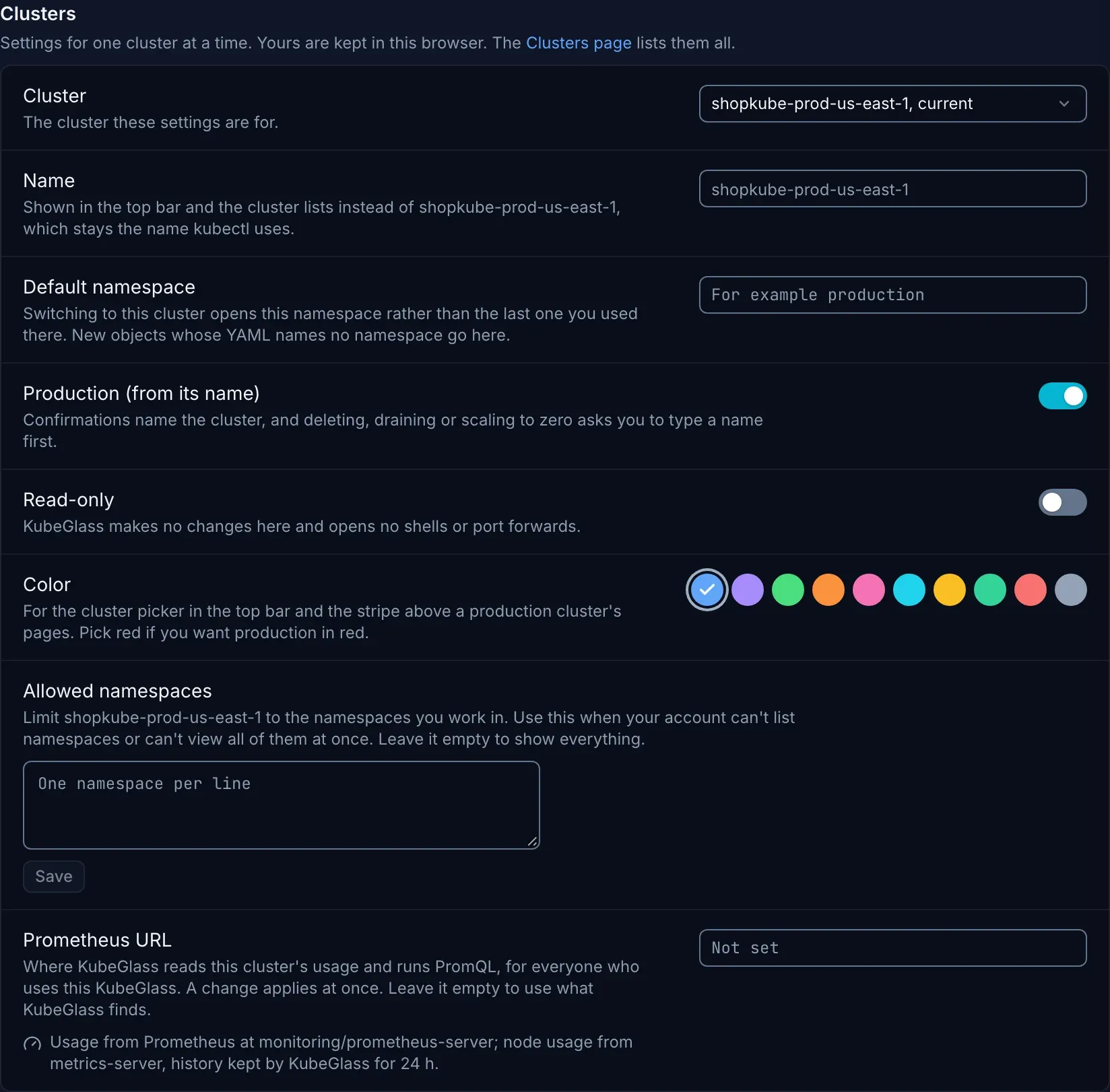
On your own machine your browser keeps them. When several people sign in to one KubeGlass, the server keeps each person’s, so they follow you to any browser; the first time, what your browser had is sent up. The Prometheus URL is KubeGlass’s own and applies to everyone.
| Setting | Does |
|---|---|
| Name | The name the top bar, the cluster switcher and the Clusters page show instead of the kubeconfig context’s. Until you give one, a name Headlamp gave the context in the kubeconfig (its headlamp_info extension’s customName) is shown. The context name stays what KubeGlass and kubectl use |
| Default namespace | Switching to the cluster opens this namespace instead of the last one you used there, and new objects whose YAML names no namespace go here while you look at all namespaces |
| Production | Confirmations name the cluster, and deleting, draining or scaling to zero asks you to type a name first. Until you choose, a cluster whose name looks like production counts as one, and the row says “(from its name)” |
| Read-only | KubeGlass makes no changes to the cluster and opens no shells or port forwards there |
| Color | The cluster’s color in the cluster picker and in the stripe above a production cluster’s pages |
| Allowed namespaces | For accounts that can’t list namespaces, or can’t list them all at once: the namespaces you work in, one per line, at most 100. KubeGlass then asks each one directly. Leave it empty to show everything |
| Prometheus URL | The Prometheus KubeGlass reads this cluster’s usage and history from and runs PromQL against, for everyone. It applies at once, on any cluster, not only the one KubeGlass started on. Leave it empty to use what KubeGlass finds: for the cluster it started on, the server’s Prometheus URL or a Prometheus in the cluster; for the others, metrics-server. Only admins can change it, and in a cluster only when KUBEGLASS_UI_CONFIGURABLE lists prometheus_url |
| Setting | Does |
|---|---|
| Refresh | How often tables that aren’t live refresh: Fast (twice as often), Normal, Relaxed (half as often) or Slow (a quarter as often). Lists of kinds stay live through watches |
| Recent resources | KubeGlass remembers the last 20 objects you opened, for the command palette and the Overview’s Recently opened. Clear recent resources forgets them |
Colors
Section titled “Colors”Seven color settings, all on by default: search match highlighting and kind badges in the command palette, stronger diff colors in YAML diffs, DEBUG log styling and richer log colors in the log viewer, colored shell output in the terminal, and event colors.
Terminal
Section titled “Terminal”| Setting | Does |
|---|---|
| Shell on this computer | On or Off. It is on only when KubeGlass was started with --local-shell; see Terminal |
| Local shell start directory | Where new shells on this computer start: Server default (the directory KubeGlass runs in), Root, Home or a path you type. Open shells don’t change |
| Font size, Line height, Cursor, Cursor blink | How terminals look |
| Scrollback lines | How much output a terminal keeps. More lines use more memory |
| Bell | None, Visual or Sound |
| Copy on select | Copy text to the clipboard as soon as you select it |
| Notify when commands finish | A desktop notification when a command runs longer than the Notification threshold (5 seconds by default) while you aren’t looking at KubeGlass: another window, or another tab of the browser, is in front. Turning it on asks the browser for permission. The shell has to mark its commands with OSC 133, as fish 4 does |
| Word separators | The characters that end a word when you double-click to select |
Extensions
Section titled “Extensions”Where KubeGlass reads the extensions file and how many entries it found, then the file in an editor that marks mistakes on their lines as you type, says what each entry adds and saves the file with a backup of the old one. Running on your own computer you can save it and import from k9s; in a cluster only admins can save it. See Extensions.
Server
Section titled “Server”The settings KubeGlass can change while it runs: Log level, Default Prometheus URL (the cluster KubeGlass starts on, read at startup; a cluster’s own URL under Clusters applies at once), Alertmanager URL, Webhook alerts and Webhook URL, Slack alerts and Slack webhook URL. Each row shows its default and whether it needs a restart. Send a test alert sends a message to the webhook or Slack URL. Webhook and Slack messages are drift findings; see Drift policies.
Only admins can change these. On your own machine changes are saved in the data directory and apply right away. In a cluster every one is locked unless the deployment lists it in KUBEGLASS_UI_CONFIGURABLE; one the deployment sets through an environment variable says Set by the deployment. See Changing settings while it runs.
The version, a link to the source code, and Open-source licenses: View licenses opens the licenses of the packages the UI is built from (/third-party-licenses.txt). Release archives carry the licenses of the server’s Go modules too, in third_party/, and the container image in /licenses.
Show shortcuts opens the list of keyboard shortcuts, as ? does anywhere outside a text field. Restart the tour (also in the user menu, and >guided tour in the command palette) walks through the main parts of the window again.
After KubeGlass is upgraded, a banner above the page says what’s new in that version until you dismiss it.