
Applications
Applications › Applications groups the Deployments, StatefulSets, DaemonSets and CronJobs in the namespaces you’re looking at into applications. Applications that need attention come first, and each one has its own page.
How workloads are grouped
Section titled “How workloads are grouped”Within a namespace, KubeGlass puts a workload into the first of these it has:
- The Helm release that installed it (the
meta.helm.sh/release-nameannotation), so all of a chart’s parts are one application, even when the chart labels them differently. - Its Argo CD application (the
argocd.argoproj.io/instancelabel or tracking annotation). - The
app.kubernetes.io/part-of,app.kubernetes.io/instanceorapp.kubernetes.io/namelabel, thenappork8s-app. - Its own name.
A Helm release and a plain Deployment with the same name stay separate.
An application from a Helm release, an Argo CD application or Flux can have workloads in more than one namespace: a chart that puts some of its objects elsewhere, or an Argo CD application that deploys to several. When you look at all namespaces, or at a project, it is one application. Its namespace is the release’s or the Flux object’s own when it has workloads there, and the first by name otherwise; the list shows how many more it is in. Applications grouped by their labels stay one per namespace, since two teams can use the same label.
The list
Section titled “The list”Each row shows:
- how many of its pods are ready, and their restarts;
- what is wrong with its pods, in the same words as the resource lists. Hover over the problem for what it means and the cluster’s own message;
- its workloads, and where it came from: a Helm release (with a link to it), an Argo CD application or Flux;
- its version, from
app.kubernetes.io/versionor else the image tag; - the addresses its ingresses serve, for Services that select its pods.
System namespaces (kube-*, openshift-* and names ending in -system) are hidden when you look at all namespaces; the button above the table shows them. Choosing one of those namespaces shows its applications as usual. Need attention shows only applications with a problem, and the filter matches application, namespace and workload names.
An application’s page
Section titled “An application’s page”Clicking a row opens the application’s page at /apps/<namespace>/<name>. It starts with a verdict in one line, such as “Running. Every pod is ready.”, “Partly working: 2 of 3 pods are ready.” or “Rolling out: some pods are starting or being replaced.”, then:
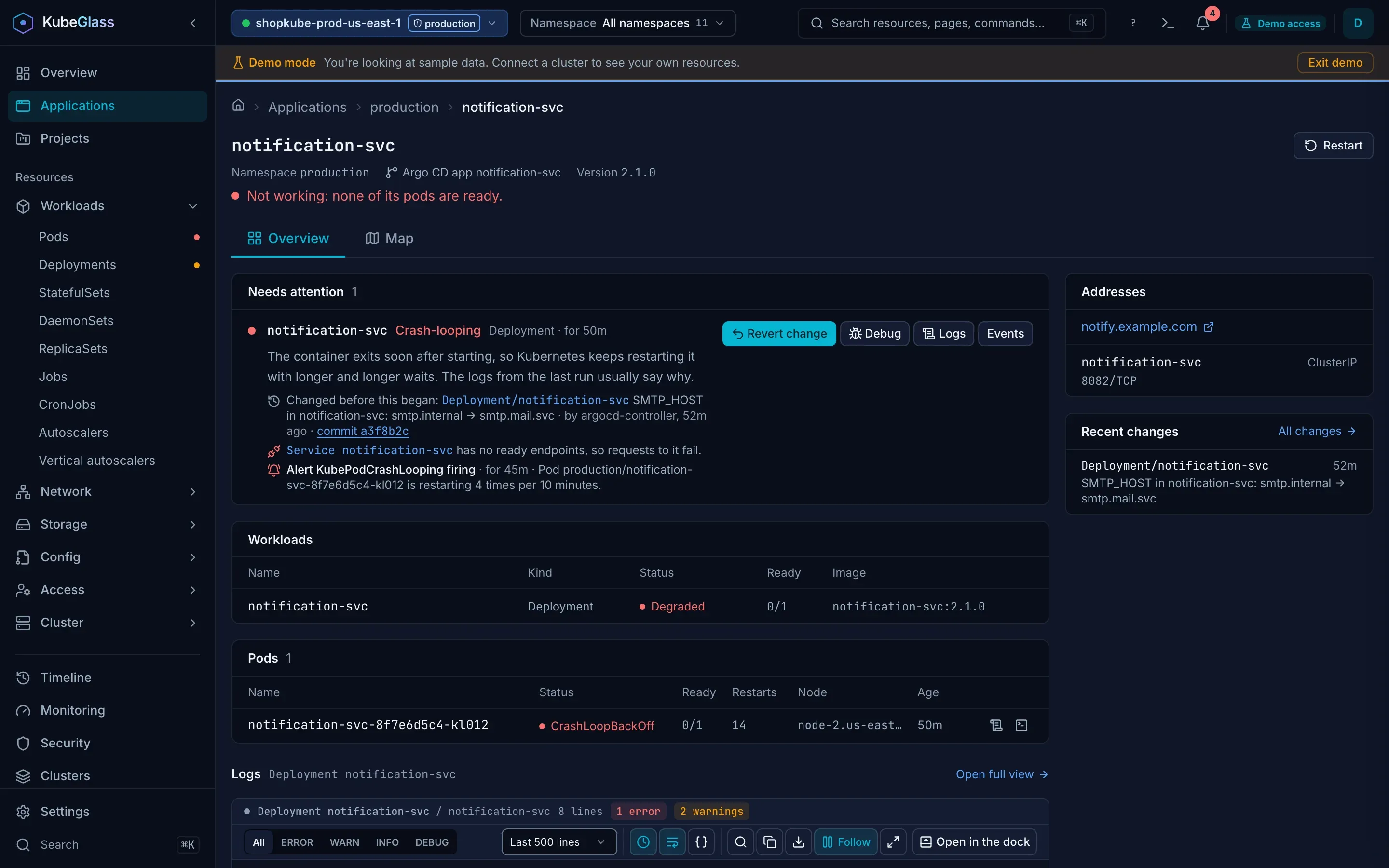
- Needs attention: the problems of its objects, as on the Overview, with their fixes.
- Workloads: each one with its ready count and image, linking to its page.
- Pods: every pod with its status, restarts and node, and links to its logs and a shell.
- Logs: the logs of the workload most worth reading, usually the one with a problem, with a choice of the others.
- Addresses: the URLs its ingresses serve, and the Services that select its pods with their type, ports and external addresses. If no Service selects them, the page says how to add one.
- Also part of it: the autoscalers that scale its workloads, with their range and how many replicas run now, the disruption budgets that cover its pods, with their limit and how many disruptions they allow, and the ConfigMaps, Secrets and volume claims its pods use. Each links to its page.
- Recent changes: the changes KubeGlass recorded to its objects.
For an application in several namespaces, every panel covers all of them, the workloads and pods say which namespace each is in, and the Map tab draws them together.
Restart restarts all its Deployments, StatefulSets and DaemonSets after asking, the way kubectl rollout restart does. It needs patch on them: when you may restart none of them, it is off and says which permission is missing; when you may restart some, it restarts those and names the others. For a Helm release, Upgrade opens the release’s view in Helm releases and Roll back opens its History. All three are hidden in read-only mode.
When two applications in a namespace have the same name, for example a Helm release and an Argo CD application, the page links to the other one.
The page’s Map tab shows the map of just this application: its workloads and pods, the Services that select them, the Ingresses and routes in front of those, and the ConfigMaps, Secrets and claims they use.
The map
Section titled “The map”Applications › Map draws how the namespace you’re looking at fits together, or the whole cluster when you look at all namespaces: Ingresses and routes, the Services behind them, workloads, pods and the config they use. Every chain that leads to a problem is red or amber, with the reason written where it turns bad, such as “No ready endpoints” or “Selects no pods”. Resource map covers how to read it, Group by, Only problems, the list view and the keys.