
CPU and memory history
kubectl top shows usage right now. The Overview tab of a pod, Deployment, StatefulSet, DaemonSet or node has a Usage card with CPU and memory over the last hour, 6 hours or 24 hours. With a Prometheus that has container metrics, the pod and workload charts come from it. Without one, KubeGlass keeps a day of usage itself by sampling metrics-server.
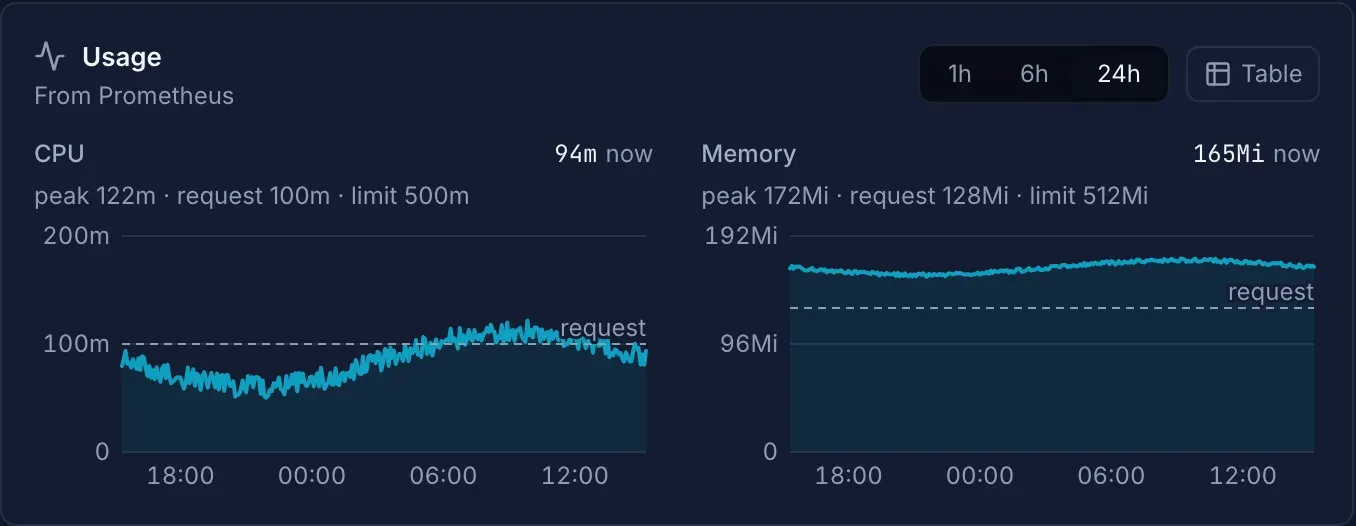
The charts
Section titled “The charts”The card has a CPU chart and a Memory chart, and 1h, 6h and 24h to pick the range. Each chart has:
- the usage, a solid line;
- the request, a dashed line, and the limit, a dotted one. For one container they are called request and limit; for a sum over several containers or pods, requests and limits. A node’s chart has the requests of the pods on it and the node’s allocatable;
- above it, the newest value, the peak in the range, and the request and limit. When the newest value is at 90% of the limit or more, it says Near the limit; for a node at 90% of its allocatable, Nearly full.
A limit more than twice the larger of the peak and the request isn’t drawn, so the usage doesn’t flatten against the bottom; it is still listed above the chart. The limit line of a sum is there only when every container has a limit. A pod’s requests and limits are those of its running containers, native sidecars (init containers with restartPolicy: Always) included, or its pod-level ones when it sets them; a finished init container’s request and the pod’s overhead aren’t counted, since the usage doesn’t hold them either.
Hover over a chart, or focus it and use the arrow keys, Page Up, Page Down, Home and End, to read the usage, request and limit at a time. Table lists every step, newest first. A pod with more than one container has a Container picker: All containers, or one container with its own request and limit.
The 1h and 6h charts have a point a minute, the 24h chart a point every five minutes. In each step CPU is the average and memory the peak.
What the lines add up:
| Page | Usage | Requests and limits |
|---|---|---|
| Pod | Its containers and sidecars (init containers that keep running) | Those of the pod |
| Deployment, StatefulSet, DaemonSet | Its pods, including the ones a rollout replaced during the range | The sum over its pods running now |
| Node | The node | The requests of the pods on it as the scheduler counts them (with a running init container’s and the overhead), as on the node’s Allocation tab, and its allocatable |
Where the data comes from
Section titled “Where the data comes from”The line under the card’s title says where:
| Line | Source |
|---|---|
| From Prometheus | A Prometheus that has cAdvisor’s container metrics (container_cpu_usage_seconds_total, container_memory_working_set_bytes): CPU as a rate, memory as the peak working set in each step. For pods and workloads only |
| From metrics-server, kept by KubeGlass for 24 hours | What KubeGlass sampled from metrics-server. Node charts always come from here, also with a Prometheus |
| From metrics-server, kept by KubeGlass for 24 hours, since 09:12 | The same, when the object’s history starts after the beginning of the range |
The Prometheus is the one set for the cluster under Settings › Clusters › Prometheus URL. Without one, for the cluster KubeGlass started on, it is the server’s Prometheus URL or a Prometheus KubeGlass finds in the cluster; other clusters use metrics-server. See Settings › Clusters.
Monitoring has the same in one line under its title, and so does Settings under the Prometheus URL, for example “Usage from metrics-server, history kept by KubeGlass for 24 h.” or “Usage from Prometheus at monitoring/prometheus-server; node usage from metrics-server, history kept by KubeGlass for 24 h.” A Prometheus without container or node metrics “answers queries only”. The Prometheus is named only to people who may list pods in every namespace.
How KubeGlass keeps a day of usage
Section titled “How KubeGlass keeps a day of usage”Without Prometheus, KubeGlass reads metrics-server every 30 seconds and keeps one point a minute for each container and each node: the average CPU and the peak memory of the readings in that minute. It keeps 24 hours.
- It samples each cluster that is in use: from the first time someone uses it until a day without use. The cluster KubeGlass started on is always sampled. At most eight clusters are sampled at once; using a ninth stops the one used least recently.
- On a cluster whose Prometheus has container metrics it samples only the nodes.
- It reads metrics-server with its own credentials: your kubeconfig on your computer, its ServiceAccount in a cluster. When those may not read every pod’s metrics, it samples the namespaces people open charts in, up to 64 per cluster, each until a day after it was last asked for.
- It holds at most 20,000 series (a container or a node each) across all clusters. A full day of one series takes about 6.5 KB, so that is about 130 MB. When it is full, series that stopped reporting go first, oldest first; while every series still reports, new ones aren’t kept.
- It saves the history to its database in the data directory (
data_dir) every 15 minutes and when it shuts down, and reads it back when the cluster’s sampling starts again, so a restart keeps it. Minutes while KubeGlass wasn’t running are gaps in the chart.
The Helm chart puts the data directory in an emptyDir unless persistence.existingClaim names a claim, so there a new KubeGlass pod starts the history again.
When there is no chart
Section titled “When there is no chart”| The card says | Why |
|---|---|
| Collecting… first points in a minute. | KubeGlass has started sampling and has no points yet |
| No usage: the pod isn’t running. / No usage: none of its pods are running. | There is nothing to measure |
| metrics-server isn’t installed, so there is no usage to show. Install it with: | The cluster has no metrics API. The card has the kubectl apply command for metrics-server, with Copy, and a link to How to install metrics-server |
| metrics-server isn’t answering. Usage shows again when it does. | metrics-server is installed but doesn’t answer |
| KubeGlass may not read this cluster’s metrics, so it keeps no usage history. | KubeGlass’s own credentials can’t read metrics-server |
| You can’t read the metrics in this namespace. / You can’t read node metrics. | Your RBAC doesn’t allow it; see below |
Permissions
Section titled “Permissions”The history holds every namespace’s usage, so KubeGlass shows it only to people who may read the same from metrics-server: get on pods.metrics.k8s.io in the namespace for a pod or workload, and get on nodes.metrics.k8s.io for a node. It reads the object and its pods as you, so their requests and limits follow your RBAC too.
To keep the history, KubeGlass’s own credentials need to list nodes and pods in metrics.k8s.io, the pods in every namespace or at least in the ones people open. The Helm chart’s ClusterRole allows both.
Rightsizing
Section titled “Rightsizing”Rightsizing uses the same history. When a container has an hour or more of usage, from Prometheus or from what KubeGlass keeps, its suggestion comes from the 95th percentile of up to 24 hours, and its row says how many hours it is based on when that is fewer than the others have. With less, the suggestion comes from one reading.
Demo mode
Section titled “Demo mode”In demo mode, pods, workloads and nodes have a made-up day of usage around the numbers the Pods and Nodes lists show.